In ecommerce, product reviews strongly influence buying decisions. According to the Local Consumer Review Survey by BrightLocal, 97% of consumers read online reviews before choosing a business, and 41% check reviews every time they visit a brand page. Research from Spiegel Research Center also shows that product pages with reviews can increase conversion rates by up to 190%.
They show that the more reviews a product has and the more detailed they are, the stronger their impact on buyers. But if reviews are only displayed without active management, their value is limited. In this guide, we explain how to manage online reviews, share six practical tips, and introduce useful tools to help ecommerce merchants turn customer feedback into growth.
What is review management?
Customer review management refers to the process of collecting, organizing, analyzing, and responding to customer feedback. It is not only part of customer service, but also an important source of insights for ecommerce operations, brand building, and product improvement.
In a mature ecommerce setup, review management usually involves review collection tools, display widgets, and analytics features. These tools allow merchants to gather reviews from different channels, manage them in one place, and show real customer feedback on product pages or marketing sections. This helps increase transparency and build trust with potential buyers.
The three key parts of review management
- Review collection: This is the first step. Merchants usually invite customers to leave reviews after purchase through email requests, order notifications, or social media interactions. Reviews from different channels can be automatically collected and managed in one dashboard.
- Review display: How reviews appear on your store affects customer trust. Common practices include highlighting featured reviews, sorting comments (such as most helpful or most recent), showing photo or video reviews, and adding country or language tags.
- Review analysis: The value of reviews is not only in the rating, but also in the content. Through sentiment analysis, keyword tracking, and trend analysis, merchants can identify common product concerns, popular features, and customer needs, which helps guide product updates and marketing strategies.
How to manage and utilize online reviews effectively? 6 Practical tips
If reviews are only displayed without active management, their value is limited. With the right strategy, reviews can build trust, influence buying decisions, and help improve conversion rates.
Encourage customers to leave high-quality reviews
High-quality reviews rarely appear by chance. Most of the time, they come from a clear process and simple incentives. By inviting customers to share their experience after purchase, merchants can collect real feedback within a consistent time window and gradually build a strong review base. According to a report by BrightLocal, 78% of consumers said they were asked to write a review in the past 12 months, and 65% actually left one after being invited. This shows that many customers are willing to share feedback when asked.
In Shoplazza, merchants can set up automated review invitations using the built-in Customer Notifications feature. You can manage different email templates and trigger review requests after the order is delivered. The email can explain why reviews matter and offer small rewards. For example, if a customer leaves a detailed review (with specific words) or uploads photos or videos, the system can automatically show a coupon and send it by email. This helps increase review volume and can also encourage repeat purchases.
If your store is still new and has few reviews, you can temporarily hide the review section or only add it on key product pages to avoid empty spaces. If reviews exist but are scattered across platforms, you can also bulk import and export review to organize and upload them, making your product pages look more complete and trustworthy.
Highlight key reviews to guide purchase decisions
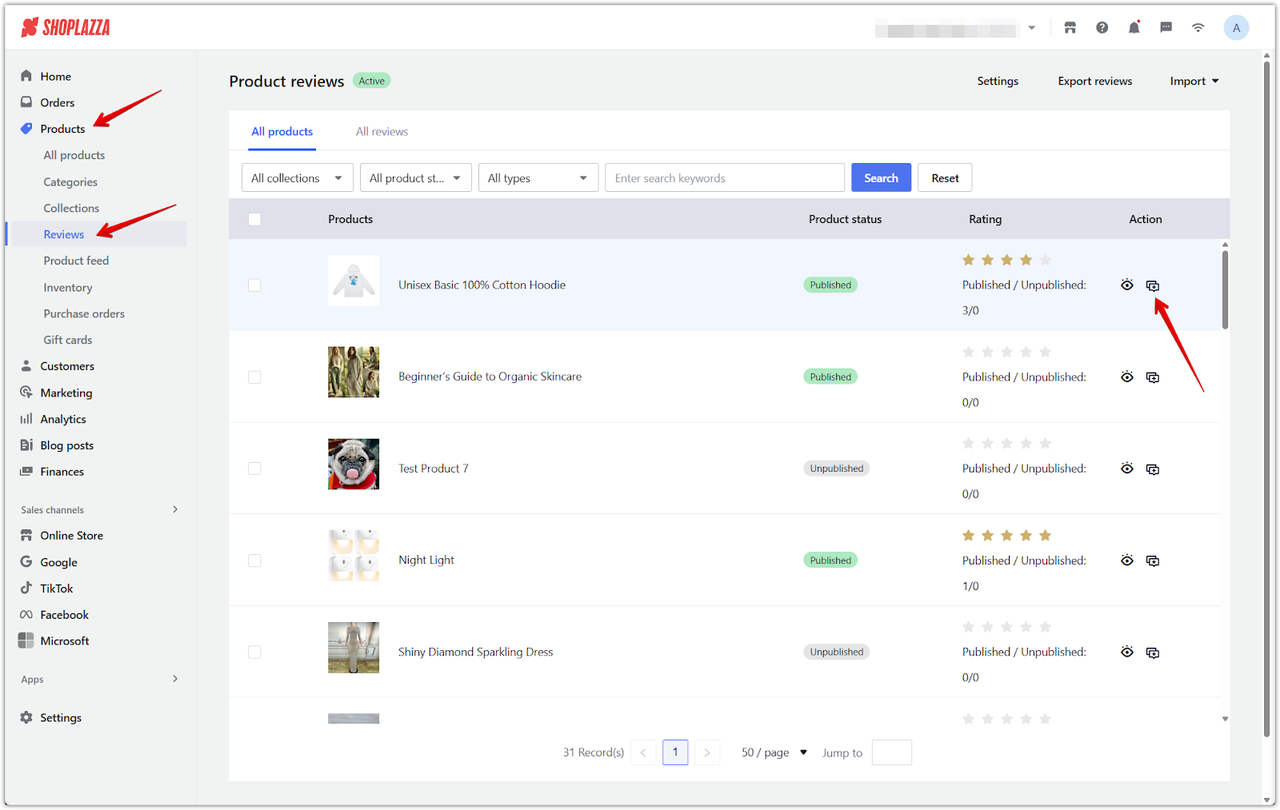
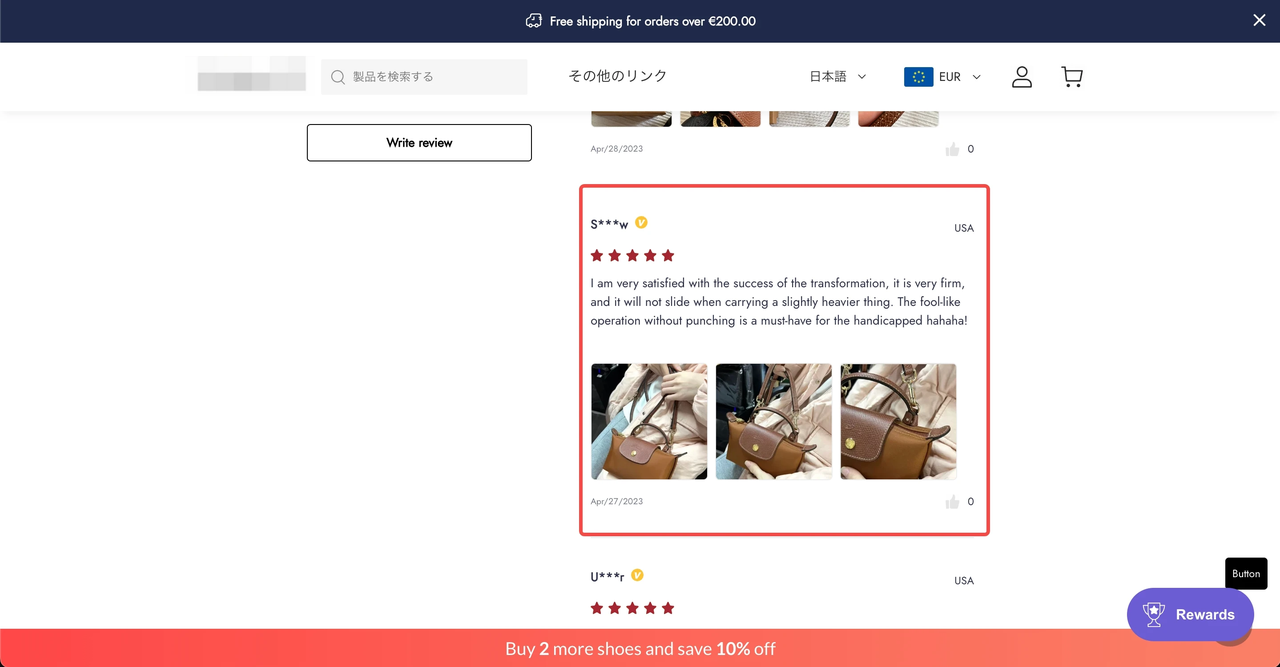
As the number of reviews increases, most visitors will not read them one by one. This makes review curation especially important. In Shoplazza, the product review management system allows merchants to configure and manage reviews directly in the admin panel. Sellers can tag certain feedback as "featured reviews" or "verified reviews." These usually come from real buyers and include detailed feedback, photos, or videos. Highlighting them helps visitors quickly understand how the product works in real situations and reduces hesitation.
Review features also differ by platform. For example, Shopify does not provide a built-in review system. Many stores use third-party apps such as Judge.me. Its free plan supports basic review collection and display. The paid plan, about $15 per month, adds features like recommendations, coupons, integrations, and more customization for stores that want stronger review management.
Turn reviews into marketing content
High-quality reviews are valuable marketing assets. Many brands turn standout reviews into short quotes for product pages, ads, emails, or even offline materials to strengthen buyer confidence. For example, Glossier pairs user testimonials with products to show real experiences.
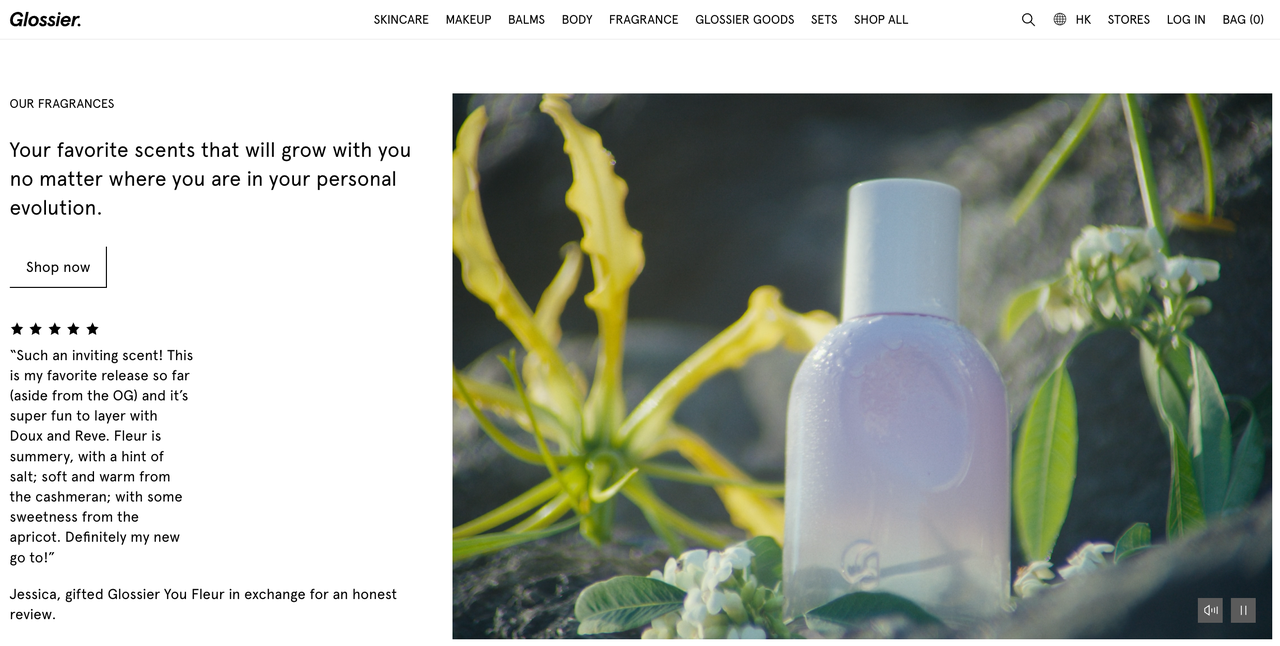
Merchants can select high-rated, detailed reviews and highlight representative sentences, noting the context and user type, like first-time buyers or repeat customers from specific countries. These quotes can then be embedded in pages or marketing materials to support product messaging.
Reviews with photos or videos can be showcased in a "real user experience" section, enriching content and filling gaps in official assets. Over time, top reviews become reusable marketing content, creating a cycle of trust, engagement, and conversions.
Combine reviews from multiple platforms
Cross-border sellers often run independent stores alongside marketplaces and social media. Showing reviews separately can scatter social proof and weaken trust on your site. Combining reviews from all platforms boosts credibility and shows real customer feedback in one place.

Some review management tools let you import reviews from Amazon, AliExpress, Etsy, and display them on your product pages in a consistent style, with labels like "from Amazon buyers." This signals sales credibility to new visitors while avoiding duplicated collection. Google or Facebook ratings can also be embedded on homepages, brand pages, or checkout areas to give more third-party validation. Always ensure imported reviews are genuine and comply with platform rules. Clearly label sources and respect privacy when displaying them.
Respond to reviews
Responding to reviews shows respect to individual customers and demonstrates your service attitude to potential buyers. Studies show 5% of consumers are more likely to buy after reading positive reviews, while 77% may abandon a brand after negative feedback.
- Positive reviews: Thank the customer, highlight a key product or service benefit, and suggest related products or repeat purchases.
- Neutral reviews: Ask for details on what could improve, show understanding, and offer clear solutions or plans for improvement.
- Negative reviews: Start with a positive acknowledgment, avoid blaming, and provide actionable solutions like exchanges, refunds, or dedicated support.
Use standard reply templates in review tools for efficiency, but personalize them with customer names or product info. For multilingual reviews, use translation and localization tools to ensure natural, accurate responses.
Use reviews to identify needs and pain points
One of the biggest values of reviews is that they act as ongoing user research. By analyzing recurring issues and highlights, you can better understand your customers' real needs and pain points.
For example, multiple comments mentioning "runs small," "color darker than pictures," or "instructions unclear" signal areas to adjust sizing, update images, or improve guides. Positive feedback, like "long battery life" or "sturdy material," shows which features to emphasize in product pages and ads.
Using BI and text analysis tools, you can categorize reviews by sentiment or topic—such as product, shipping, or customer service issues—helping you prioritize improvements. For cross-border sellers, leveraging review insights ensures data-driven updates that match real market demands.
6 Review management tools recommended (support importing from social, ecommerce, and Google platforms)
Mastering review management is important, but the right tools make it much easier. Several platforms help merchants collect, display, and analyze reviews efficiently. Here are six common solutions.
Instagram Show
Instagram Show is a free tool that automatically syncs Instagram content to your store. Merchants can tag products directly in photos so visitors can click to buy. Displaying real user posts builds trust and social proof. It also supports follow buttons, turning website visitors into social followers. The system updates automatically to keep content fresh. For Facebook-focused reviews, Facebook Reviews lets you import authentic reviews, choose grid, carousel, or badge layouts, and display ratings or usernames while inviting users to leave feedback.
Trustpilot Reviews
Trustpilot is a well-known review platform that serves as third-party credibility. It supports automated review invitations, allowing merchants to email top customers for feedback and collect reviews in bulk. Reviews can be displayed on key pages via your site editor, and Trustpilot ratings integrate with Google Ads to boost click-through rates. Analysis features on Trustpilot Reviews help identify trends and improvement areas, while synced reviews across your website and marketing materials strengthen brand trust.
Stamped Product Reviews
Stamped.io focuses on ecommerce review management, supporting text, photo, and video reviews. Like Trustpilot Reviews, it can automatically send review invitations via email or SMS to boost feedback. Review displays include banners, carousels, and sidebars, all responsive for different devices.
Stamped Product Reviews can sync review data to Google Shopping ads, helping improve search rankings and click-through rates. For insights, Stamped offers sentiment analysis and topic trends, helping merchants spot user feedback patterns. Multi-language support makes it a good choice for cross-border ecommerce sellers.
Kudobuzz Reviews
Kudobuzz Reviews helps merchants collect and consolidate reviews from multiple platforms, including Google, Facebook, and other ecommerce sites. It uses smart widgets, email reminders, QR codes, or links to make it easy for customers to submit feedback. Merchants can moderate which reviews appear on their site. The free plan supports importing reviews from Facebook, AliExpress, Yelp, Amazon, Etsy, and Google, and includes 50 automatic review invites per month, enough for small shops.
Paid plans start at $19.99/month for 3,000 review requests and 2,000 published reviews. Single-platform options, like Amazon Reviews, Etsy Reviews, or AliExpress Reviews, are also available from $6/month each.
SocialEcho multi-account social media management
SocialEcho is an AI-powered social media management platform supporting Facebook, Instagram, X, TikTok, YouTube, Telegram, and LinkedIn. It connects via official APIs, keeping all operations secure and within platform rules. Merchants can manage content posting, comment replies, direct messages, and analytics across multiple accounts from one dashboard. The platform includes a unified inbox for comments and messages, sentiment analysis, and AI-powered automatic replies that detect tone and issue type.
The free plan offers 30-day analytics and scheduled posts. Paid plans start at $13.75/month for automatic replies, while $20.13/month adds AI comment replies, AI DMs, and automated engagement, helping teams improve social media efficiency.
Pinterest Pin It
Pinterest Pin It, starting at $6/month, isn't a traditional review tool but helps merchants showcase products and images on Pinterest. Visitors can easily save items they like, boosting brand visibility and attracting new customers through visual discovery.The tool supports one-click sharing, custom icons and captions, and lets you adjust button style and placement to match your store's design. It's fully mobile-friendly, ensuring smooth performance on all devices. By enabling users to save and share products, merchants can expand reach, drive traffic, and increase brand exposure through Pinterest's visual discovery features.
Manage your customer reviews
The right tools help you collect reviews from multiple channels, highlight the best feedback, and display it in ways that build trust. Automated invitations and curated showcases turn reviews into marketing content that keeps giving. Build your store on Shoplazza, and you can use its built-in review management and functional review tools to centralize multi-channel reviews, set featured comments, and automate invitations. Just learn how to manage online reviews effectively? Start now with Shoplazza and turn your customer feedback into a lasting sales advantage!
FAQs about managing customer reviews
Q1: My store is new and has almost no reviews, where should I start?
For new stores, set up automated post-purchase review invitations using your platform or email tool, and include simple guide cards in packages. In the early stage, you can hide the review section or only show a few key product reviews to avoid empty pages that hurt trust.
Q2: Will negative reviews hurt conversion? Should I delete them?
Negative reviews can impact conversions, but handling them properly shows your commitment to customers and builds credibility. Never delete genuine reviews, just respond publicly and offer solutions or compensation when needed.
Q3: How should I handle reviews in different languages if I sell in multiple countries?
Use tools that support multi-language reviews (like Stamped Product Reviews) and localize content for key markets. For other languages, use translation tools or hire local teams to optimize important responses.
Q4: How do I know if a review management tool suits my business?
Check if it integrates with your platforms (brand store, Amazon, Google Reviews), supports automated invitations and cross-platform imports, has clear display components, and offers basic analytics. Consider pricing and team adaptability during the trial period.
Q5: How can review data help my business decisions?
Reviews help improve product descriptions, images, and sizing advice, highlight top products, optimize logistics, and enhance customer service. Regularly analyzing review trends identifies high-potential items and risks, boosting overall efficiency.
Q6: How can I increase the chances of customers leaving reviews?
Send automated invitations and offer rewards like discounts or points. Keep the process simple, Shoplazza has built-in review flows to help new sellers start quickly.