If you've ever stalled out on "choose a template," "write the homepage copy," or "make it mobile-friendly," an AI website builder can remove a lot of that friction by generating a usable starting point in minutes. Many modern builders can suggest layouts, draft copy, and recommend design elements based on a short description of your business and goals.
In this guide, the focus is practical: what an AI website builder is, where it shines and fails, and we will review the top tools across different use cases and provide actionable guidance for choosing and using a builder effectively.
Key takeaways
- AI website builders streamline site creation by generating layouts, content, and designs from simple prompts, ideal for non-technical users across e-commerce, content, design, and development needs.
- Key benefits include rapid launches (under 1-3 minutes), affordable pricing (e.g., Shoplazza $39/mo), high performance, and ongoing AI assistance for iteration (e.g. Shoplazza AI-generated product photos or AI Agent "Advalet" for advertising).
- Choose by use case: Shoplazza excels for e-commerce with full stores (free generation, no sign-up needed); 10Web suits WordPress users needing customization; Squarespace/Hostinger for content; Framer/Elementor for designers; v0 for developer prototypes.
- Common fixes: Combat generic designs via Page Builders, boost SEO with audits/schema, ensure privacy/scalability with platforms like Shoplazza (AWS-backed), and iterate weekly using dashboards for conversions.
- Success requires smart prompts (audience/actions/style), QA passes (PageSpeed, headings), and human touches (real photos, testimonials) to create unique, revenue-driving sites.
What is AI website builder and how does it work?
An AI website builder is a platform that uses artificial intelligence to help create a website with less manual work. It often generate a layout, starter content, and design suggestions from your prompt or answers to a few questions.
Most tools follow a similar workflow:
- You describe what you're building (business type, style, pages, goals).
- The builder generates a first draft (structure, sections, and suggested copy/visuals).
- You edit in a normal visual editor (drag-and-drop or section-based), and then publish.
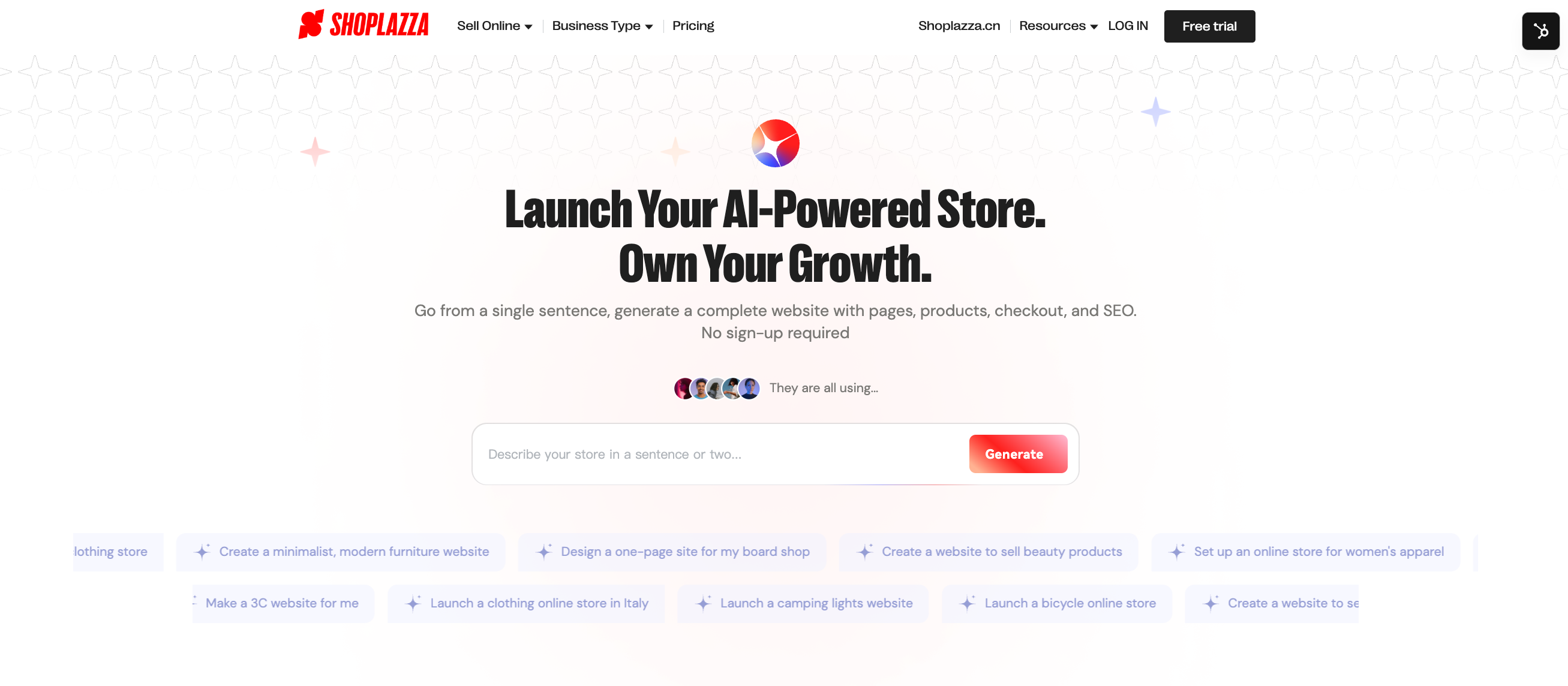
A useful nuance: "AI website builder" can mean either prompt-to-site generation (generate an initial site from a description) or AI inside a traditional builder (AI helps with writing, styling, images, and iteration inside an editor). Shoplazza, for example, is positioned as an AI-assisted store builder that can build a complete and functional online store with product pages, a logical navigation, checkout. Once done, you can directly sell any legal products on it.
Top benefits of AI website builder
AI builders are popular for one simple reason: they compress the messy early stage of web creation into a fast first draft—then let humans refine it. Beyond this, there are also many pros that matter most with verifiable sources:
- Speed to first version (often under a minute). Most of generators state that they can build a website in under one minute after you describe your needs.
- Lower cost of getting online. Hostinger's public pricing page shows entry-level pricing starting at $9.99/mo with 1 website for explorer (pricing varies by plan/term and promotions). And Shoplazza shows $39/mo with basic e-commerce features for small and medium businesses. Both of them are materially different from hiring custom development for a simple marketing site.
- Ongoing AI assistance, not just a one-time generation. Many AI builder as an ongoing workflow where AI continues to assist as you edit and expand, and it generates a full and workable site you can extend later.
- Performance-minded hosting options. 10Web claims 90+ PageSpeed scores on desktop/mobile; while Shoplazza delivers P95 first-screen loads ≤1.9s, product image visibility in 1.5s, INP response <120ms, and 1.2s page loads for million-SKU catalogs. They help load fast, click fast, buy fast. Also they're relevant if you're trying to improve Core Web Vitals without doing manual optimization first.
- Rapid content drafting and brand consistency support. AI builders can generate website copy and visuals from prompts, while still allowing customization of colors, content, and layouts.
One strategic advantage that doesn't get said enough: faster drafts mean more time for what actually moves the business—positioning, offers, product pages, lead capture, analytics, and iteration.
4 Major types of AI website builders (7 top tools reviewed)
AI builders don't all serve the same audience or use case. Once you see the main categories, it becomes much easier to shortlist tools—and avoid choosing a platform that fights your primary use case. This part will break AI builders into types like design-oriented, content-driven, e-commerce-focused, and code-based approaches.
For E-commerce sellers
If selling is your primary goal, the builder needs to handle product pages, collections, checkout flows, marketing integrations, and ongoing merchandising—not just static layouts. These tools generally fall into all-in-one SaaS platforms or open-source/self-hosted options.
- Shoplazza: A free AI website builder (no subscription required upfront—you can try and preview results before signing up). Shoplazza AI generates complete e-commerce stores with product pages, shopping carts, built-in SEO, payments, order and shipping management, dropshipping supplier integrations, and marketing tools—in minutes across its tiered plans for beginners, SMEs, and enterprises.
- 10Web: An AI-powered WordPress platform that automates many aspects of website building, hosting, and management. However, it is not entirely a "set-it-and-forget-it" solution. The platform provides powerful automation and AI assistance, but still requires human input, customization, and management to achieve professional, functional results that align with specific business needs.
For content creators
Content creators usually care about publishing workflows, blogging/CMS, basic SEO controls, email capture, and a site that stays fast as content grows.
- Squarespace: Squarespace offers Blueprint AI for quick custom sites, plus AI content generation for blog posts, SEO titles, and descriptions. Features include drag-and-drop editing, portfolio layouts, email campaigns, analytics, and memberships. Its Fluid Engine provides flexible control while maintaining professional designs and fast performance.
- Hostinger: Hostinger's AI Website Generator creates sites in under a minute, ideal for fast launches. It supports blogging, email capture, basic SEO, and simple CMS editing. Compared to Squarespace, it emphasizes affordability and speed, with reliable hosting that keeps growing content sites responsive.
For designers
Designers want strong visual control, animations, interactions, and flexible layout systems—without sacrificing speed.
- Framer AI: Framer AI generates responsive pages from text prompts, featuring advanced animations, interactive components, and Figma-like editing. It has pixel-perfect control, real-time previews, and CMS integration for dynamic sites. Compared to Elementor, it excels in motion design while maintaining high performance for client projects.
- Elementor: Elementor combines AI tools for content and layout generation with a robust drag-and-drop editor in WordPress. Features include theme building, motion effects, global styling, and popups. It offers deep customization like Framer but shines in ecosystem plugins and scalability for complex sites.
For developers
Developers typically don't want a locked template—they want a fast prototype and usable code they can integrate into a real stack.
- v0: v0 by Vercel is an AI-powered UI prototyping tool that generates clean, production-ready React/Tailwind code from text prompts. Features include iterative refinements, component libraries (shadcn/ui), and exportable snippets for Next.js or custom stacks. Pros: Speeds prototyping 10x while delivering flexible, editable code for seamless integration.
How to choose the ideal one? (actionable checklist)
The best choice is usually the tool that matches your maintenance reality. A site that launches fast but is painful to manage will cost more over a year than a slightly slower setup that stays clean.
Use this checklist as a scorecard:
- Define your business goal first: Are you building a content site (blogging/SEO focus), e-commerce store (sales/catalog growth), design portfolio (visuals/interactions), or developer prototype (code export)? This filters tools immediately.
- Budget and pricing clarity: What is the real first-year cost (domain, email, AI add-ons, e-commerce add-ons)? Under $500/year with no extras? Choose Shoplazza—yearly plans save 25% at just $351/year.
- Ease of editing after AI generation: Can a non-technical teammate adjust sections, navigation, and forms without breaking layout? Shoplazza's Page Builder, Elementor, and more allow you design modules individually.
- Performance and Core Web Vitals: Does the platform have credible performance tooling or claims (e.g., 10Web's 90+ PageSpeed claim and Shoplazza's 1.2s page loads for million-SKU catalogs)?
- SEO controls: Can you edit metadata, headings, slugs, redirects, canonicals, and add schema?
- Integrations: Can you connect analytics, email marketing, CRM, and—if needed—developer workflows like GitHub-based deployments?
- Scalability: Can you add pages, blog, products, and new features without migrating in six months?
Quick scoring method: rate each category 1–5 and pick the tool that wins on the categories that directly impact revenue or publishing cadence.
Step-by-step tutorial: best way to build your website with AI
Now that you know how to choose the right builder for your goals, it's time to learn how to maximize it—turning a fast AI draft into a revenue-driving site through smart prompts, QA, and iteration.
Prompt first
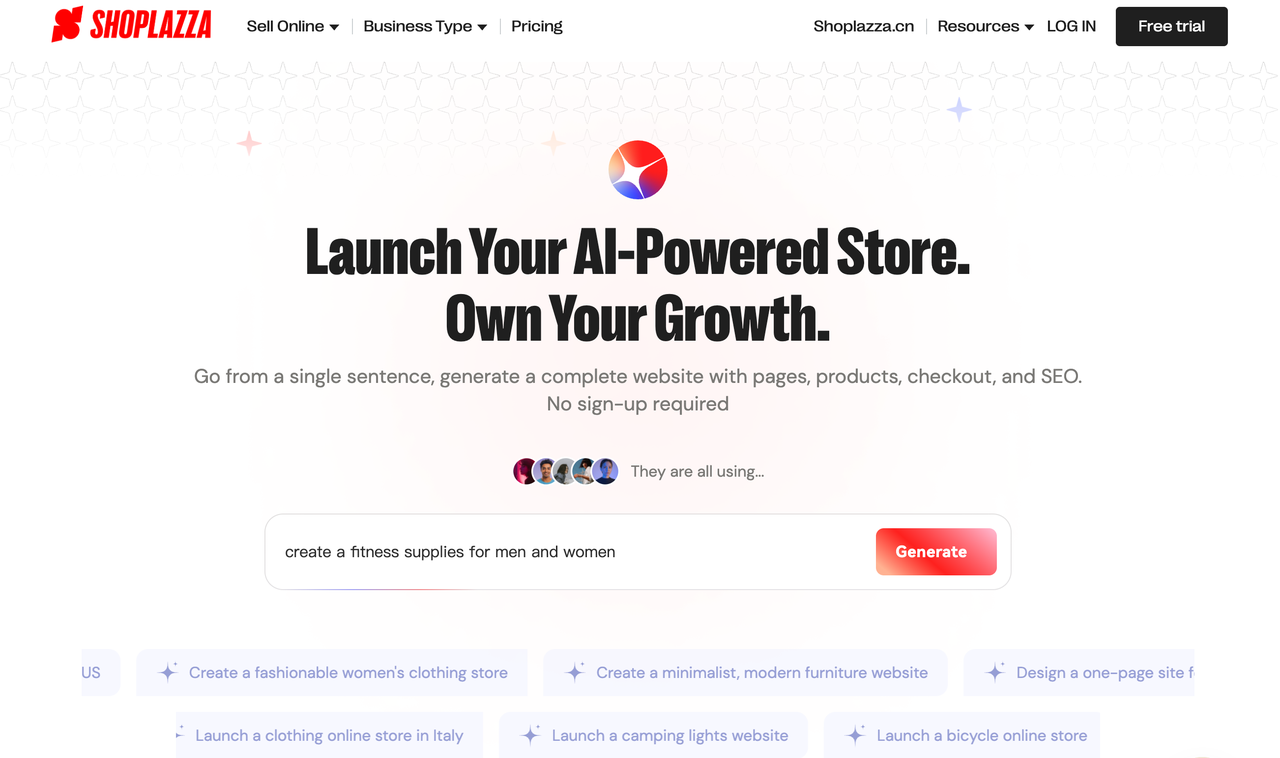
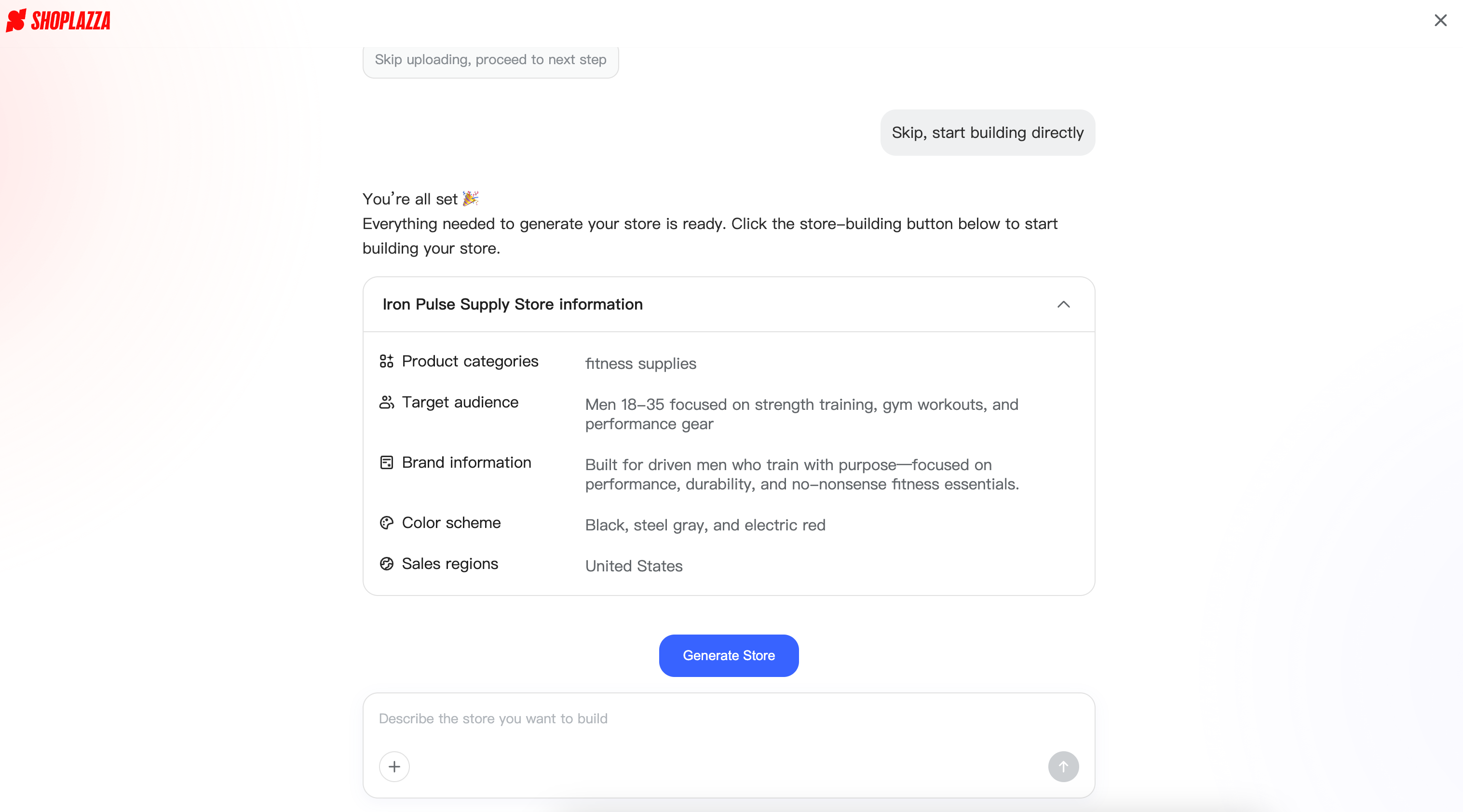
Start by "chatting like a friend" in the AI interface, but add business-critical details for usable output. This is as answering questions about your site's purpose, style, and pages. Or, you can upload your product image for inspiration.
A strong prompt includes:
- Who the site is for (audience, country/region, problem). You may input "create a fitness supplies for men and women" in the chatbox first.
- What you want visitors to do (book a call, buy a product, or subscribe). Tell the AI that you want "drive purchases of professional gym gear."
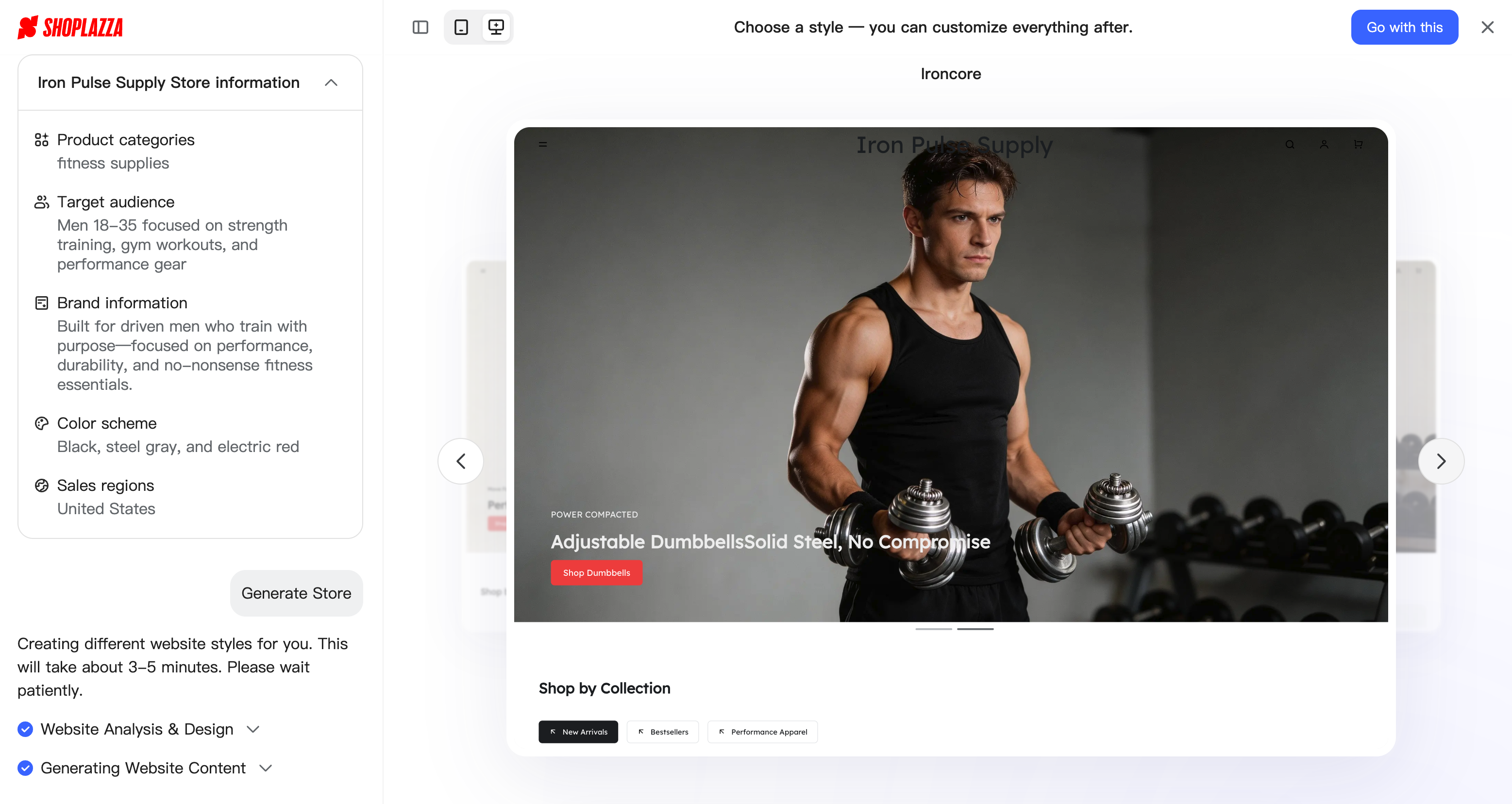
- Brand style and tone (minimal, bold, premium, playful). Beginners often lack design ideas, so Shoplazza offers style previews to confirm your vision quickly.
- Required pages (home, about, products, pricing, FAQ, contact).
- Examples of sites you like (2–3 URLs) and what you like and dislike about them. Inspiration sites (2–3 URLs): "Like Nike.com for bold imagery, but simpler navigation."
Generate the draft site
Confirm your prompt, then generate. Accept it's version zero. Shoplazza creates 3 sample sites fast from your description, and you can pick one to build a full e-commerce store with images, titles, descriptions, CTAs, shopping cart, and checkout.
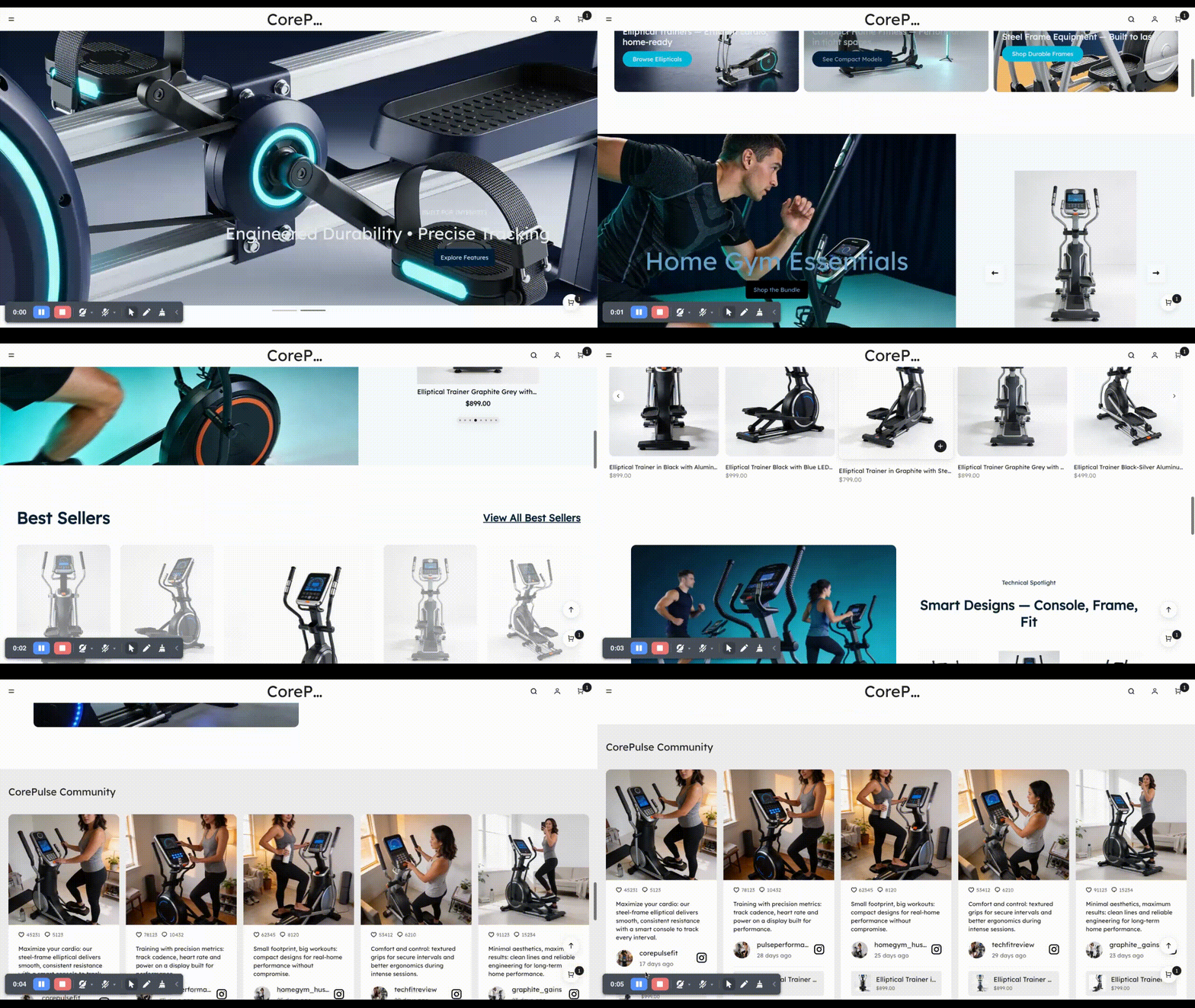
Want design tweaks? Use Page Builder for custom modules and animations. Next, add trust elements:
- Real photos (products/team).
- Clear offers/pricing.
- Testimonials or case studies (even small ones).
- Policies/contact details (especially for commerce).
This step is where most AI sites become "real businesses" instead of polished demos.
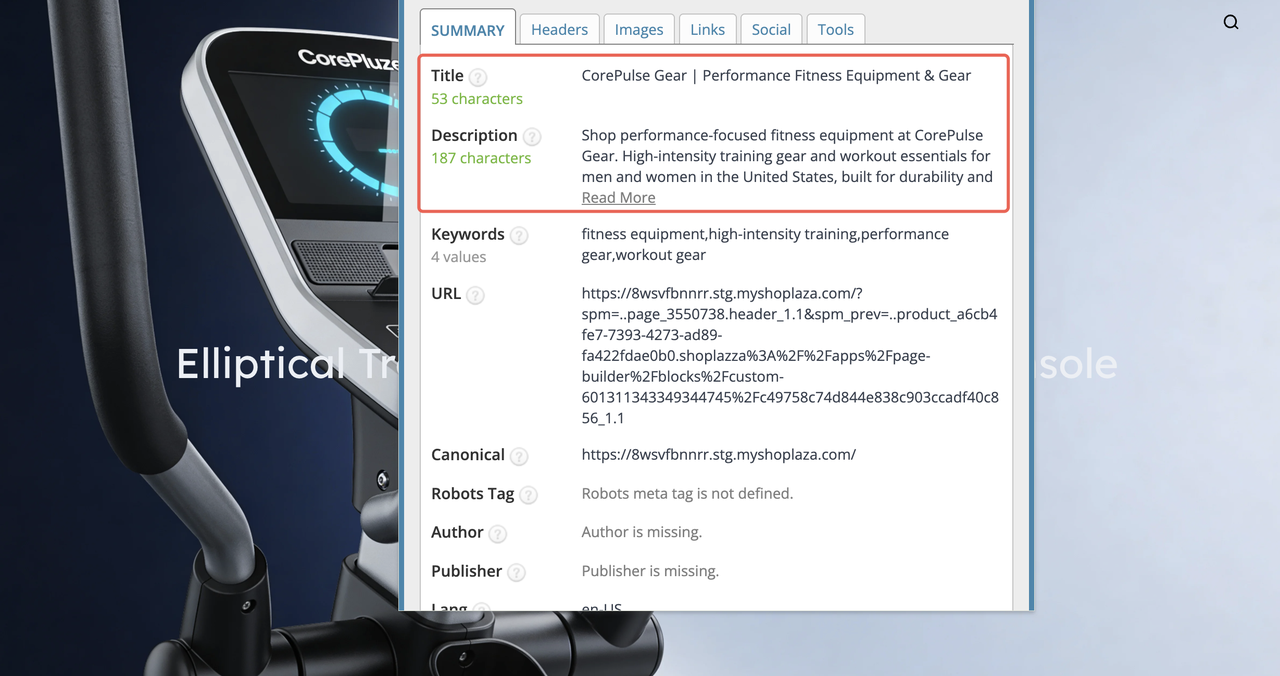
Do an SEO and performance QA pass
Run this repeatable checklist:
- Verify meta titles and meta descriptions per page.
- Confirm logical headings (one H1, clean H2/H3).
- Check internal links (home to products or blog).
- Run PageSpeed/Lighthouse for heavy images, unused scripts, layout shifts—especially with nested builder code.
Publish, then check weekly
AI helps you launch. Growth still comes from iteration:
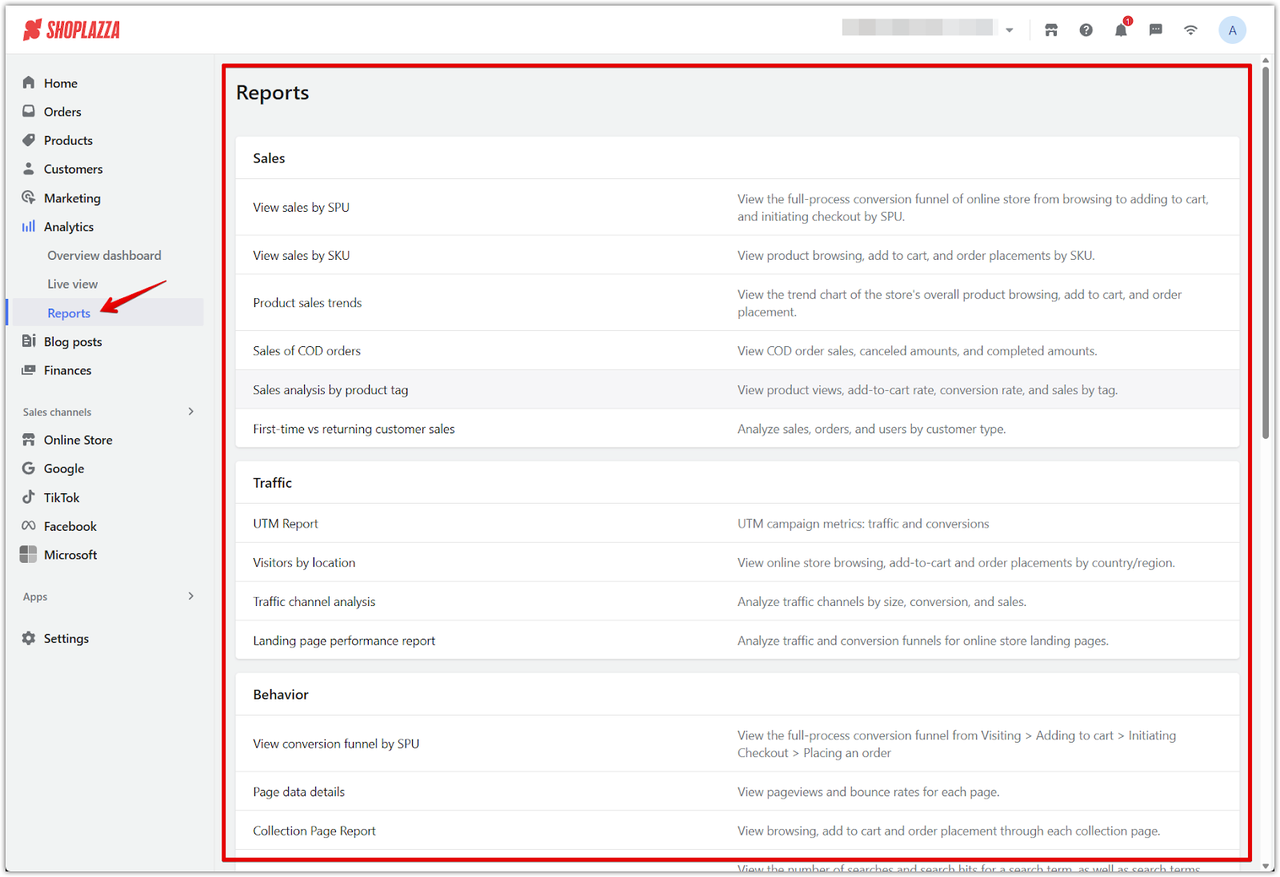
- Track conversions, including form submits and checkout completion. Shoplazza, for example, has e-commerce performance tracking tools to provide dashboard and report. You can know sales, orders, visitors, conversion rates, and customer paths.
- Improve the highest-traffic pages first.
- Refresh content based on real customer questions.
How to prevent an AI-built site from looking generic?
A unique site is usually the result of unique inputs and ongoing editorial decisions, not unique templates. Customization is still important for expressing brand identity even when AI generates the first version.
To make your website stand out, you may use these three levers:
- Prompt specificity: When you touch your text, description, and any content in the page, you may add distinctive constraints (tone, structure, unique selling points, brand vocabulary, "avoid these competitor phrases").
- Signature sections: Unique selling points capture consumers' minds. Build 2–3 reusable blocks that competitors don't have—comparison tables, "how it works" timelines, pricing calculators, founder's letter, or industry-specific FAQs.
- Post-launch management: Commit to monthly updates, including new case studies, industrial news, product blogs, updated product photos, refreshed FAQs, and performance checks so the site stays fast and current.
If brand matters, don't let AI invent it. You should feed the AI your brand decisions, then enforce them consistently across pages.
Do AI website builders have common problems? If yes, how to fix them?
AI-based website builders are good at getting you to "something publishable," but they're not magic. Most problems show up after launch: the site looks generic, SEO basics are incomplete, or your business outgrows what the builder can do. Below are the most common drawbacks and how to fix them without restarting from scratch.
Limited customization
Many AI-generated sites feel like "cookie-cutter" templates—fine for a first draft, but weak for differentiation, conversion, and brand recall. Widespread AI usage can lead to "an increasingly flat design landscape" in digital spaces.
How to fix: Use AI to generate the base, then push the design further in an editor that supports deeper layout control.
- If you're building commerce, prioritize a platform where you can design high-intent pages (home, collection, product, landing pages) with a page builder and reusable sections so the store doesn't look like everyone else's.
- If you're design-forward, consider generating a draft and then refining visuals in tools that supports animations/interactions and per-page generation.
SEO weaknesses
AI builders can produce readable pages, but SEO quality often breaks at the implementation level: thin internal linking, missing schema, bloated code, weak headings, and duplicated "template phrasing" across pages.
How to fix: Treat AI output as draft material, then run a repeatable SEO QA process.
- Add structured data where relevant (Organization, Product, FAQ, Article schema) via your platform's SEO tools or schema plugins.
- Audit for bloat: check HTML size, unused scripts, and whether your page builder stacked too many nested containers; performance and crawlability can suffer if every section is overloaded. A practical starting point is using Lighthouse/PageSpeed Insights.
- Watch "AI echo": Google's helpful content direction is consistently summarized as rewarding user-first, original, accurate content, regardless of whether it was AI-assisted, while discouraging content produced primarily to rank without adding value.
If a competitor could publish the same page by changing the company name, the content likely isn't differentiated enough to win.
Data privacy
When you generate text, images, or layouts through AI features, you may be feeding sensitive business context (product plans, pricing logic, positioning, customer info) into tools you don't fully control. That may create governance risk for regulated industries and for teams with strict brand/legal review needs.
How to fix: Use platforms that allow more control over infrastructure and data flow when privacy matters.
- A "self-hosted solution" with its API can run on your own infrastructure and under your brand, reducing dependency on external workflows for site creation.
- For business sites tied to customer data, a more controlled setup (clear roles/permissions, backups, security and hosting policies) is often worth more than the fastest generator. For example, Shoplazza leverages expanding data technologies and global leaders like AWS for reliable computing power, security, and data protection.
Scalability limits
Many AI builders are great for brochure sites, but basic setups can struggle when you need real e-commerce features, multi-currency, inventory logic, complex shipping rules, or a long-term content strategy.
How to fix: Choose a platform based on the end state—not just the first day.
- If you plan to sell online, consider an e-commerce-first builder with strong store foundations (catalog, checkout, payments, integrations) rather than forcing a blog-first tool into a store later. Shoplazza, for example, offers an AI Store Builder positioned to generate an e-commerce store designs quickly so you can focus on setup and selling.
- If you're on open source platform like WordPress, 10Web can be a strong "AI + WordPress" option, but it still requires human decision-making and ongoing management (plugins, content, product logic, SEO, and updates) to meet specific business needs.
Create your first AI website
Ready to discover what an AI website builder can do for your business? Choose Shoplazza for fast speed and sales power—try it free without signing up today. Launch a live, revenue-ready site by tomorrow and see how AI website builders turn ideas into high-converting stores quickly. This investment saves time and drives long-term conversions.
FAQs about AI website builder
Q1: Is there an AI that can build a website without requiring code and design skill?
Yes. Modern AI website builders are designed specifically for non-technical users, combining drag-and-drop editors with AI-generated layouts, copy, and imagery. Platforms like Shoplazza, Hostinger, Squarespace, Framer, and Elementor all let you describe your business in plain language and get a usable starting site you can tweak visually, without touching code.
Q2: How much does an AI website builder cost?
Pricing varies by use case and billing cycle. For e-commerce, Shoplazza starts around the $39/month, while 10Web is at roughly $11–$23/month tiers. For content-focused sites, Hostinger's AI builder sits in the $9.99/month, and Squarespace is at $16-$99/month. Design-oriented tools like Framer AI start from $10/month, while developer-focused tools such as v0 typically offer a free tier plus an affordable premium plan at $30/month.
Q3: What's the best AI website builder?
There is no single "best", only "better" for specific goals. For example, if you want to create an online store with product pages, carts, payments, and marketing tools baked in, an e-commerce–first platform like Shoplazza is usually more suitable than a blog- or portfolio-first builder. Designers might prefer Framer or Elementor, while content creators lean toward Hostinger or Squarespace.
Q4: Can an AI builder create an e-commerce store end-to-end?
AI builders can generate a surprisingly complete store skeleton: home, category pages, product templates, basic copy, and even SEO-ready structures. However, you still need to set up real products, pricing, shipping rules, taxes, and policies, and refine content to match your brand. On e-commerce platforms like Shoplazza, AI accelerates launch, but merchandising and optimization remain human-led tasks.
Q5: Are AI-generated websites SEO-friendly?
AI-generated sites can be SEO-friendly if the platform provides solid technical foundations (clean code, fast loading, mobile responsiveness) and you optimize on-page elements. You still need unique page titles, meta descriptions, headings, internal links, and structured data. AI can draft content, but you must refine it for originality, depth, and search intent to compete effectively.
Q6: How to use AI without losing your soul?
Use AI as an assistant, not an author. Let it handle first drafts, repetitive layouts, and routine copy, then inject your own experience, data, stories, and opinions. Keep a written brand voice guide, revise AI suggestions against it, and prioritize real customer insights and case studies so your site reflects your perspective rather than generic internet averages.
Q7: Is AI content penalized by Google?
Google does not automatically penalize content just because AI helped create it; what matters is whether the content is helpful, original, accurate, and created primarily for users rather than for manipulating rankings. To stay on the safe side, fact-check AI output, add unique value, and ensure your pages demonstrate expertise, experience, authority, and trustworthiness.