
Plenty of sellers think about the same move. You start on Shopify, Shopline or another store builder to get a site up fast, then switch to a more flexible system once orders are steady. It sounds like a safe plan, but the closer the move gets, the more the worries pile up.
- Will my Google rankings drop to zero overnight?
- Will all the ad spend and content I built up over months go to waste?
Many sellers hesitate and put up with the platform they have. The worry is fair, because switching platforms does carry real risk. But "will it reset?" isn't a guessing game. It depends on a few specific variables, and we'll go through what decides your SEO and traffic, which channel assets you can take with you and which you can't, and what habits you can start building today.
TL;DR: Short answer, will switching platforms wipe out your SEO and traffic?
No, as long as your domain stays the same and your redirects are done right. If you only change the platform and keep the domain, then redirect every URL that changes to its new address, your link equity and ranking signals mostly hold. If the domain changes too, you need a complete map from old URLs to new ones. Rankings usually take a few weeks to a few months to recover, and if the redirects are incomplete, recovery can stretch past a year.
Your ad accounts, social followers and email lists don't depend on your store platform, so they stay yours after a switch. What you can't take are customer login passwords and saved payment methods. If you plan to start on Shopify and move later, export your data on a regular schedule from day one. Shoplazza can also take in member status and points balances, so less of the move starts from zero.
Will switching platforms really wipe out your traffic?
Not necessarily. What drives the risk is whether your domain changes, not whether the platform does. Google's site move documentation treats a move that only changes hosting differently from a move where URLs change, and that split tells you the same thing.
Does SEO suffer if the domain stays and only the backend changes?
The impact is limited, as long as every old URL redirects to its matching new URL. Search engines still see the same address serving content, so you don't need to run a full site move. After a switch, though, your product and collection paths may look different. Set a redirect for every old URL that changes, so your core ranking signals don't swing hard.
Even a well-run migration isn't perfectly smooth. According to ranges compiled from industry articles, organic traffic usually dips 5% to 15% in the first 30 days, then recovers to 95% to 100% of pre-migration levels by weeks 8 to 12.
How long do rankings take to recover if the domain changes too?
Usually a few weeks to a few months, and over a year if the redirects are incomplete. Once the domain changes, Google treats it as a full site move, and the signals from old and new URLs have to be consolidated again. Google recommends keeping 301 redirects in place for at least a year so every historical link has time to be recognized, and you should also submit the Change of Address tool in Search Console.
Recovery isn't slow when the migration is done properly. Industry analysis points to 30 to 60 days, and Google's John Mueller has mentioned 4 to 12 weeks as a rule of thumb. The cost grows sharply when redirects are incomplete. A Search Engine Journal study of 892 domain migrations found that a new domain took an average of 523 days to match the old domain's organic traffic, and 17% of sites hadn't recovered after 1,000 days. Industry analysts note that the average includes many cases where the redirect map was already incomplete at launch.
In other words, whether you change the domain decides if this is a few weeks of turbulence or a dip you may not climb out of for more than a year.
Can you take your ad accounts and email lists with you?
Most of them, yes. What you can't take are customer login passwords and saved payment methods. Beyond SEO, sellers also worry that the ad budget they've spent and the subscribers they've gathered will have to start over. None of these channel assets depends on a specific store platform.
Assets that move with you
Your email subscriber list is yours and doesn't depend on any third-party channel, so a platform change doesn't affect who owns it or whether you can use it. Followers on social accounts live inside each social platform's own account system, so switching store platforms has no effect on them. The Pixel IDs in your Google and Meta ad accounts are tracking identifiers you can install again on the new system, and they don't stop working because you changed platforms.
Assets that carry over, with a few things to watch
Ownership of your ad accounts isn't tied to your store platform. During a migration, though, your domain and landing page structure can change, so keep your spending steady and avoid big swings in creative and bids over a short period.
Assets you can't take with you
Customer account passwords and saved payment methods are among the few things that physically can't move between platforms. This is a requirement of the Payment Card Industry Data Security Standard (PCI DSS), not a question of whether a platform is willing to open an interface, and customers have to reset their passwords on any new platform.
Membership tiers, points balances and order history can in theory be exported, but whether the new system can take them in as they are depends on what that platform supports. Take Shoplazza's Loyalty & Push as an example. It can import member status and points balances directly, and even if a customer forgets their old password, they can confirm their identity with a social login such as Google or Facebook, so you don't have to rebuild your membership base from zero.
What should you prepare if you start on Shopify or another platform?
Three things are enough. Export your data regularly, avoid platform-specific features that lock you in, and keep control of your domain and DNS. Lowering your future migration cost now beats scrambling on the day you decide to move.
Export your data regularly
Most store systems let you export product information, customer lists and order history in formats like CSV. Exporting once a month or once a quarter and keeping a copy locally is much safer than grabbing everything at the moment you decide to migrate. It also avoids incomplete exports that leave errors and gaps in the new system.
Avoid deep lock-in with platform-specific features
Some store systems let you customize core steps like checkout and product page structure with code. The deeper the customization, the more you have to rewrite when you migrate. On Shopify, for example, product, collection and standalone page URLs carry fixed prefixes such as /products/, /collections/ and /pages/ by default, and sellers can't remove them. When you move to a system with a different path structure, all of those default URLs become redirects you have to handle one by one. Knowing this ahead of time makes the work much smaller later.
Keep control of your domain and DNS
Register your domain and manage your DNS with an independent domain registrar where you can, rather than leaving both inside your store platform. That way, whether or not you ever switch platforms, the domain, your most important SEO asset, stays in your hands. You don't need to arrange a transfer at the last minute, and you're not exposed to one platform's policy changes.
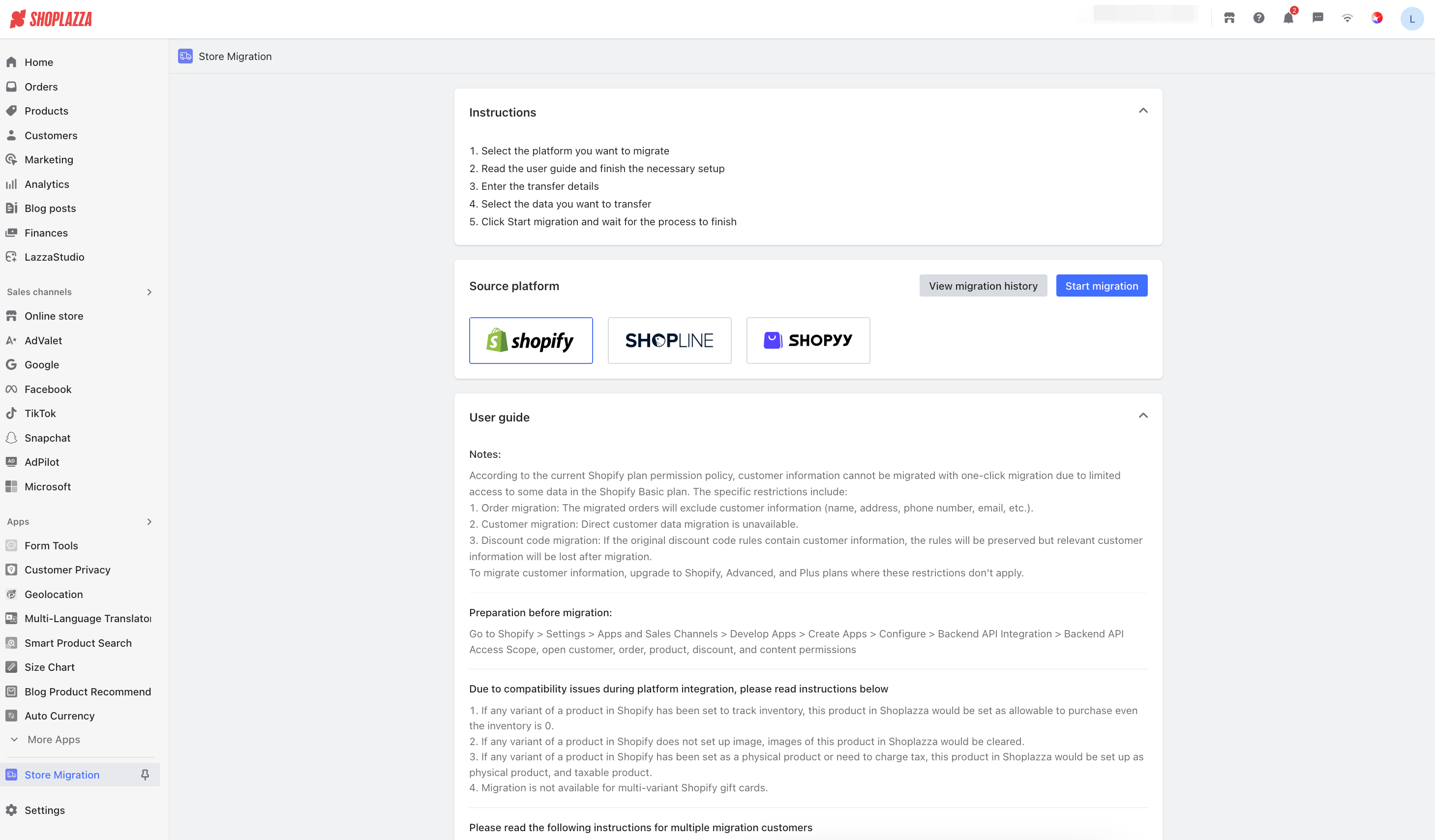
If you're already weighing a move and want to see how your data, members and storefront would carry over, take a look at the migration options and get your checklist in order early.
When should you migrate now instead of waiting?
Don't wait in these two cases.
- Your account faces removal or a forced takedown.
- Your business is growing steadily, but your current platform's features and costs can't keep up with your scale.
The first case already has a real example. On June 24, 2026, Shopify told US merchants that it would no longer support the sale of electronic nicotine delivery system (ENDS) products and asked them to remove all related products by July 8, or face product suspension and even store closure (Reuters). The decision came after 25 state attorneys general and New York City signed a joint letter asking platforms to curb illegal online vape sales (Office of the New York State Attorney General). Merchants had only about two weeks, far too little for a calm platform migration, so sellers in that category had to find a new route and move their stores quickly to another platform that supports selling vapes. Getting products, order history and customer records out first keeps the business from stopping altogether.
The second case is better suited to planning a replacement on your own schedule. Sort what you have by scenario and it becomes clear what has to move. Products, order history and customer records can be imported in one go, which cuts down on manual copying. Promotions like gift with purchase, bundles and free shipping thresholds can be rebuilt with native features and apps, or set up through the platform's AI operations assistant, such as Athena, so you don't have to find a replacement for every old plugin one by one.
Take Shoplazza as an example. For merchants moving from Shopify and other platforms, there's a self-serve store migration tool, and there's also a dedicated migration team that works through a set process, which is to understand your business needs, plan the move, migrate and configure, verify the whole chain, and go live. It covers checks across data, storefront, members and payments. The goal is simple, to make sure a migration no longer starts from scratch.
Bottom line
Whether switching platforms wipes out your traffic and SEO starts with whether you change your domain. If the domain stays, it's a controlled system upgrade. If the domain changes too, rankings take longer to recover. Ad accounts, email lists and social followers don't depend on your store platform, and the things you can't take are customer login passwords and payment details. If you plan to start on Shopify and move later, build the habit of exporting your data now. Shoplazza's data and member carry-over support means less of the move has to start from zero.
Frequently asked questions about switching ecommerce platforms
Q: If I change my store system but keep my domain, how long does Google take to recover my rankings?
According to Google, signals for small and medium-sized sites usually take a few weeks to consolidate, and how fast it goes depends on how much your URL paths change and whether your redirects are complete. As long as the domain stays and the redirects are in place, this is usually a short-term swing, not a long-term loss of traffic.
Q: If I start on Shopify and switch later, was my earlier SEO work wasted?
No. If you keep the same domain when you switch and set up your redirects well, most of the backlinks and domain authority you built carry over. What can really go to waste is changing your domain without a proper redirect map, not the fact that you started on a given platform.
Q: Do I need to reopen my Google Ads and Meta ad accounts after I switch platforms?
No. Ad accounts belong to the person running the ads, so a platform change doesn't affect them, and your Pixel IDs can be installed again on the new system. During the migration your domain and landing page structure can change, so keep your spending steady and avoid big swings in creative and bids over a short period.
Q: Can I keep my member points and customer login details after I switch?
Customer passwords and saved payment methods have to be set up again on any platform because of payment security rules. Membership tiers, points balances and order history can be exported, and whether the new system takes them in as they are depends on that platform. Shoplazza, for example, can import member status and points balances directly, and customers can use a social login, so they don't have to register again from scratch.
