Have you ever experienced this? You invest heavily in ads on Facebook, Instagram, or Google. The click-through rate looks strong. Traffic is flowing in. But once visitors land on your store, conversions collapse. Many sellers review their funnel and immediately check landing page visuals or shipping fees. Few stop to examine the most fundamental layer: localization.
When a French shopper reads product copy that feels machine-translated, trust erodes instantly. When a Brazilian customer reaches checkout and sees prices jump from BRL back to USD, hesitation follows. That single moment of doubt can undo every dollar spent on acquisition. In cross-border ecommerce today, competition is no longer just about product quality. It is about experience control:
- Can global customers browse comfortably?
- Can they pay confidently?
- Can they complete checkout without friction?
Multi-language and multi-currency shapes how international buyers perceive credibility, pricing transparency, and brand professionalism. This article breaks down the core mechanics behind multilingual and multi-currency configuration. It evaluates what truly impacts conversion performance. It also compares how Shoplazza and Shopify implement these capabilities, helping merchants build independent stores designed for global competition rather than local limitations.
Is your store welcoming customers or driving them away?
Installing a plugin, converting text into another language, and replacing currency symbols does not equal true localization. Assuming the job is complete at that stage often leads to invisible friction that quietly pushes customers away:
- The first issue is a break in trust. Poor machine translation—such as rendering "Spring Collection" into wording that misses the original tone—instantly weakens brand positioning. The store loses its premium feel. In extreme cases, visitors may even question legitimacy.
- The second issue appears at the most critical moment: checkout. Some plugins display foreign currencies only on product pages. Once users move to the checkout page, the currency switches back to the store's default, often USD. That sudden change introduces uncertainty. Price inconsistency at the final step remains one of the primary drivers of cart abandonment.
- A deeper problem lies in technical inefficiency. Heavy third-party scripts used for multilingual setup can slow page loading speed. A one-second delay can reduce conversion rates by 7% or more. If the plugin does not support SEO-friendly, independent URL structures, localized pages become invisible to search engines. Smaller language markets lose organic exposure before competition even begins.
True customer acquisition requires continuity. Only a fully integrated localization strategy turns global traffic into confident buyers.
How to choose multi-currency and multi-language plugins? Key factors and real reviews
When evaluating platforms or comparing plugins, many sellers fall into the trap of feature stacking. More functions do not automatically mean better localization. A strong solution is not defined by whether it can translate text or convert exchange rates. Its real value lies in how it strengthens every conversion touchpoint inside the store.From an overseas shopper's perspective, localization influences the entire journey. To address common decision pain points, these factors can be divided into four critical stages:
- Traffic Acquisition Stage: SEO friendliness determines whether customers can find the store among massive search results.
- On-Site Entry Stage: Translation quality and site performance determine whether visitors stay beyond the first three seconds.
- Decision-Making Stage: Exchange rate logic and pricing rules determine whether prices feel locally reasonable and psychologically acceptable.
- Checkout Stage: Currency consistency and payment gateway compatibility determine whether the final transaction proceeds smoothly without abandonment.
The following sections analyze how these elements perform in real operational scenarios.
SEO friendliness
For new and growing stores, organic search traffic forms the foundation of a low-cost acquisition system. Yet many sellers misunderstand multilingual setup. Installing a front-end translation widget that dynamically converts text may help visitors read content, but it often fails to generate indexable pages. Search engines cannot properly crawl floating translation layers.A mature multilingual SEO strategy requires independent URLs for each language version, such as /es or es.store.com, along with properly configured hreflang tags. This structure acts as a clear navigation map for search engine crawlers, ensuring that the correct language page appears in the correct regional search results.
Within the Shopify ecosystem, Weglot is a widely used solution for this purpose. It automatically manages metadata, generates hreflang tags, and creates clean URL structures, making multilingual indexing relatively straightforward. However, this professional capability comes with tiered pricing:
- The free plan supports only one language and 2,000 translated words.
- Supporting three or more languages typically starts at around $32 per month.
Because Weglot hosts translations in the cloud, rendering and indexing efficiency may also depend on network response speed.
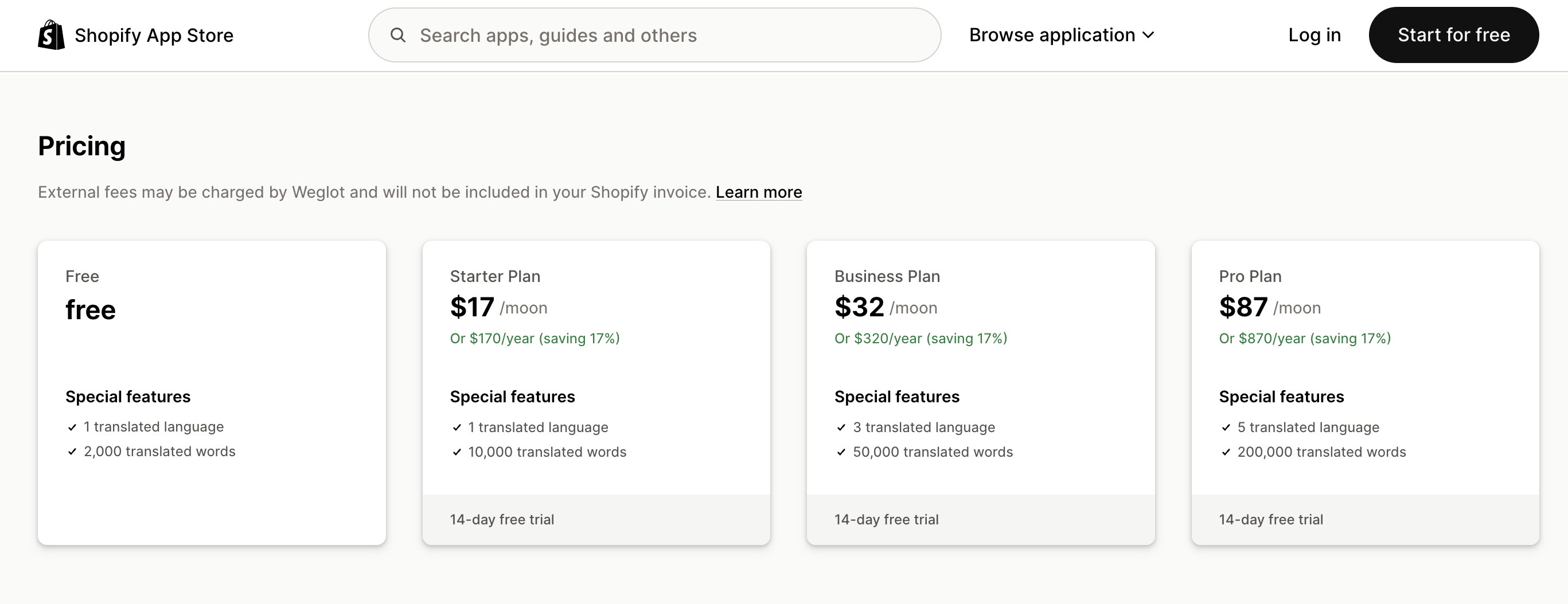
Source: Shopify App Store - Weglot
By contrast, Shoplazza provides built-in SEO Optimizer at no additional cost. Merchants can configure meta titles, meta descriptions, and image ALT tags directly in the admin panel. Page indexing rules for Google can also be customized to improve click-through rates in search results.
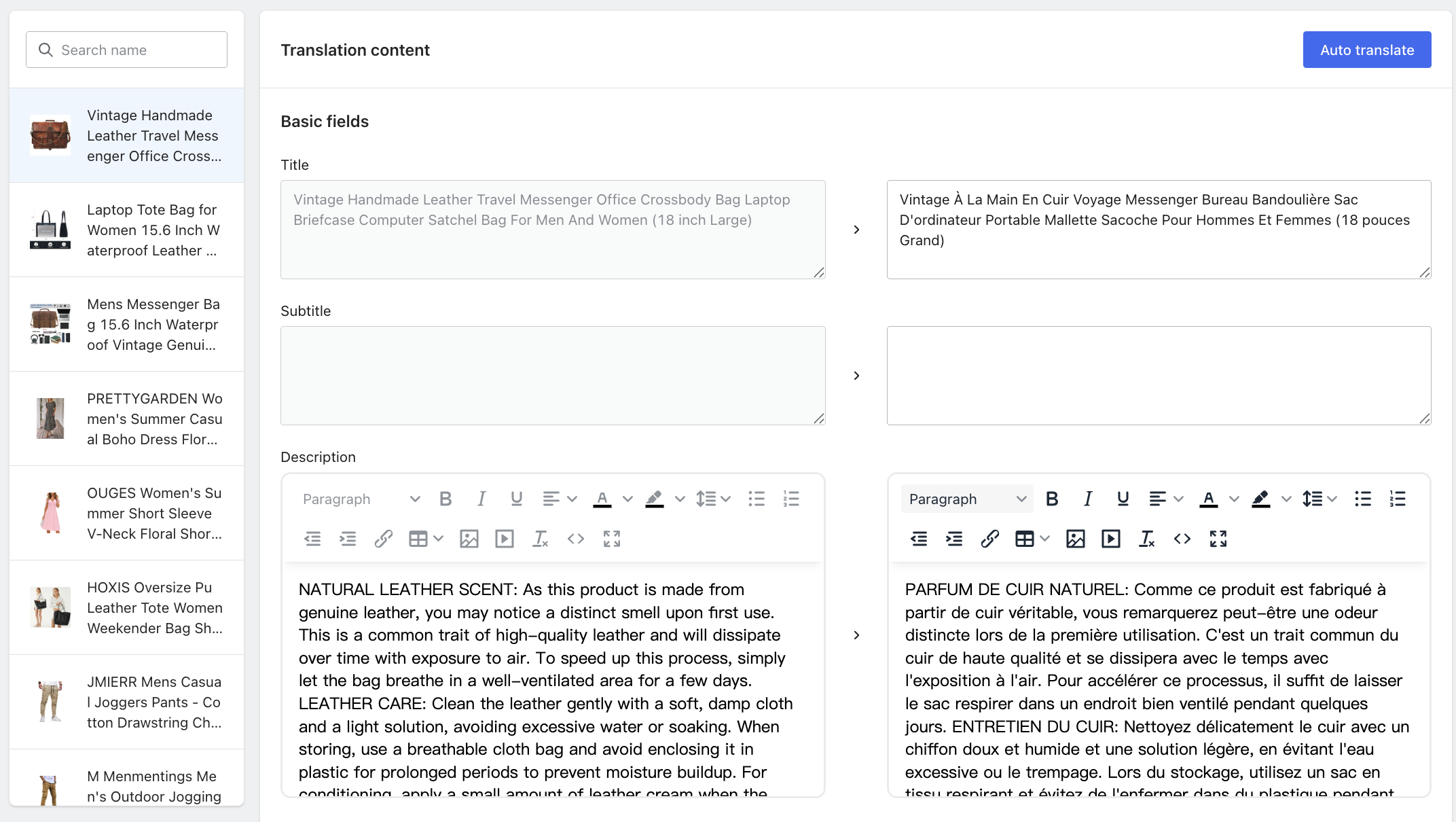
For content localization, Shoplazza's visual multi-language translatior plugin supports targeted translation for specific products or collections. Each month includes 5,000 free translated words. If usage exceeds that limit, 30,000 additional words are available for $9.90 per month, offering a more cost-efficient structure.
Flexibility extends further. For proprietary brand terms or protected keywords, Shoplazza allows selective exclusion from translation through theme code adjustments. This selective translation approach preserves local readability while protecting branded search weight across international markets.
Translation quality
Text does more than communicate product details. It signals brand professionalism. Stiff phrasing and obvious machine translation often create the opposite effect. Overseas shoppers may struggle to read the contents, which makes the store appear untrustworthy. A translation solution therefore becomes a balance between automation efficiency and linguistic authenticity.
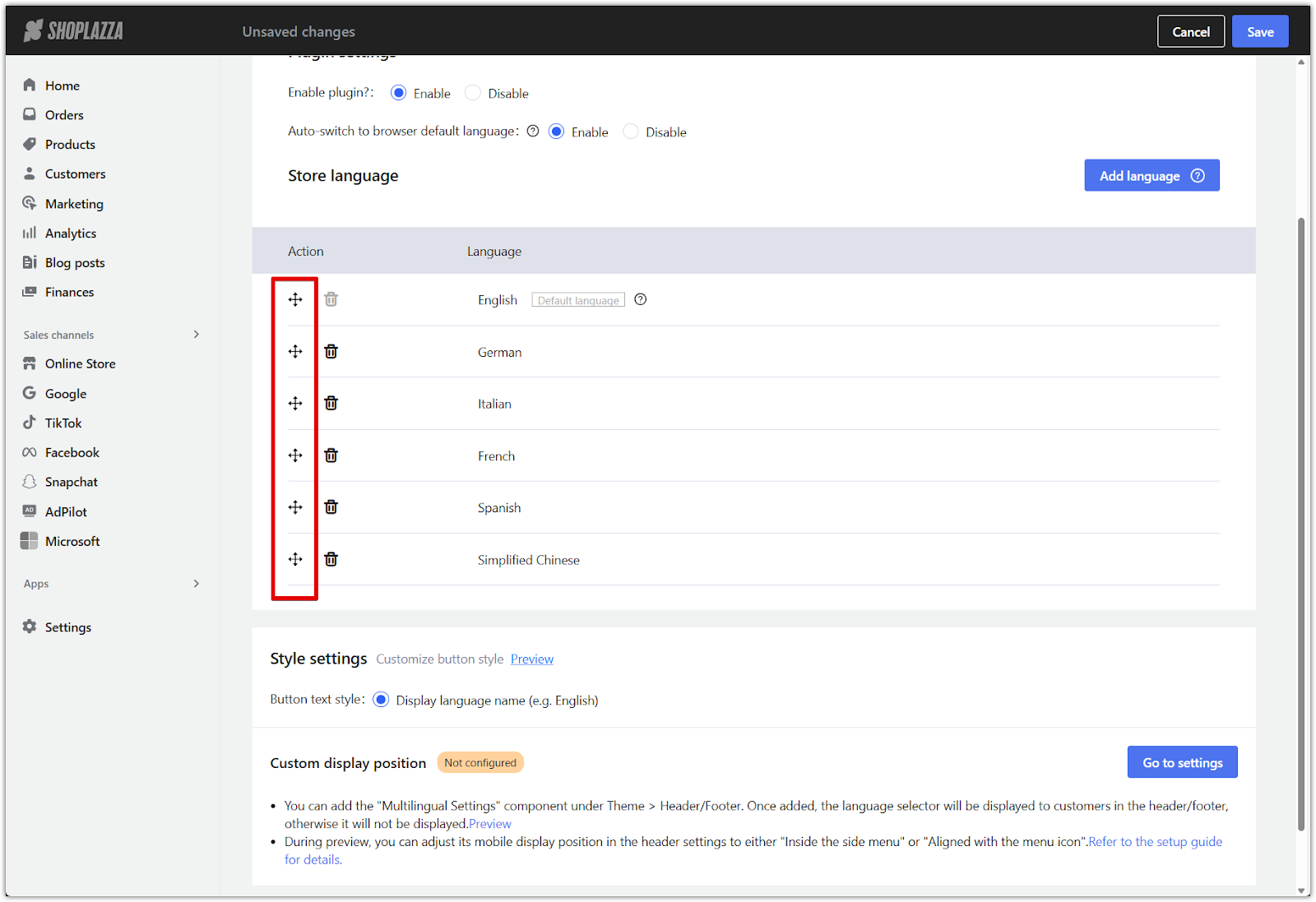
Shoplazza integrates Google Translate within its multi-language configuration. By default, it supports six major languages, including English, German, Italian, French, Spanish, and Simplified Chinese. Additional languages can be activated based on market needs.
From a user experience perspective, the system detects browser language preferences and automatically switches the storefront language. Visitors do not need to manually search for a language selector.
Display logic also affects conversion. Language order influences visual priority and psychological focus. Shoplazza allows merchants to rearrange language display order based on target audience profiles. This seemingly minor adjustment supports more strategic localization and improves marketing precision.
Within the Shopify ecosystem, the official Shopify Translate & Adapt app is built on the same Google translation infrastructure. The tool currently offers a free usage tier. However, automation capacity and strategic flexibility have clear limitations.
Automatic translation supports only up to two languages per store. Expanding into additional markets requires manual configuration. Some merchants also report hidden product restrictions. One user review states:
These structural limits can slow expansion plans for merchants targeting multiple international regions.
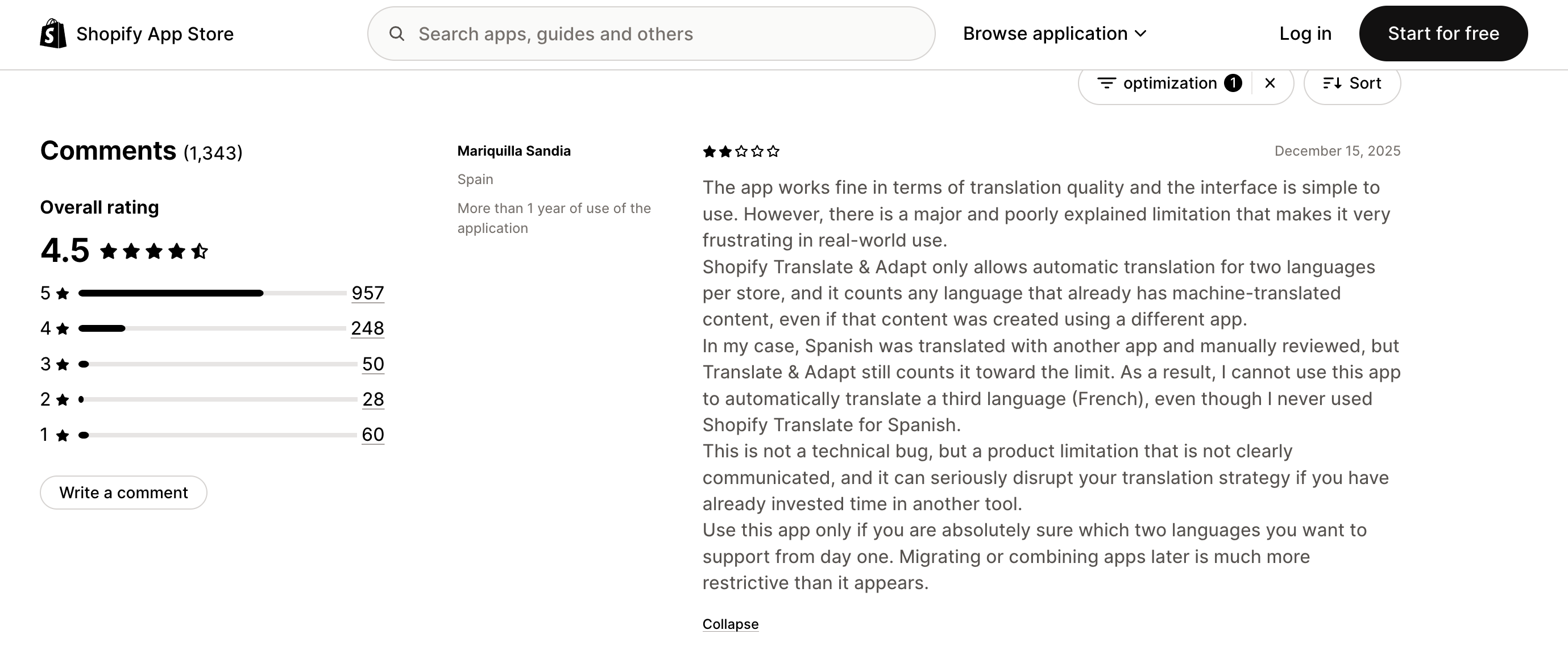
Source:Shopify App Store - Translate & Adapt
Website performance
Website performance is primarily reflected in loading speed. Loading speed is not just a technical metric. It is a revenue variable. Multi-language and multi-currency plugins often rely on large language packages and real-time exchange rate APIs. If the code structure is bloated, these scripts can slow first-screen loading and weaken conversion performance.
Shoplazza designed its multi-language and multi-currency plugins with platform compatibility in mind. The system integrates directly with all native store templates, reducing script conflicts at the structural level and minimizing performance loss caused by third-party injections.
However, performance depends not only on plugins but also on the underlying theme architecture. Take the Reformia theme as an example. Reformia is built for high-frequency cross-border transactions and optimized for mobile responsiveness. Its loading strategy demonstrates measurable efficiency gains:
- Reformia automatically converts images into high-efficiency formats such as WebP and AVIF, reducing file size by 30% to 60%. First Contentful Paint (FCP) is compressed to under 0.7 seconds, outperforming industry benchmarks by more than 61%. Cumulative Layout Shift (CLS) is controlled below 0.01, delivering over 90% greater stability than common industry standards. This eliminates layout jumping during loading and improves visual precision.
Performance improvements also translate into interaction efficiency. Under the Reformia theme, users can switch to secondary product images by hovering over the main image. There is no need to open a separate product detail page. A "+" button at the bottom right allows direct add-to-cart action.

Fast rendering combined with frictionless cart interaction reduces drop-off across the conversion funnel. Each incremental gain in speed directly contributes to higher order volume and stronger revenue consistency.
Currency exchange rates
Exchange rate fluctuations are a critical risk for global sellers. One of the biggest concerns is delayed or inaccurate rate updates in plugins, which can create discrepancies between displayed front-end prices and actual checkout totals. In some cases, this can silently erode profit margins.
Beyond real-time updates, a reliable pricing conversion strategy is essential. A common recommendation is to use automatic rounding while retaining two decimal places. This approach avoids minor exchange losses and ensures front-end prices appear clean and professional.
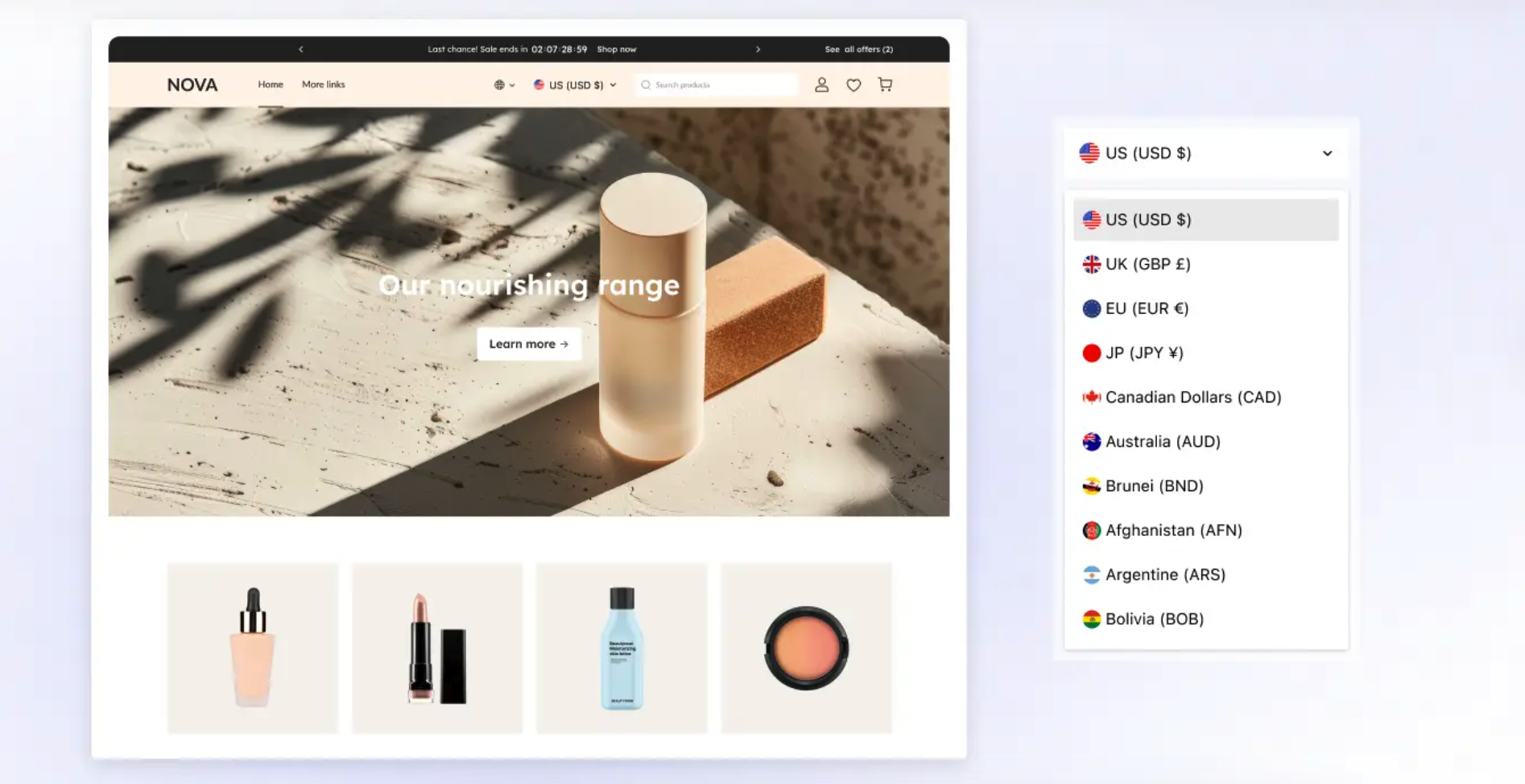
Shoplazza offers an Auto Currency conversion system. The platform intelligently detects a customer's location based on IP and automatically displays prices in the local currency, while still providing a manual switch option. Key advantages include rapid deployment and data reliability:
- Supports currency conversion for 150+ countries and regions.
- Exchange rates are updated daily.
- Zero-code setup allows merchants to configure the system in under five minutes.
- Regional toggles enable fine-grained control, helping optimize purchasing decisions for global buyers.
By contrast, in the Shopify ecosystem, the Supernova Currency Converter plugin uses a tiered pricing model. While it supports unlimited currencies and rounding rules, functionality depends on subscription level:
- The free plan only allows manual currency switching.
- Automatic IP-based currency detection requires $1.99/month.
- Advanced rounding algorithms require an additional "Dynamic Currency Converter" plugin, starting at $9.99/month.
The combination of automatic updates, intelligent detection, and flexible pricing rules makes Shoplazza's system particularly efficient for high-volume international stores.
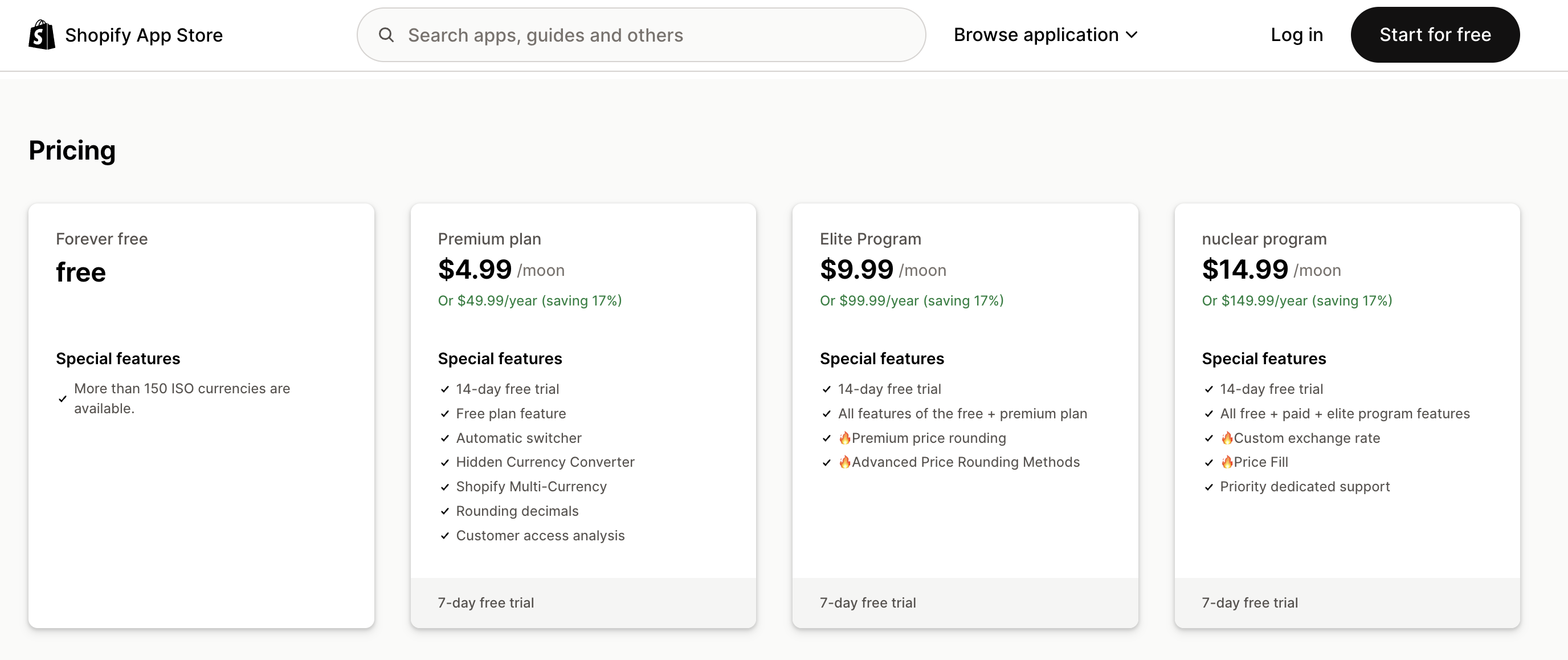
Source:Shopify App Store - Dynamic Currency Converter
Checkout consistency
One of the most subtle yet critical risks in multi-currency setups is checkout consistency. Many basic plugins display converted currencies only on product pages. Once customers reach the checkout page, prices may suddenly revert to the store's default currency, often USD. This abrupt "currency jump" creates a psychological disconnect, raising doubts about the final amount and the security of the transaction. Such experience gaps are a leading cause of high cart abandonment. Ensuring that the selected currency remains consistent from homepage to checkout is essential to protect the final conversion.
Payment gateway compatibility
Displaying local currencies on the front end is only part of the solution. The core challenge is whether the converted currency integrates seamlessly with payment gateways. Merchants must verify that their localization tools support major gateways like PayPal and Stripe, allowing transactions to be processed in the displayed currency. Incompatible plugins can result in hidden fees or failed payments, even if the front-end display appears correct. High-quality localization tools ensure full alignment between displayed and settled currencies, providing global customers with a frictionless checkout and completing the purchase loop.
Shoplazza vs Shopify: Which one to choose for your business needs?
When it comes to multilingual and multi-currency localization, should you rely on Shoplazza or Shopify's plugin ecosystem? The answer depends on three key factors: platform positioning, upfront costs, and long-term maintenance.
If you already operate a mature store on a platform, it makes sense to stick with its native features or established plugins. But if you haven't set up a website yet, are still exploring options, or are considering migrating from another platform, Shoplazza stands out as a highly competitive choice in terms of both purchase and maintenance costs.
In terms of numbers and extensions, Shoplazza still lags behind Shopify's massive plugin ecosystem. However, Shoplazza's strategy focuses on precisely covering core needs rather than sheer quantity. Nearly 90% of Shoplazza's marketing and operational plugins are completely free, with no paid upgrades required to unlock essential features. For most small and medium cross-border sellers, these plugins are ready to use immediately and fully meet operational needs. Even better, Shoplazza's backend natively integrates multiple marketing campaign settings, letting merchants run complex promotions without relying on third-party plugins.
By comparison, Shopify offers a wide range of plugins, but its cost structure often grows complicated as your business scales. Take the professional translation plugin Weglot, for example: pricing is based on word count and the number of languages. As your product catalog and traffic increase, costs can rise exponentially (supporting three or more languages can cost $32 or $87 per month). While this tiered pricing enables quick early deployment, long-tail sellers with many SKUs may face significant ongoing expenses.
From a maintenance perspective, Shoplazza's plugins are highly standardized, automatically compatible with all major themes, reducing the risk of technical conflicts. For new sellers without coding experience, detailed step-by-step guides are available in the help center, and the customer support team can be contacted directly.
Optimize your multi-market store
In today's competitive global market, every detail counts. A site that adapts to customer language, updates exchange rates instantly, and loads in milliseconds drives far higher conversions than a patched-together store. Shoplazza equips independent sellers with free, powerful native plugins and high-performance templates, enabling stable, cost-effective global reach. By activating its multi-language and multi-currency tools, you can skip complicated subscriptions and coding, turning every advertising investment into real orders with a smooth, fully localized shopping experience.
FAQs about multi-currency and multi-language plugins
Q1: What if the plugin doesn't match my website theme and causes layout issues?
Layout problems usually happen when third-party plugin code conflicts with a theme's CSS. Fixing this often requires coding skills. Shoplazza's multi-currency and multi-language plugins are designed for native compatibility, automatically adapting to all platform themes. Buttons, price displays, and other elements integrate seamlessly with your site's style, greatly reducing the risk of visual glitches.
Q2: Will installing multi-language and currency plugins slow down my website?
Plugins with redundant code or frequent external API calls (like some pay-per-word translation tools) can slow initial page load. Choosing performance-optimized plugins—like Shoplazza's—helps minimize this impact. Combined with the Reformia theme, built for cross-border stores, features like WebP image conversion and FCP speed rendering ensure your site remains fast even with multiple localization tools active.
Q3: Are free translation plugins sufficient?
It depends on your SKU count. Shopify's Translate & Adapt supports only two languages, ideal for small tests. Upgrading to Weglot's free plan covers just one language and 2,000 words; 10,000 words cost $17/month, and more words start at $32/month. Shoplazza's Multi-language Translatior plugin supports six languages by default, with 5,000 words free for fine-tuning—enough for startups. For larger catalogs, 30,000 words cost just $9.90, offering high value for mid-to-large stores.
Q4: Is Shoplazza's currency exchange data real-time?
Yes. Shoplazza supports over 150 currencies worldwide, updating rates daily. This high-frequency data ensures front-end prices stay synchronized with international exchange rates, helping sellers protect profit margins while giving global customers accurate, reliable pricing.
Q5: What if I encounter plugin setup issues as a new seller? Is Shoplazza support available?
New sellers don't need to worry. Detailed step-by-step guides and video tutorials are available in the help center. For any setup questions, the customer support team is ready to ensure sellers get immediate guidance, keeping stores running smoothly across global markets.