Most people ask the wrong question. "Which platform is best for dropshipping?" sounds reasonable, but it sends you straight into a rabbit hole of comparison lists that all say the same thing — WooCommerce is cheapest, BigCommerce is for scale, Wix is for beginners. That's not useless, but it doesn't actually help you decide.
The better questions are what dropshipping platform is suitable for you at your current stage, or why do you want to leave in the first place? Your reason for switching determines your destination far more than any feature checklist. A seller bleeding on transaction fees needs a different answer than someone whose two-person team keeps bumping into access restrictions. This article won't tell you which platform is objectively best. It will help you identify your actual problem, figure out what kind of platform solves it, and tell you honestly when switching isn't worth it.
Four reasons dropshippers switch away from Shopify
Switching platforms is a real cost — in time, SEO disruption, and supplier re-integration. Before you commit, it helps to know exactly what's pushing you out. These are the four most common reasons, and they don't all lead to the same answer.
You're no longer working alone.
Shopify's Basic plan does not include additional staff accounts. The owner gets one login, and that's it. The moment you hire a second person to help manage orders, update product listings, or run ad campaigns from the backend, you're forced to upgrade to the Grow plan, which runs $105/month, or $95/month billed annually.

That's a significant jump for what is essentially a team access feature. If you're a two- or three-person operation just getting started, you're paying for a plan tier designed for much larger operations.
The entry-level plans of Shoplazza and Shopify land at nearly the same price:
| Plan | Shopify (annual) | Staff accounts | Shoplazza (annual) | Staff accounts |
| Entry | $29/mo | 0 additional | $29.25/mo | 3 |
| Mid | $95/mo | 5 | $78.75/mo | 5 |
| Upper | $360/mo | 15 | $299.25/mo | 15 |
But Shopify Basic includes zero additional staff accounts, while Shoplazza Basic includes three. If you need even one extra team member in the backend, Shopify immediately jumps you to Grow at $95/mo annually. Shoplazza's Basic plan handles a three-person team at the same price you're already paying. For a small team splitting backend responsibilities, that's a meaningful structural difference — not just a price difference. You're getting collaborative access at the entry-level plan rather than paying to unlock it.
Transaction fees are cutting into thin margins.
Dropshipping margins are already thin. Most sellers operate somewhere between 15% and 30% gross margin depending on niche, supplier, and ad costs. When a platform charges a percentage of every sale on top of your payment processor fees, it directly reduces what's left over.
Shopify charges third-party transaction fees on every plan: 2% on Basic, 1% on Grow, and 0.6% on Advanced. On $20,000 in monthly sales at the Basic rate, that's $400 disappearing before you account for product cost, ads, or shipping. The only way to eliminate these fees entirely on Shopify is to use Shopify Payments as your sole payment provider — and that option is only available on the Plus plan, which starts at $2,300/month.

Shoplazza follows a similar structure. Transaction fees run 2% on Basic, 1% on Advanced, and 0.5% on Pro. Pro users who activate Shoplazza Payments can eliminate the platform transaction fee, paying only the standard rate from the payment processor.
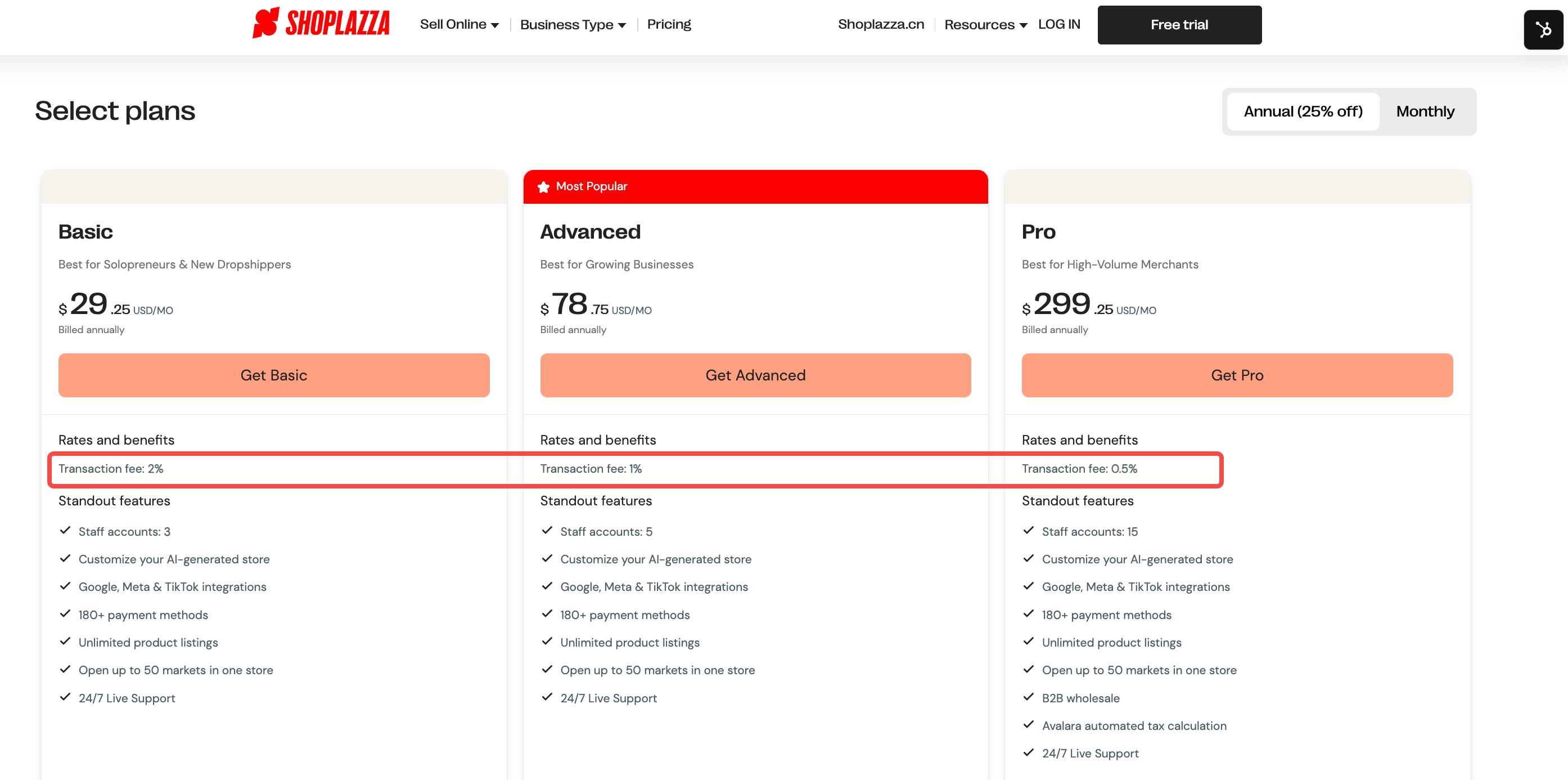
The meaningful difference is cost of entry: Shoplazza Pro runs $299.25/month billed annually, compared to Shopify Plus at $2,300/month. For a high-volume dropshipper where transaction fees are a real line item, that gap in plan cost changes the math considerably. If transaction fees are your primary pain point, the calculation is straightforward. Take your monthly sales volume, run it through the fee structure at the plan tier you'd actually use on each platform, and compare the all-in number — subscription plus fees — rather than looking at subscription price alone.
Your app stack costs more than your subscription.
The subscription price is only part of what ecommerce platforms actually cost. Most platforms — not just Shopify — charge separately for features that dropshipping stores use every day: product reviews, order tracking, pixel management, bundle selling, and promotional tools. A typical app stack adds $80 to $150 per month on top of whatever you're paying for the plan itself.
So when you ask how much does Shopify cost — or any platform, for that matter — the honest answer is: the subscription plus whatever you need to buy to make it functional.
Shoplazza builds most of these in at no extra cost. Here's how the numbers compare:
| Feature | Shoplazza | Most other platforms |
| Theme templates | Free, included | ~$150–$400 |
| Discount and promotion tools | Free, included | ~$288/year, with order limits |
| Promotional widgets | Free, included | ~$200/year via multiple paid plugins |
| Bundle selling | Free, included | ~$180/year, with revenue caps |
| Product review system | Free, included | ~$180/year via plugin |
| Order tracking for customers | Free, included | ~$120/year |
| Data tracking and Pixel management | Free, included | ~$120/year |
| Smart product recommendations | Free, included | Paid plugins from ~$108/year, with order limits |
| Abandoned cart recovery emails | 90,000/month free (3,000/day) | ~10,000/month free |
| Multilingual translation | 100+ languages for paid users | Up to 2 languages auto-translated |
For a dropshipper who would otherwise be paying for each of these capabilities separately, the all-in monthly cost looks quite different from what the subscription price alone suggests.
You're selling across more than 10 markets.
Shopify's Basic, Grow, and Advanced plans each cap inventory locations at 10. If you're managing multiple supplier warehouses, regional fulfillment centers, or simply want to separate stock for different markets, you hit that ceiling faster than you'd expect. The next option with meaningful headroom is Plus — which starts at $2,300 per month for 200 locations.
For cross-border dropshippers who are simultaneously running stores into the US, Europe, Australia, and Southeast Asia, 10 inventory locations isn't a hypothetical constraint. It becomes a real operational ceiling.
Shoplazza supports up to 50 markets across all plan tiers. Multi-currency support and multilingual store options are also included without requiring third-party apps. This is less a feature comparison and more a structural design difference: Shoplazza was built with cross-border selling as a primary use case, not an add-on.
What Shoplazza looks like if you're coming from Shopify?
The real migration anxiety isn't usually about features — it's about relearning how to do everything you already know how to do. That's worth addressing directly.
The backend feels familiar.
Shoplazza's backend follows a similar navigational logic to what most Shopify users already know: product management, order tracking, discount setup, and analytics are all organized in ways that feel intuitive if you've spent time in another ecommerce backend.
The store builder offers both template-based editing with drag-and-drop blocks and an AI Store Builder, both operate without requiring code. This doesn't mean zero learning curve. But it means the curve is measured in days, not weeks.
Dropshipping supplier integrations work the same way.
The core dropshipping workflow — connecting suppliers, importing products, syncing inventory, and routing orders — works the same way on Shoplazza as it does on most major platforms. Everything runs from the backend without any custom development. If your current workflow on another platform runs through dropshipping suppliers like CJDropshipping, the operational mechanics after migration are almost identical. That continuity matters when you're trying to minimize disruption during a switch.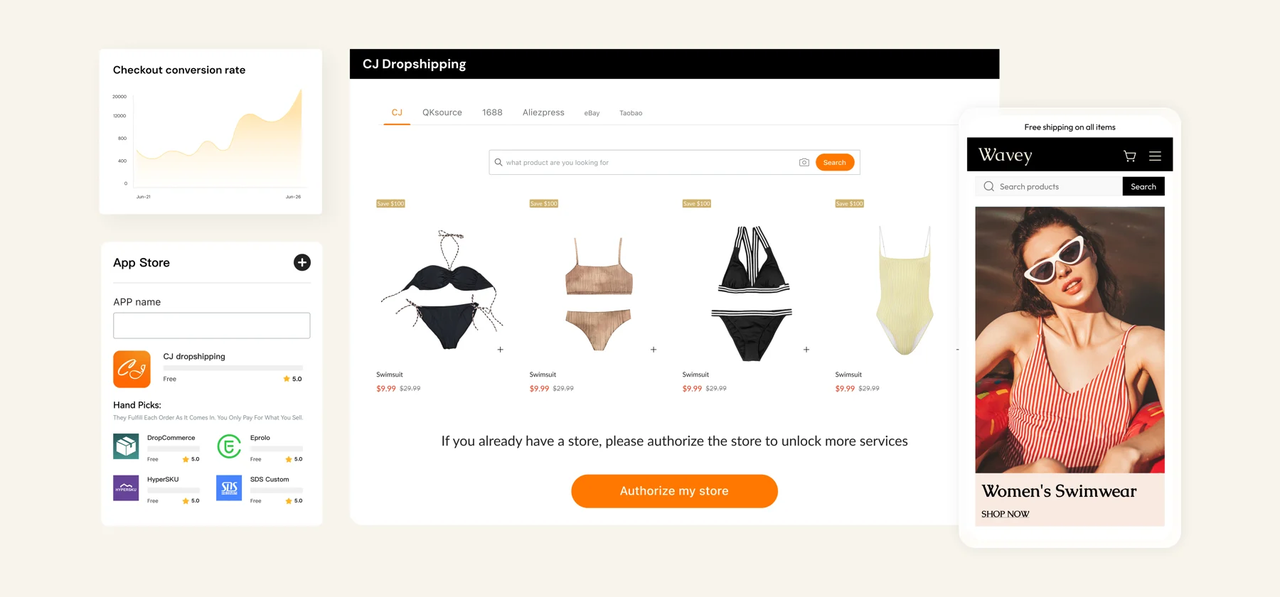
Your AI store assistant carries over too.
If you've been using an AI assistant on your current platform to handle store operations — writing product titles, processing orders, or pulling sales reports — it's a fair concern that switching means starting over without those tools.
Shoplazza's Athena covers the same ground. It's a 7x24 AI operations agent built directly into the backend, not a separate app or chatbot. You can use it to bulk-create product listings from URLs, images, or spreadsheets, process orders, configure discounts, and generate data analysis with charts and business recommendations. Sensitive actions like creating, editing, or deleting records require your confirmation before executing, so nothing changes in your store without you approving it first.
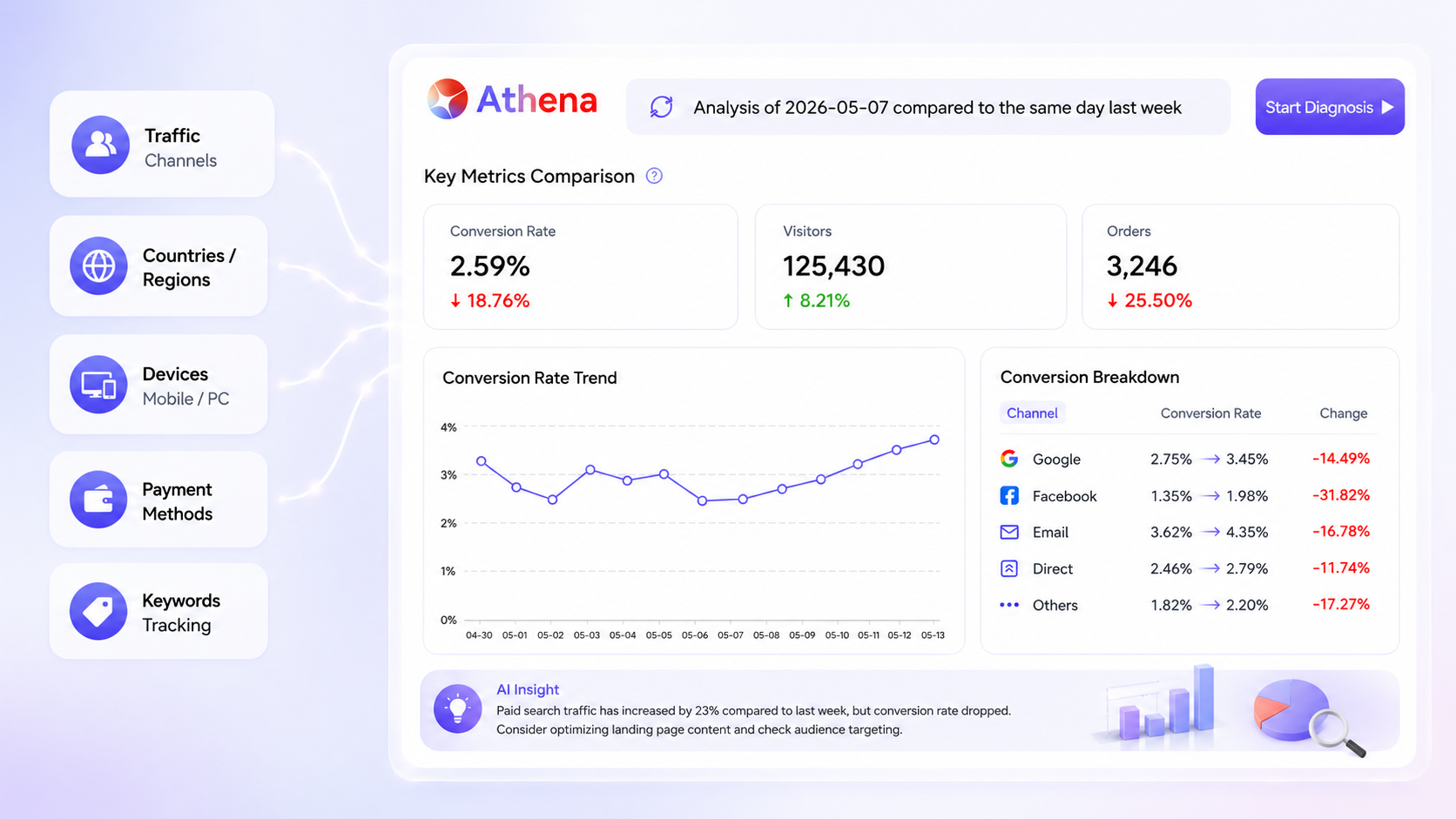
If AI-assisted operations are already part of your daily workflow, migrating to Shoplazza doesn't take that away.
Who should not switch from Shopify?
Not everyone should switch, and saying otherwise would be bad advice. Here's when staying put is the smarter call.
- If your store is already profitable and your current setup is stable, the migration cost — in time, temporary SEO disruption, and supplier re-integration — may outweigh any savings from lower platform fees. A working system has real value that's easy to underestimate until you break it.
- If you rely on platform-exclusive apps or native sourcing features that don't exist elsewhere, those integrations don't transfer. Before committing to a migration, audit your current tool stack and confirm that everything you depend on has a working equivalent on the new platform.
- If you're mid-campaign — running active paid ads with conversion tracking tied to your current storefront — switching mid-flight introduces risk that's hard to control. Finish the campaign cycle, then evaluate.
Switch to Shoplazza
The right platform is the one that solves the problem you actually have. If your current setup is costing you on staff access, transaction fees, or market expansion, those are fixable problems with a clear platform path. If your store is running well, the cost of switching is higher than it looks on a pricing page. Either way, the decision starts with an honest diagnosis — not a features checklist. If you want to see what a different platform looks like before committing to anything, Shoplazza offers a 7-day free trial with no credit card required.
Frequently asked questions about switching dropshipping platforms
Q: Can I keep my dropshipping suppliers if I switch platforms?
In most cases, yes. Major suppliers like CJdropshipping and AliExpress integrates with multiple platforms, so you can reconnect them after migrating. What doesn't transfer is your order history and any automation rules you've configured. Plan for a setup period on the supplier side, typically a few days to a week, depending on how complex your current integration is.
Q: How long does it actually take to migrate a dropshipping store?
Faster than most people expect. Shoplazza's one-click migration plugin handles products, orders, and customer records automatically. Small stores can be up and running in minutes. Larger stores with high product and order volume may take a few hours, but the system processes up to 20,000 items per hour per module, so even high-volume stores move quickly. The migration itself is rarely the bottleneck — setting up your payment methods, reviewing store policies, and reconnecting any third-party tools is usually what takes the most time.
Q: Is it worth switching platforms just to save on the monthly fee?
The subscription price is the wrong number to focus on. The real calculation is total monthly cost: subscription plus apps plus transaction fees. For many dropshipping stores, the app stack alone adds $80 to $150 per month on top of the base plan. If that combined number is significantly higher than what you'd pay on a platform that bundles more natively, the savings are real regardless of your revenue stage. Run the full number, not just the headline price.
Q: What happens to my store's data when I switch?
With Shoplazza's one-click migration plugin, your products, customer records, and order history are transferred automatically — you don't need to manually rebuild your catalog from scratch. The process is largely handled for you. That said, it's still good practice to keep your original store accessible for a period after the switch, so you have a reference point while you confirm everything migrated correctly.