If you're launching an apparel brand with creative designs, one of the first real questions you'll face is which platforms and tools to use for designing, printing, and selling your products. The options are overwhelming, and the wrong choices early on cost you time and money you can't afford to waste. Most successful apparel startups run on a print-on-demand (POD) model. It lets you create the designs, a supplier prints and ships each order as it comes in, and you never touch the inventory. But POD only works well when you build it on the right tools. Here's what actually makes sense for each layer of the stack.
Key takeaway
Print-on-demand lets you design, sell, and ship apparel without holding any inventory. Every order goes straight from your store to the print supplier, who handles production and delivery. It is one of the lowest-risk ways to launch an apparel brand, as long as you build it on the right tools.
- Creative design tools: Canva and Kittl work well for beginners; Illustrator, Photoshop, and Procreate give you more control as your brand scales.
- POD platforms: Printful for premium branding, Printify for cost efficiency, OGO for Australian fulfillment, and Customall, CustoMeow, or Customily if personalization is your product.
- Ecommerce storefronts: Own your store from day one. Shoplazza and Wix both support POD integrations and give you full control over your brand, your customer data, and your margins.
Design tools that apparel startups actually use
Most apparel print suppliers accept high-resolution PNG files with transparent backgrounds. Some also require vector formats like SVG or AI files for embroidery and screen printing. Knowing your required format before you start saves you from redoing work later.
Canva
Canva is the go-to starting point for founders with no design background. It runs in the browser with no installation needed, and its template library covers t-shirts, hoodies, tote bags, and more. The interface is intuitive enough to get your first design ready in under an hour.
Key features:
- Canva Pro unlocks transparent PNG export, which is required for print-ready files on most POD platforms.
- Drag-and-drop editor with thousands of fonts, graphics, and layout options.
- Built-in Brand Kit feature lets you save brand colors, logos, and fonts for consistent design across products.
- Available on desktop and mobile, so you can work on designs from anywhere.
Kittl
Kittl is purpose-built for apparel design. It comes loaded with text transformation tools, vintage textures, and distressed effects — the visual language that streetwear and graphic tee brands actually use. Unlike Canva, it exports print-ready files natively, so there are no format workarounds before you upload to your POD platform.
Key features:
- Built-in vintage, grunge, and distressed texture effects designed specifically for apparel aesthetics.
- Native export of print-ready files including transparent PNG and high-resolution formats.
- Pre-built apparel design templates covering streetwear, athletic, and boutique brand styles.
- Vector-based text effects that would otherwise require Adobe Illustrator to produce.
Adobe Illustrator
Illustrator is the industry standard for vector-based apparel graphics. Every design you create scales to any print size without losing quality, which matters when the same artwork needs to work on a full-front hoodie and a small chest placement. It is also the required tool if you plan to move into embroidery or screen printing at scale.
Key features:
- Vector output that scales to any size without quality loss, essential for multi-placement apparel printing.
- Exports AI, EPS, SVG, and PDF files accepted by most professional print vendors.
- Precise anchor point and pen tool control for clean logo marks and typographic layouts.
- Industry-standard compatibility with freelance designers and print production workflows.
Photoshop
Photoshop is the better choice when your designs are rooted in detailed illustration, photo-based artwork, or layered digital painting. It also gives you precise control over color correction before uploading to DTG platforms, where on-screen colors and printed fabric colors can look noticeably different.
Key features:
- Layer-based editing for complex, photo-realistic, and multi-element apparel artwork.
- Color profile management to match digital design colors to DTG print output more accurately.
- Supports high-resolution PSD and PNG export suitable for most POD platform upload requirements.
- Widely used for preparing and retouching product mockup images alongside design work.
Procreate
Procreate is an iPad-native drawing app favored by independent apparel artists who want a natural, hand-drawn creative process. Working with an Apple Pencil feels close to drawing on paper, which makes it the preferred tool for brands built around original illustration and an artisanal identity.
Key features:
- Apple Pencil support with pressure and tilt sensitivity for natural illustration workflows.
- Exports high-resolution PNG and PSD files ready for further editing in Illustrator or Photoshop.
- Large brush library including textured, inked, and watercolor styles suited to apparel illustration.
- Time-lapse recording of the full design process, useful for brand storytelling content on social media.
Print-on-demand platforms for apparel printing and fulfillment
Once your designs are ready, the POD platform handles printing, packing, and shipping every order automatically. Different platforms specialize in different print methods, so your design style and target market should guide your choice as much as price does.
Printful
Printful stands out for its branding depth. Beyond just printing your design on a blank shirt, it lets you add custom inside neck labels, branded packaging inserts, packing slips, and sticker sheets to every single order. It fulfills through partner facilities across North America, Europe, and Australia, which keeps delivery times reasonable across markets. For a startup that wants to feel like an established brand from the first order, that attention to the full customer experience is hard to match.
Key features:
- Custom neck labels, branded inserts, and sticker sheets available on all orders, not just bulk.
- Partner fulfillment facilities in multiple regions including Australia, reducing international shipping delays.
- Built-in mockup generator for creating product listing images without ordering physical samples.
- Catalog of 300-plus products across apparel, accessories, and home goods.
Printify
Printify connects you to a global network of independent print providers rather than fulfilling orders through its own facilities. When you add a product, you pick your supplier based on location, base cost, and turnaround time. That flexibility often means lower per-unit costs compared to full-service platforms. The trade-off is that you are managing supplier relationships yourself, and print quality can vary depending on which provider you choose.
Key features:
- Access to 90-plus print providers globally, including Australian-based suppliers for local fulfillment.
- Side-by-side provider comparison showing base cost, shipping rates, and production time per product.
- Free plan with no monthly fee; Printify Premium reduces base product costs by up to 20%.
- Catalog of 900-plus customizable products across apparel, accessories, and homeware.
Customall
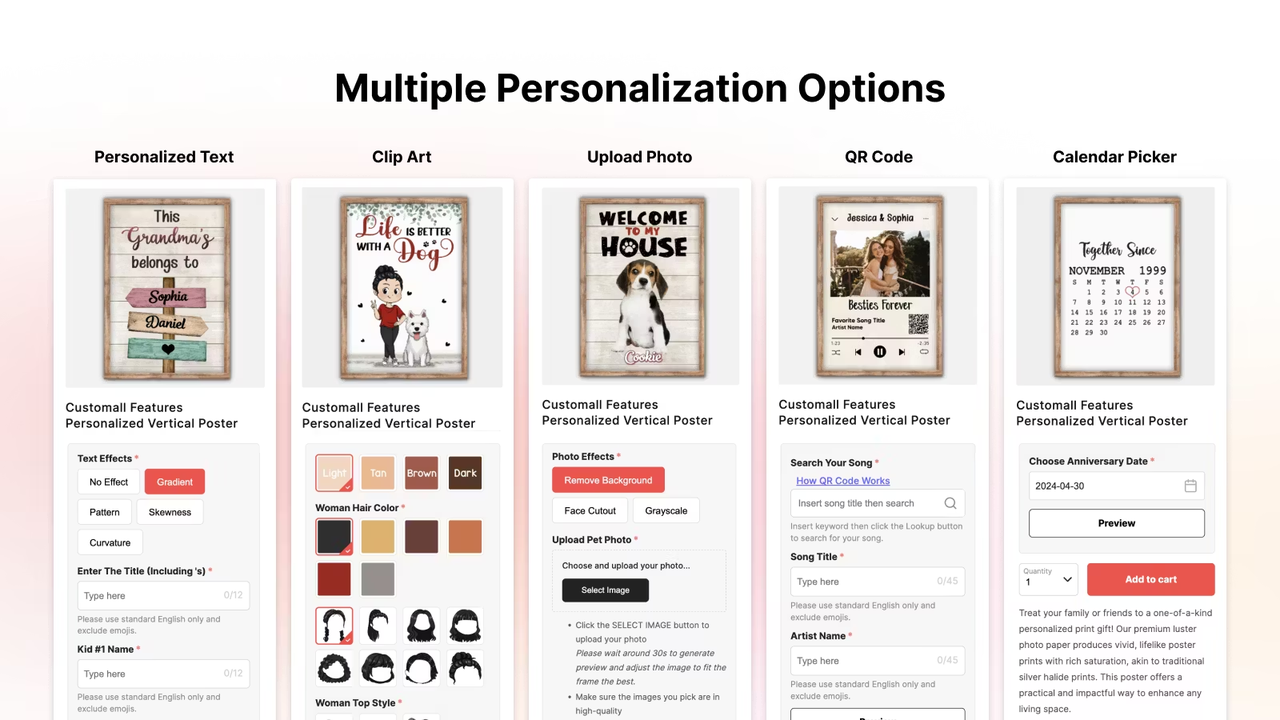
Customall adds a personalization layer on top of your existing POD setup. Customers configure their own product directly on your storefront, entering a name, uploading a photo, or adjusting custom text, and Customall generates the print-ready file automatically before routing the order to your connected fulfillment partner. You do not need to handle each personalized file manually, and you do not have to replace your current fulfillment workflow to use it.
Key features:
- Connects to Printful, Printify, Dreamship, Printway, and Gearment for fulfillment.
- Supports text, image upload, date, and clipart personalization across product types.
- Customer-facing customizer embeds directly on your storefront product pages.
- Compatible with major ecommerce platforms without requiring a full store rebuild.
OGO
OGO is a Melbourne-based POD supplier built specifically for the Australian and New Zealand market. Their catalog stocks AS Colour blanks, a New Zealand brand widely recognized in Australia for its heavyweight, retail-quality fabric. Because OGO fulfills domestically, delivery times match those of any local retailer, which is a real advantage over global POD platforms shipping from North America or Europe where customers can wait weeks for standard orders.
Key features:
- Stocks AS Colour blanks, one of the most requested premium apparel brands in the Australian market.
- Domestic fulfillment from Melbourne with standard local shipping speeds.
- White-label shipping with no OGO branding on outgoing parcels.
- Tighter quality control from a focused apparel-only catalog rather than a broad general product range.
PrintDoors
PrintDoors covers the core POD use cases with a broad apparel and accessories catalog and a straightforward upload-and-sell workflow. It sits in a useful position for founders who need a backup fulfillment option or want to test product types their primary supplier does not carry. As a less prominent platform, it also tends to have less competition for print capacity during peak periods, which can mean more reliable turnaround times when demand spikes.
Key features:
- Wide product catalog covering apparel, accessories, and lifestyle items.
- Practical secondary supplier option that runs alongside Printful or Printify without conflict.
- Straightforward design upload and placement tools with a low learning curve.
- Less print capacity competition during peak seasons compared to larger, higher-traffic platforms.
CustoMeow
CustoMeow is built for brands where the personalization is the product. Customers upload a photo, enter a name, or configure a custom layout directly on your product page, and the platform generates the production-ready print file automatically. This makes it particularly effective for niche apparel categories where buyers are purchasing something unique to them: pet portrait hoodies, memorial shirts, custom family name tees, and similar products that a standard fixed-design catalog cannot offer.
Key features:
- Customer-facing design tool lets shoppers build and preview their personalized product before checkout.
- Automated print file generation removes manual design work from every personalized order.
- Suited to photo-based personalization including pet portraits, family designs, and event merchandise.
- Integrates with standard POD fulfillment workflows for production and shipping.
Customily
Customily takes the same personalization-first approach but adds a live preview tool that updates in real time as customers make changes on your product page. Shoppers see exactly what their final product will look like before they place the order, which reduces hesitation and cuts down on returns, two persistent challenges in the personalized product category. It connects with multiple fulfillment providers and fits into most existing ecommerce store setups.
Key features:
- Live product preview refreshes in real time as customers adjust their personalization options.
- Supports text, image upload, clipart, and custom font personalization across product types.
- Integrates with multiple fulfillment providers and ecommerce platforms.
- Reduces return rates by letting customers confirm the final design before completing checkout.
Ecommerce platforms for selling your apparel startup
Your own storefront gives you full control over the customer relationship, the brand experience, and your sales data. Those advantages compound over time in ways that selling on a marketplace simply cannot replicate.
Shoplazza
Shoplazza is an ecommerce platform built for DTC and cross-border apparel brands, with dedicated support for print-on-demand businesses. If you are starting from scratch, the AI Store Builder generates a complete clothing store — product pages, checkout, policies, and navigation — from a short prompt, so you are not spending days on setup before your first sale. Once your store is live, you connect your preferred POD suppliers directly through the Shoplazza App Store, which includes integrations with major fulfillment platforms so orders route automatically without any manual processing on your end.
POD platform support: Customall, Customily, CustoMeow, PrintDoors
Suitable for: DTC apparel founders and POD sellers who want to launch quickly with an AI-built store, manage fulfillment through a single dashboard, and grow across international markets without stitching together multiple tools.
Key ecommerce features:
- Athena AI operations agent handles bulk product uploads, order processing, discount configuration, and data reporting directly from the backend, cutting down hours of manual work for small teams.
- Built-in social marketing allows you to connect your store to major social channels, letting you run campaigns and sync product catalogs to platforms like TikTok, Facebook, Pinterest, and Google from one place.
- Local SEO tools built into the platform help your apparel store rank in local and regional searches, covering meta titles and descriptions, keyword-rich URLs, Google Maps and Business Profile integration, and mobile-responsive pages.
Wix
Wix is a drag-and-drop ecommerce builder that gives design-led founders precise control over how their storefront looks and feels without writing a single line of code. The editor lets you customize layouts, typography, and imagery at a granular level, which matters for apparel brands where the store aesthetic is as much a part of the brand as the products themselves. On the POD side, Wix connects to major fulfillment platforms through its App Market, and once the integration is active, orders route to your print provider automatically. It is a solid starting point for founders who want a visually polished store without a steep technical learning curve.
POD platform support: Printful, Printify
Suitable for: Lifestyle apparel brands and independent artists who prioritize storefront design and want a low-barrier setup with reliable POD integration.
Key ecommerce features:
- Pixel-level layout control through the drag-and-drop editor, including custom fonts, image positioning, and section-by-section design across all pages.
- Built-in abandoned cart recovery, discount codes, and product gallery layouts suited to apparel catalog presentation.
- Wix Analytics tracks store visits, sales, and conversion rates from a single dashboard, giving you clear data on which products and pages are performing.
How to choose and connect your apparel startup tool stack?
Most founders overthink the tool stack at the start and underthink the decision order. Here is a practical sequence that connects the tools above into a working setup from day one.
- Choose your design tool based on your current skill level. If you have no design background, start with Canva or Kittl. If you have design experience or plan to hire a designer, use Illustrator as the primary production tool. Do not start with a professional tool if it slows you down at the validation stage.
- Identify your print method before selecting a POD platform. Look at your designs and ask what printing technique they require. Photo-realistic and multi-color artwork suits DTG. Flat-color graphics and text logos suit screen print transfer. Raised, textured logo placements suit embroidery. The print method determines the platform, not the other way around.
- Select a POD platform that matches your print method and target market. If you are selling primarily to Australian customers, OGO gives you local fulfillment and premium blanks. If you need personalization built into your product, start with Customall, CustoMeow, or Customily. If you want global scale and consistent branding, Printful is the stronger starting point. If cost efficiency is the priority, vet Customall or Printify's supplier network carefully before committing.
- Set up your ecommerce storefront and connect your POD integration. Choose your platform, configure your store, and activate the POD connection. Test the full order flow with a sample order before you launch publicly. This is the step most founders skip and regret.
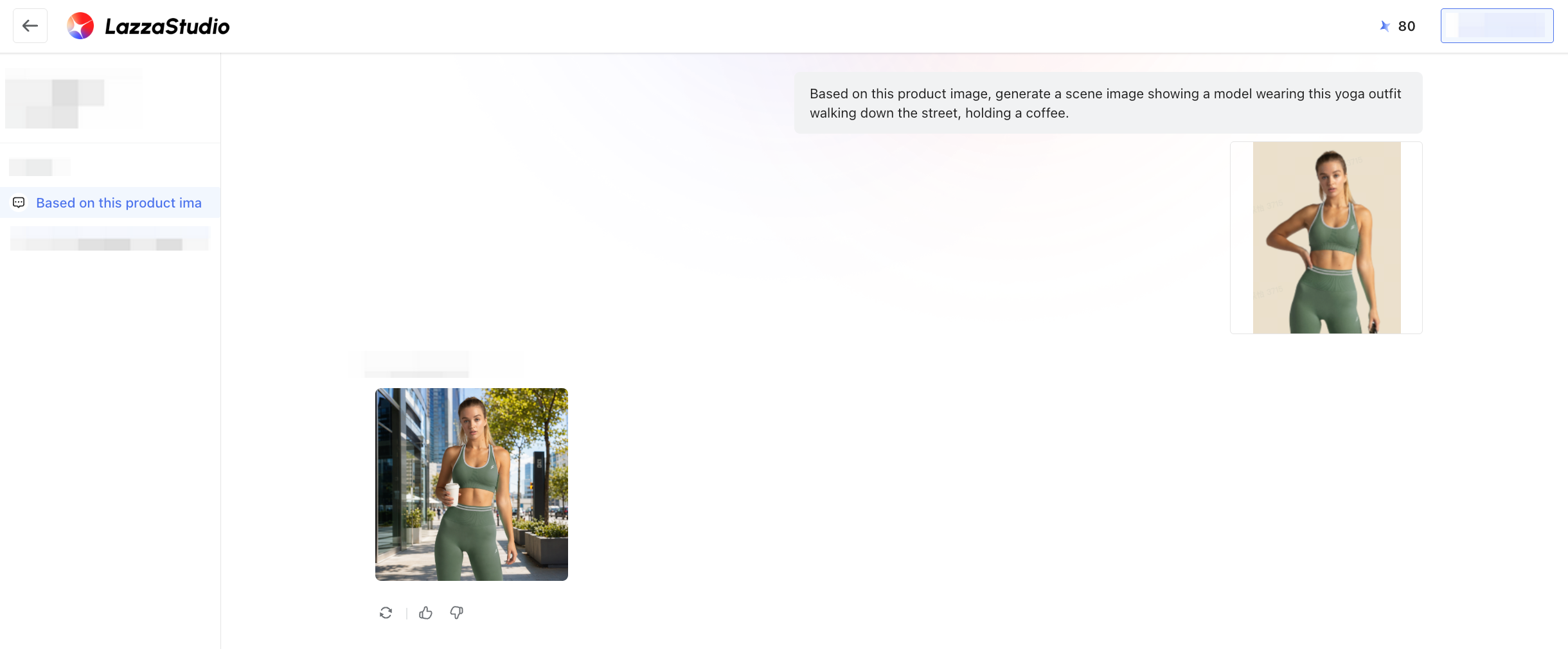
- Use AI image generation to create product photos before ordering physical samples. Tools like LazzaStudio on Shoplazza let you generate lifestyle apparel images without a physical product in hand. Use these for your initial product listings to reduce time-to-launch and avoid the cost of a pre-launch photography session.
- Launch with three to five SKUs and validate before expanding. Resist the urge to launch with a full catalog. Pick your three strongest designs, publish them, drive some traffic through organic social or a small paid test, and measure which products generate interest. Expand the catalog based on what the data tells you, not what you assume will sell.
Build your POD store
Building an apparel startup does not require a big budget or a warehouse full of stock. With the right design tool, a matched POD platform, and a storefront you own, you can go from concept to first sale faster than most people expect. Shoplazza lets you generate a complete apparel store for free and explore the platform with a 7-day free trial before committing. Pick one tool from each layer, start with a tight product range, and scale from there.
Frequently asked questions about apparel startup platforms and tools
Q: What is the best free design tool for an apparel startup?
Canva's free plan is the most accessible option, but exporting designs with transparent backgrounds requires a Canva Pro subscription. For a free tool with more apparel-specific design features, Kittl's free tier includes a usable range of text effects and templates. If your designs are illustration-based, Procreate on iPad is a paid app but a one-time purchase rather than a subscription.
Q: Which POD platform has the best branding options for apparel?
It depends on what you mean by branding. Printful leads on physical packaging, with custom neck labels, inserts, and sticker sheets on every order. For personalization-driven branding, Customall, CustoMeow, and Customily let customers configure their own product, which makes every item feel uniquely theirs. Both approaches build brand loyalty, just in different ways.
Q: Do I need my own ecommerce store, or can I sell on a marketplace?
Selling on a marketplace can work as a short-term validation exercise for testing whether a design generates demand. But for a POD apparel brand with long-term ambitions, owning your storefront is the better path. Marketplaces limit your brand experience, remove your access to customer data, compress your margins through fees, and leave your traffic at the mercy of platform algorithms. Your own store removes all of those constraints.
Q: What is the difference between Printful and Printify for apparel?
Printful operates its own fulfillment network and controls product quality directly, which produces more consistent results but at a higher base cost. Printify connects you to a network of independent print providers, where you choose your supplier based on price, location, and product type. Printify can offer lower base costs, but quality management requires more active involvement from you as the store owner.
Q: Can I use multiple POD platforms at the same time?
Yes, and many founders do. You might use Printful for premium branded orders, Printify for cost-sensitive products, and a personalization platform like Customall or CustoMeow for custom name or photo-based items. Most ecommerce platforms support multiple POD integrations simultaneously, so different products route to different suppliers automatically.
Q: What print method should I choose for a t-shirt startup?
For most apparel startups, DTG printing is the default starting point. It handles multi-color designs without setup fees, has no minimum order quantity, and is the most commonly offered method across POD platforms. If your designs use fewer colors and you plan to order in bulk eventually, screen printing produces more vivid colors at a lower per-unit cost at volume. Embroidery suits logo-based designs on hats, polos, and heavyweight garments.