Building a professional online store used to mean hiring a developer, wrestling with templates, or spending weeks on setup. Today, an AI website builder can turn a text prompt into a fully functional storefront in minutes. But not every platform is built for the same goal — and picking the wrong one costs more than just money. This guide puts two leading contenders, Shoplazza and Wix, head to head, breaks down where each one wins, and helps you decide which fits your business before you commit to either.
Key takeaways
- Shoplazza is the specialist for product selling. It is built strictly for ecommerce growth. If your primary goal is to move products globally, manage dropshipping, or scale a brand without technical friction, Shoplazza's AI builds a sales-ready infrastructure (checkout, policies, product pages) from day one.
- Wix is the generalist for branding. It shines if you need a stunning brochure site, portfolio, or a small store where design flexibility matters more than heavy-duty backend logistics. Its "unstructured" editor gives you total visual control.
- Starting is free on both platforms. Shoplazza and Wix let you generate and preview a complete store without signing up or entering a credit card.
Why this comparison matters: Most people confuse "website builders" with "store builders / ecommerce platforms." They're not the same, and picking the wrong one is costly. Wix struggles with high-volume dropshipping. Shoplazza feels too rigid for portfolios or blogs. This guide highlights those differences so you don't end up migrating six months later.
Overview: comparison table between Shoplazza and Wix
| Criteria | Shoplazza | Wix |
| AI Generation | Full store design in 3 versions (products, policies, checkout) and AI-generated product images and text ★★★★★ |
Design, layout, and simpale images and text ★★★☆☆ |
| Free Trial/Preview | Instant AI Preview and 7-day free trail (no sign-up required) ★★★★★ |
Free preview and plan (no sign-up required) ★★★★★ |
| Templates | 20+ free templates, responsive ecommerce-focused ★★★☆☆ |
900+ niche templates, customizable ★★★★★ |
| Dropshipping | Dropshipping suppliers (e.g. CJ/EPROLO) sync and more third-party integration supported ★★★★★ |
Printful only, manual markup ★★★☆☆ |
| Ease of use | Chat-based AI and drag-and-drop ★★★★★ |
Conversational AI and drag-and-drop ★★★★★ |
| SEO tools | Built-in meta suggestions and SEO plugins ★★★★☆ |
AI SEO Wiz, keyword plans ★★★★★ |
| Support |
Dashboard-focused, app and plugins ecosystem ★★★★☆ |
24/7 but paywalled analytics ★★★★☆ |
| Mobile Optimization |
Responsive default, global logistics ★★★★☆ |
Mobile tweaks needed, potential bloat ★★★☆☆ |
| Pricing (paid monthly) | Start from $39/mo, 0.5% - 2% transaction fees | Core eCommerce at $29/mo and Standard at $39/mo, 0% transaction fees |
| Best For | Merchants, Dropshippers, DTC Brands | Creatives, Service Biz, Small Stores |
What is Shoplazza AI?
Shoplazza positions itself not just as a website builder, but as an AI-powered ecommerce growth engine. Unlike generic builders that slap a "buy button" on a blog template, Shoplazza's AI store builder is trained to automate the full loop of selling. When you prompt it, it doesn't just make a pretty homepage; it constructs a logical shopping environment including product descriptions, checkout flows, refund policies, and navigation menus.

Who should use Shoplazza?
- Dropshippers: The platform has deep, native integrations with dropshipping suppliers like CJdropshipping and allows for zero-inventory business models.
- Cross-border Sellers: If you plan to sell globally, Shoplazza simplifies multi-currency payments and international logistics.
- Ecommerce Beginners: Users who want a "sell-ready" store generated instantly without worrying about backend configuration.
Pros and cons of Shoplazza AI store builder
Strengths:
- Free AI Website Preview: Generate and preview a complete ecommerce website instantly—no registration, no sign-up, no credit card required. You only upgrade when you are ready to publish and sell.
- Sales-Ready Output: The AI generates core commerce pages (refunds, shipping policies) and product details, not just aesthetic mockups.
- Social Channel Integration: Deep integrations with Google, Facebook, Pinterest, and TikTok allow you to manage traffic, ads, and social commerce from one central hub.
- Multi-Currency and Global Payments: Connect local and international payment methods across 180+ countries and regions, including cards, e-wallets, buy-now-pay-later, and region-specific options, without touching a single backend setting.
- Responsive Design: Stores are automatically optimized for mobile and tablets, ensuring a smooth checkout experience on any device.
Weaknesses:
- Niche Focus: It is less suitable for non-retail businesses like subscription services, gated content sites, or complex media publications.
- Rigid for Creatives: While great for sales, it offers fewer "wild" design customization options compared to a blank-canvas CMS.
What is Wix ADI?
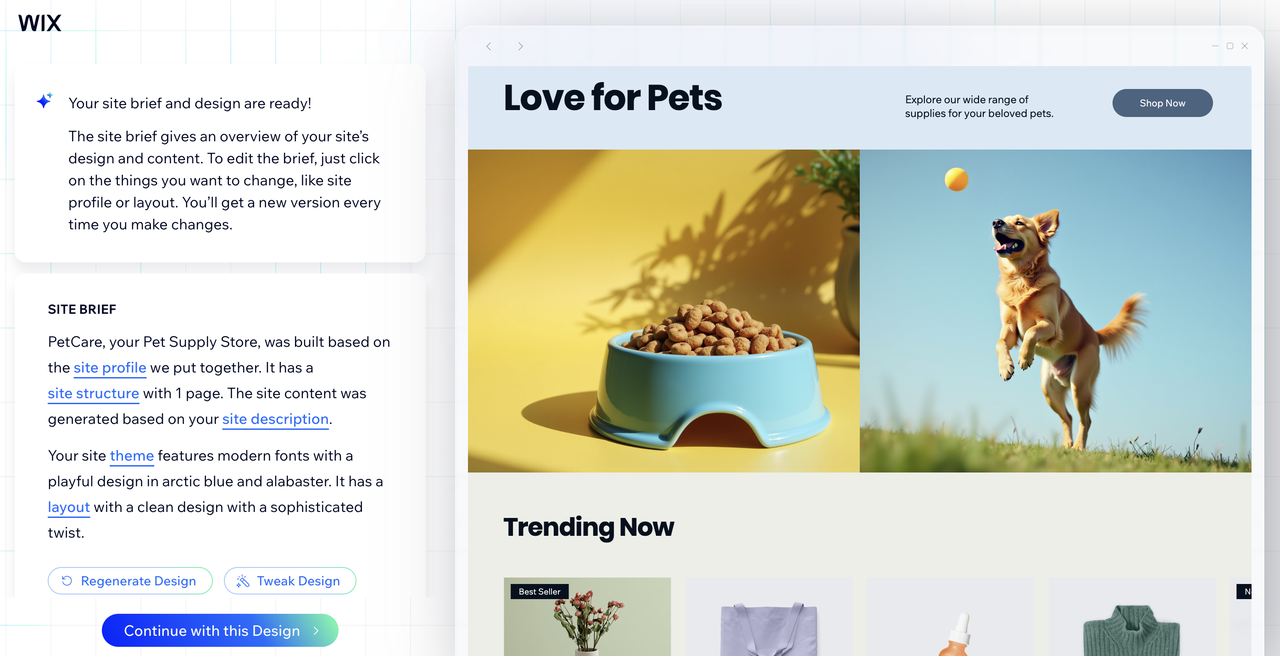
Wix is a massive cloud-based development platform famous for its "unstructured" editor. It allows you to drag and drop elements literally anywhere on the screen—you aren't stuck in a grid. Its AI evolution (formerly ADI, now a conversational AI builder) aims to streamline this by chatting with you to build a site blueprint. It's a complete ecosystem that tries to be everything to everyone, from restaurants to blogs to online stores.
Who should use Wix?
- Small Online Stores: Sellers running modest product catalogs, print-on-demand shops, or niche boutiques where design presentation matters as much as sales volume.
- Small Business Owners: Restaurants, consultants, and service providers who need booking systems or menus.
- Creatives & Portfolios: Photographers or designers who need pixel-perfect control over how their images display.
- Tech-Savvy Beginners: The new "Wix Vibe" coding feature allows users to prompt code changes, making it great for those who want a custom feel without writing raw HTML.
Pros and cons of Wix AI website builder
Strengths:
- AI Text & Image Creator: Inside the editor, you can use AI to rewrite text specifically for SEO or generate unique images if you lack stock photos.
- AI SEO Wiz: A personalized plan that uses AI to tell you exactly what keywords to put in your titles and descriptions to rank on Google.
- Massive Template Library: Over 900+ professionally designed templates cover almost every industry imaginable.
- Vibe Coding: A unique feature where you can act like a project manager, telling the AI to "make this button bounce," and it writes the code for you.
- Ecosystem: A massive app market with over 250 integrations for things like booking calendars and events.
Weaknesses:
- Template Lock: Once the AI builds your site and you start customizing, you generally can't switch to a completely different template without starting over.
- Generic AI Content: The text and images generated are often placeholders (like "Lorem Ipsum" style quality) and aren't commercially precise enough to use without heavy editing.
- Performance Bloat: Because the tools add so many scripts, Wix sites can sometimes struggle with speed (Core Web Vitals) compared to cleaner code.
- Mobile Tweaking Required: While it auto-adjusts for mobile, it often requires manual cleanup to look perfect.
Shoplazza vs Wix: Features comparison
When evaluating an AI website builder for Wix and Shoplazza, feature depth matters far more than surface simplicity, especially once real ecommerce scale, automation, and operational efficiency come into play.
E-commerce capabilities
This is where Shoplazza pulls ahead. It is built for the "growth loop." It handles multi-currency and international payment methods, global logistics, and inventory management natively. It even has automated tax suggestions and dropshipping integrations for finding products.
Wix has e-commerce, but it feels like an add-on to a website builder. It supports dropshipping (via Printful, etc.) and sales, but features like storage limits on lower plans (2GB to 100GB) and lack of advanced shipping automation make it harder to scale a large operation.
Templates and design flexibility
Wix takes the crown for pure visual variety. With 900+ templates and an editor that ignores grid constraints, you can build practically anything. However, this freedom comes with a "Template Lock" drawback—if you pick a design and change your mind later, you might have to rebuild from scratch.
Shoplazza focuses on conversion over artistic freedom. Its AI generates layouts specifically designed to sell products—think logical navigation and clear Call-to-Action (CTA) buttons. While you have less freedom to break the grid, you get a store that follows ecommerce best practices automatically.
Ease of use
Both platforms let you build a store manually or generate one through AI. If AI generates a store or webiste, you can just describe what you want, and the AI assembles a working site in minutes.
For Shoplazza, the experience stays structured throughout: the AI builds a commerce-ready layout, and the visual editor lets you refine it without fighting with individual elements.
For Wix, Wix Vibe adds a third path for both platforms' more adventurous users — prompt code-level changes in plain language, like "add a sticky header" or "make this section fade in on scroll," without writing a single line of script.
Shoplazza's approach favors speed and simplicity; Wix rewards those who want to spend more time shaping the final look.
Performance and speed
Site speed is critical for SEO. Shoplazza uses a responsive-by-default approach. Because the structure is controlled, the code tends to be optimized for shopping loads across devices. Wix has historically struggled with "code bloat" because the drag-and-drop freedom adds extra scripts to the page. While they have improved, users still report that heavily customized Wix sites can score lower on Google PageSpeed / Lighthouse tests.
Integrations and extensions
Wix has a massive App Market (250+ apps) covering everything from hotel bookings to live chat. If you need a niche tool for a service business, Wix likely has it. Shoplazza's app ecosystem is strictly focused on retail: marketing automation, logistics tracking, and conversion optimization. It integrates deeply with TikTok, Facebook, and Google for ad management, which is vital for merchants.
Support and documentation
Shoplazza offers a "Chat to build" approach that guides you through the setup, effectively acting as onboarding support. If you still have no idea how to set up an AI store, you can ask for customer service and search for helpcenter. Wix has extensive forums and help articles, but advanced support (like priority response) is gated behind their most expensive "Business Elite" plan ($159/mo).
Who gets better value for ecommerce? Pricing breakdown
Shoplazza pricing (paid annually):
- Basic: $29.25/mo (normally $39/mo), 2% transaction fee, 3 staff accounts – best for small stores and beginners.
- Advanced: $78.75/mo (normally $105/mo), 1% transaction fee, 5 staff accounts – for growing brands needing more automation and scalability.
- Pro: $299.25/mo (normally $399/mo), 0.5% transaction fee, 15 staff accounts – for high-volume/enterprise, includes B2B wholesale and Avalara automated tax calculation. (0 transaction fee needed if you set up Shoplazza Payments.)
Wix pricing (ecommerce-relevant):
- Free: $0 – good only for testing; shows Wix banner, no custom domain.
- Light: $17/mo – basic presence site, light marketing suite; not ideal for serious ecommerce.
- Core: $29/mo – entry-level ecommerce with analytics; suitable for small online stores.
- Business: $39/mo – advanced ecommerce, 100GB storage, better shipping and automated sales tax; more appropriate for growing stores.
- Business Elite: $159/mo – unlimited storage, priority support, higher ecommerce limits and advanced dev platform; aimed at larger, more complex operations.
Core, Business, and Business Elite plans enjoy 50% off if billed annually.
At entry level, both platforms land around the same monthly cost — Shoplazza Basic at $39/mo ($29.25/mo if paid annually) and Wix Core at $29/mo. But what's included at that price differs significantly. Shoplazza Basic is commerce-ready out of the box: multiple staff accounts, full checkout functionality, supplier integrations, and marketing tools are all included. Wix Core covers basic ecommerce and analytics, but advanced shipping rules, automated sales tax, and stronger storage only unlock at the Business tier ($39/mo). This means you'll likely need to upgrade sooner than the entry price suggests.
Transaction fees are where the gap widens at scale. Shoplazza charges 2% on Basic, dropping to 0.5% on Pro — and waives fees entirely if you use Shoplazza Payments. Wix charges no platform transaction fees on Pro plan, which looks favorable on paper. However, Wix's ecommerce plans don't include the operational depth (marketing campaigns like flash sale, discount, etc.) that Shoplazza bundles natively, meaning Wix merchants often fill those gaps with paid third-party apps, adding $30–$100/month in hidden overhead.
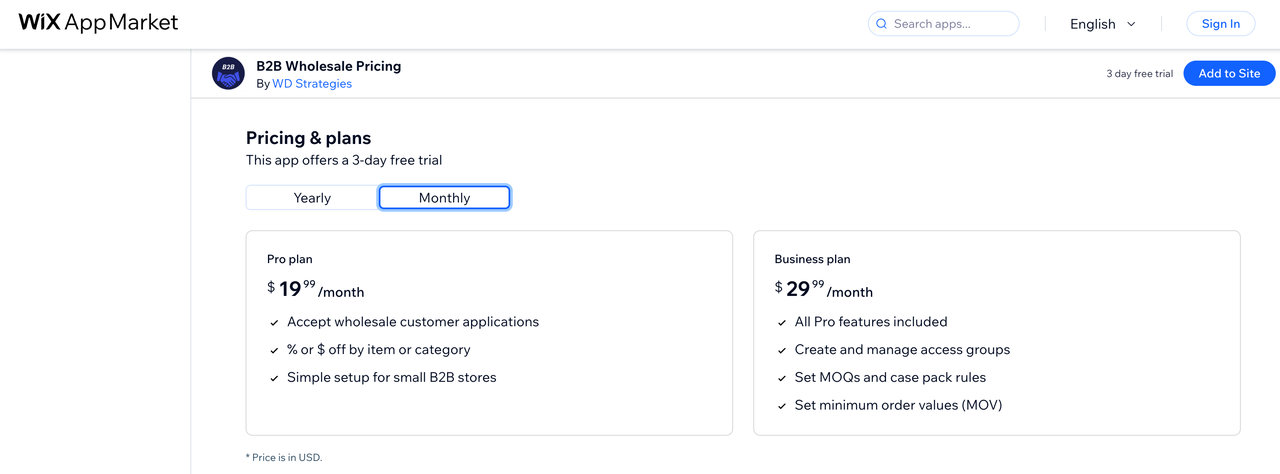
For high-volume operations or B2B business, Shoplazza's Pro plan at $299.25/mo includes B2B wholesale tools and Avalara automated tax calculation. On Wix, B2B wholesale functionality requires a separate third-party app; the "B2B Wholesale Pricing" app on the Wix App Market starts at $19.99/mo for basic wholesale pricing rules, rising to $29.99/mo for MOQ controls, access groups, and minimum order values. That's an additional $20–$30/month on top of your Wix subscription before you've matched what Shoplazza includes by default. Wix Business Elite at $159/mo offers unlimited storage and priority support, but not B2B ecommerce functions scaled out.
The honest summary: if your store's primary function is selling products at volume, Shoplazza's pricing structure rewards growth more directly. If you run a smaller store where design and content carry as much weight as transactions, Wix's pricing is competitive and the upgrade path is more gradual.
Which AI builders should I choose? Use cases and recommendations
- Best for Dedicated Merchants: Shoplazza If your goal is to quit your job or do your sideline and run a dropshipping business, or take a local retail brand global, choose Shoplazza. It cuts out the fluff. You won't spend hours aligning text boxes; you'll spend time managing orders and checking ad spend. The AI acts like a business partner, setting up policies and checkout flows that would take days to do it manually.
- Best for Creatives & Service Businesses: Wix If you are a photographer, a local bakery, or a consultant, Wix is the better choice. You need your site to capture a "vibe". Shoplazza's rigid commerce structure will feel restrictive for a portfolio. Wix's drag-and-drop editor allows you to create a visual experience that perfectly matches your brand identity.
Real user feedback
- Shoplazza Users: Users often appreciate the "speed to launch." The ability to preview a store without an email sign-up is a frequent favorite feature. However, some users note that while it's great for selling physical goods, it lacks flexibility if you try to selling subscriptions or digital courses later on.
- Wix Users: The community loves the design freedom but frequently complains about the "Template Lock." A common frustration found in forums (like Reddit) is building a site and then realizing you can't swap the theme without losing content. Speed enthusiasts also note that you have to be careful not to overload your Wix site with too many animations, or it will lag.
Conclusion
Choosing between the top 2 AI website builders come down to one question: Are you building a store, or are you building a website? Not sure yet? Head to Shoplazza and generate a preview store. No credit card or signup is required, making it the fastest way to test whether its AI truly understands your business goals. Compare the results side by side and let the structure—and the data—guide your decision.
FAQs about AI website builder
Q1: Are there free plans?
Shoplazza offers a truly free AI preview where you generate and view a complete ecommerce store instantly, no signup, credit card, or registration needed. You only pay when upgrading to publish and sell. Wix provides a free tier for site creation, but it displays a prominent Wix banner, lacks a custom domain, and limits ecommerce features. For testing stores without commitment, Shoplazza's preview wins.
Q2: How much does Shoplazza AI store builder cost?
Shoplazza's pricing (annual billing discounts) starts at Basic $29.25/mo (regular $39/mo, 2% transaction fee, 3 staff accounts) for small beginner stores, Advanced $78.75/mo (regular $105/mo, 1% fee, 5 staff accounts) for growing brands with automation, and Pro $299.25/mo (regular $399/mo, 0.5% fee, 15 staff accounts, B2B/tax tools) for high-volume merchants. Free AI preview before signup. Transaction fees drop with scale and is cancelled when use Shoplazza Payments, ideal for ecommerce growth.
Q3: How much does Wix AI website builder cost?
Wix's pricing starts free (branded, no domain), then Light at $17/mo for presence sites, Core at $29/mo for basic ecommerce with analytics, Business at $39/mo for advanced stores (shipping, tax calc, 100GB storage), and Business Elite at $159/mo for unlimited scale and priority support. No platform transaction fees on ecommerce plans, but apps may add costs. It's affordable for mixed-use sites but scales pricier for heavy selling.
Q4: Which platform is better for SEO?
It depends on your needs and daily operation. For content-heavy SEO like blogs, Wix edges ahead with its AI SEO Wiz generating keyword plans, customizable URLs, and meta tools tailored for articles. Shoplazza shines in ecommerce SEO, delivering out-of-the-box product schema, fast load times via responsive designs, and SEO plugins for mobile-first product pages.
Q5: Can I do dropshipping on Wix and Shoplazza?
Both support dropshipping and POD, but Shoplazza excels with integrations to CJdropshipping, EPROLO, and others—auto-syncing orders, inventory, and tracking for seamless high-volume fulfillment without inventory risk. Wix only relies on third-party like Modalyst or Printful, lacking deep backend automation. Shoplazza is the dropshipper's choice; Wix works for lighter POD needs.
Q6: Do I need coding skills for either platform?
No coding required for either—Shoplazza is 100% prompt-based and visual, chatting your store into existence then tweaking via a simple editor. Wix uses conversational AI plus drag-and-drop for beginners, with optional "Vibe Coding" (AI-generated code) for advanced tweaks like custom buttons. Both prioritize no-code ease, making them accessible for non-techies launching pro sites fast.