In ecommerce, paying for an order doesn't mean the shopping experience ends. The time from placing the order to receiving the package is just as important. Customers check tracking updates constantly, and if information is unclear or hard to access, it often leads to more customer service questions and frustration. For sellers, this adds extra work and can hurt trust in the brand. A clear and easy-to-use ecommerce order tracking system keeps customers informed, reduces support requests, and makes fulfillment smoother. Here are 10 practical strategies to improve order tracking, boost customer experience, and cut service costs.
Why ecommerce order tracking often becomes a problem?
Many ecommerce sites offer tracking, but the experience is often poor. The issue isn't whether tracking exists, but whether the information is clear, timely, and easy to use. Here are the main reasons tracking often frustrates customers:
WISMO increases operating costs
WISMO ("Where Is My Order") is one of the most common questions for ecommerce support. Research by logistics tech company Ingrid shows that tracking-related questions take up a large portion of customer service requests. Without clear updates, customers call to check their packages. This adds work for the support team and raises operating costs. Companies that make tracking more transparent see fewer WISMO inquiries, freeing up staff to handle more complex issues.
Too much information confuses customers
Another common problem is overly detailed tracking updates. Carriers often provide technical statuses like "left transit center" or "in flight," which can be hard for most customers to understand. Good tracking simplifies the information. For example, grouping updates into clear stages—shipped, in transit, out for delivery, delivered—helps customers understand their order's progress at a glance.
Basic carrier tracking doesn't meet needs
Most carriers provide only basic tracking, designed for their own systems rather than ecommerce customers. Pages may redirect to a third-party site, lack branding, or fail to show multiple packages in one view. That's why more ecommerce sellers are using independent or custom order tracking systems to combine and display logistics data clearly on their own sites.
10 Strategies to optimize order tracking
To address these issues, ecommerce sellers can follow the 10 best practices for customer delivery updates. They cover the full chain, from front-end displays to back-end management.
Optimize order confirmation pages and emails
The order confirmation page is the first summary a customer sees after completing payment. If key information is missing, customers often contact support soon after to double-check details. The page should clearly show a few essential things.
- Order costs: Include item prices, discounts, taxes, shipping fees, and the total amount to avoid confusion after payment.
- Shipping info: Show delivery method (standard, express), estimated shipping and arrival times. For cross-border orders, note potential customs or duties.
Confirmation emails are just as important. They should include the order number, item details, shipping address, delivery method, payment method, and a tracking link or instructions. Some sellers also note that a tracking link will be sent once the package ships, setting expectations in advance. Clear confirmation pages and emails reduce misunderstandings and make the ecommerce order status easy for customers to follow, lowering support requests.
Build a self-service tracking page
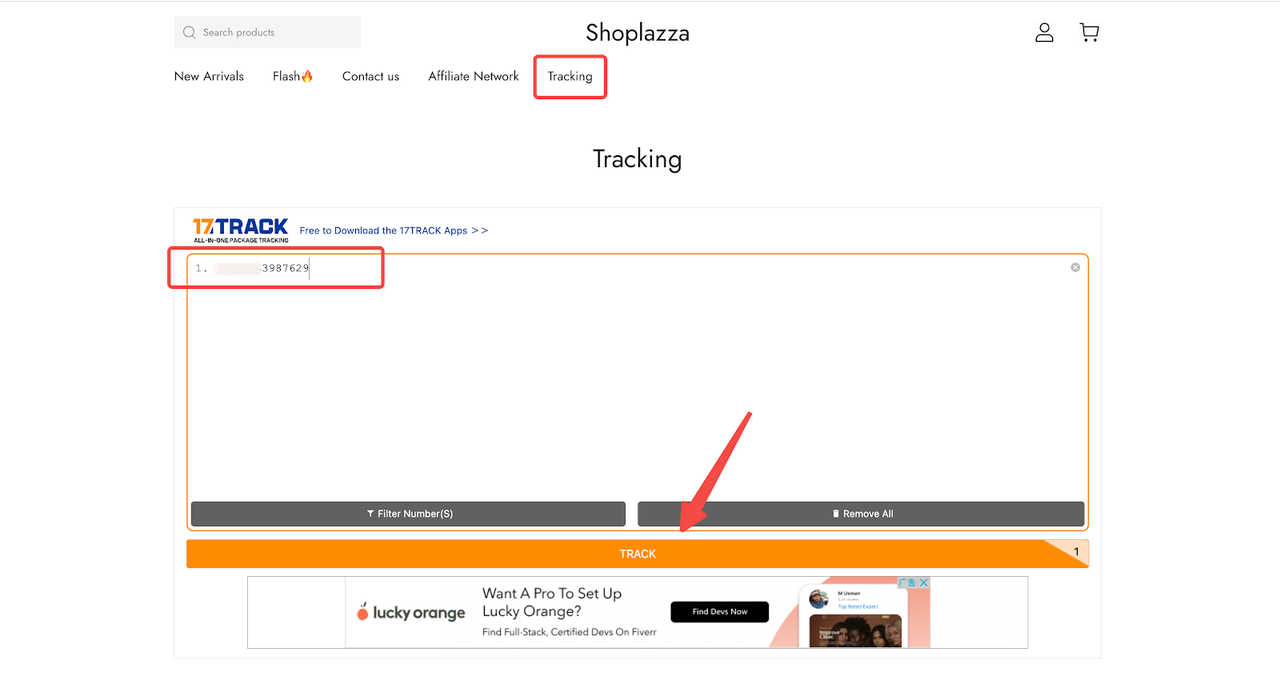
Traditional tracking often relies on the carrier's website, where customers must copy their tracking number and jump between sites. This is cumbersome and can break the connection between your brand and the customer. Many sellers now create branded self-service tracking pages so users can check order status directly on the store's website.
For example, Track718 offers a tracking plugin that can be embedded into your store. Customers can see shipping updates without leaving your site. Track718 integrates information from over 800 carriers, including FedEx, DHL, UPS, DPD, USPS, and China Post, making it ideal for cross-border sellers. Some merchants also use 17Track's tracking pages. Customers simply enter their tracking number to view package location and progress. This keeps the experience on your site, maintains brand visuals, and boosts both transparency and trust.
Provide clear shipping transparency
Shipping transparency plays a big role in customer experience. Many disputes aren't about delivery delays but unclear information. For example, if an order stays "shipped" for a long time with no updates, customers may assume something went wrong.
To improve transparency, focus on two things. First, show detailed shipping stages: order confirmed, packed, handed to carrier, in transit, customs, out for delivery, and delivered. This is much clearer than just "shipped → delivered" and helps customers know exactly where their package is.
Second, set realistic delivery expectations. Show estimated delivery times like "3–7 business days" and note possible delays during peak periods. Some platforms also indicate "on schedule" or "expected 1-day delay" directly on the tracking page. Clear updates reduce guesswork and cut down on customer service inquiries.
Use multi-channel automated notifications
Customers don't check tracking pages every day, so proactive notifications are key. Automated updates can be sent through email, SMS, app push, or chat tools, keeping users informed about their order status in real time.
The key is to be timely without overloading customers. Too few notifications can make users think their order isn't moving, while too many can cause fatigue. Many brands integrate shipping updates into automated marketing systems, so notifications are triggered based on user actions. For example, if a customer clicks the tracking link in an email, the system stops sending duplicate alerts.
Monitor exceptions and act proactively
In logistics, exception monitoring means continuously tracking shipments to spot issues like long delays, failed deliveries, or lost packages. Waiting for customers to report problems often leads to complaints and refunds.
With logistics tools, monitoring can be automated. For example, Track718 lets merchants set alerts for unusual situations, such as "no update for 48 hours," "delivery failed," or "shipping delay." The system flags these orders, helping the operations team quickly investigate and contact carriers. This proactive approach ensures timely ecommerce tracking updates reach customers, keeping them informed and reducing anxiety.
Some platforms, like Shoplazza, also offer Worry-Free Purchase, the shipping protection for damaged, lost, or delayed packages. Merchants report that these tools reduce uncertainty, improve control, and help prevent returns or refunds while boosting overall efficiency.
Track multiple packages in a single order
In ecommerce, a single order may include several items, each from different warehouses or suppliers. Shipping everything together can delay the full order and affect the customer experience. With multi-package tracking, merchants can use partial shipments: send available items first and generate separate tracking info for each package. Customers can then see the status of each package individually.
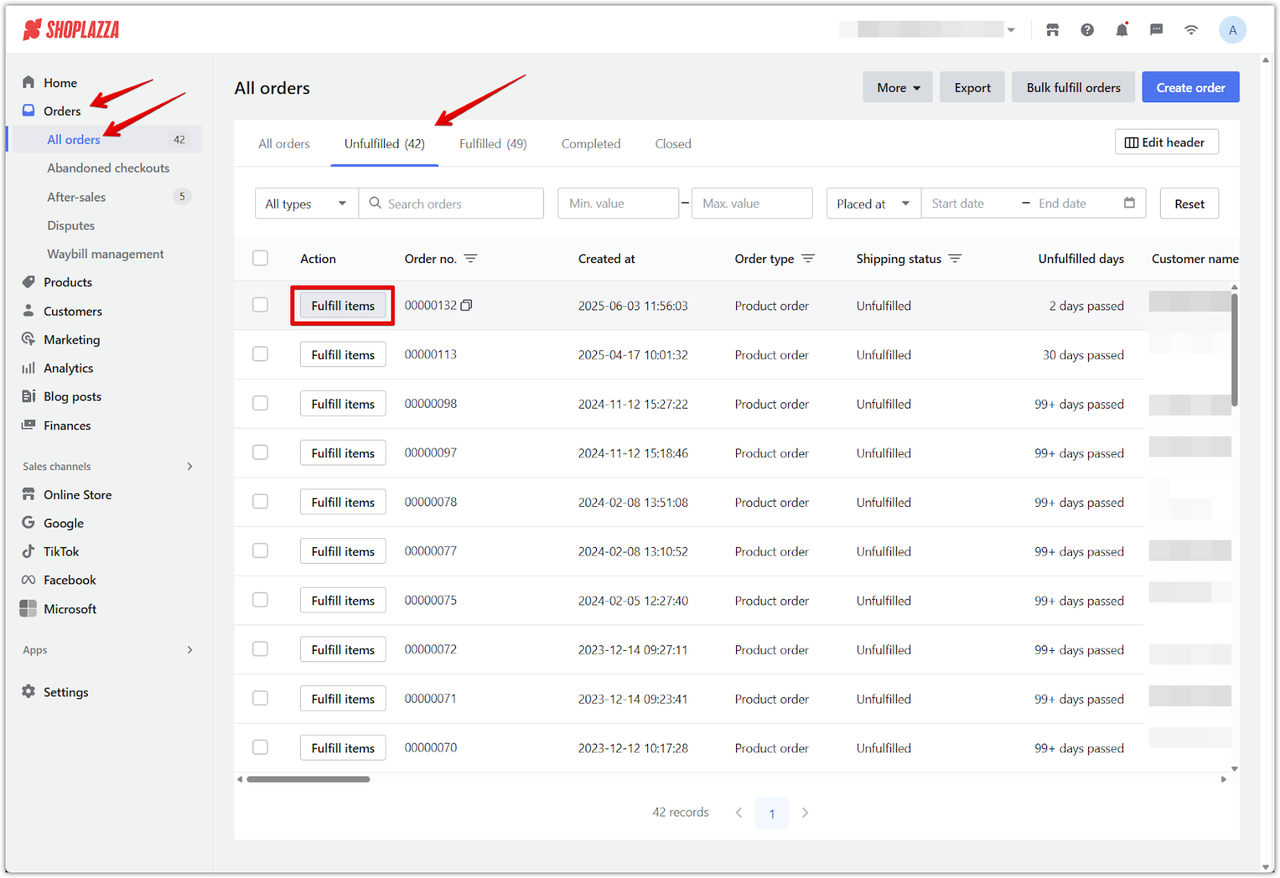
Merchants can also set the quantity and details for each shipment in the system. For example, if an order has three items—two in stock and one backordered—the system shows three separate tracking updates and provides a single access point on the order or tracking page. This approach improves customer experience while streamlining inventory and fulfillment management.
Use AI or chatbots to handle logistics questions
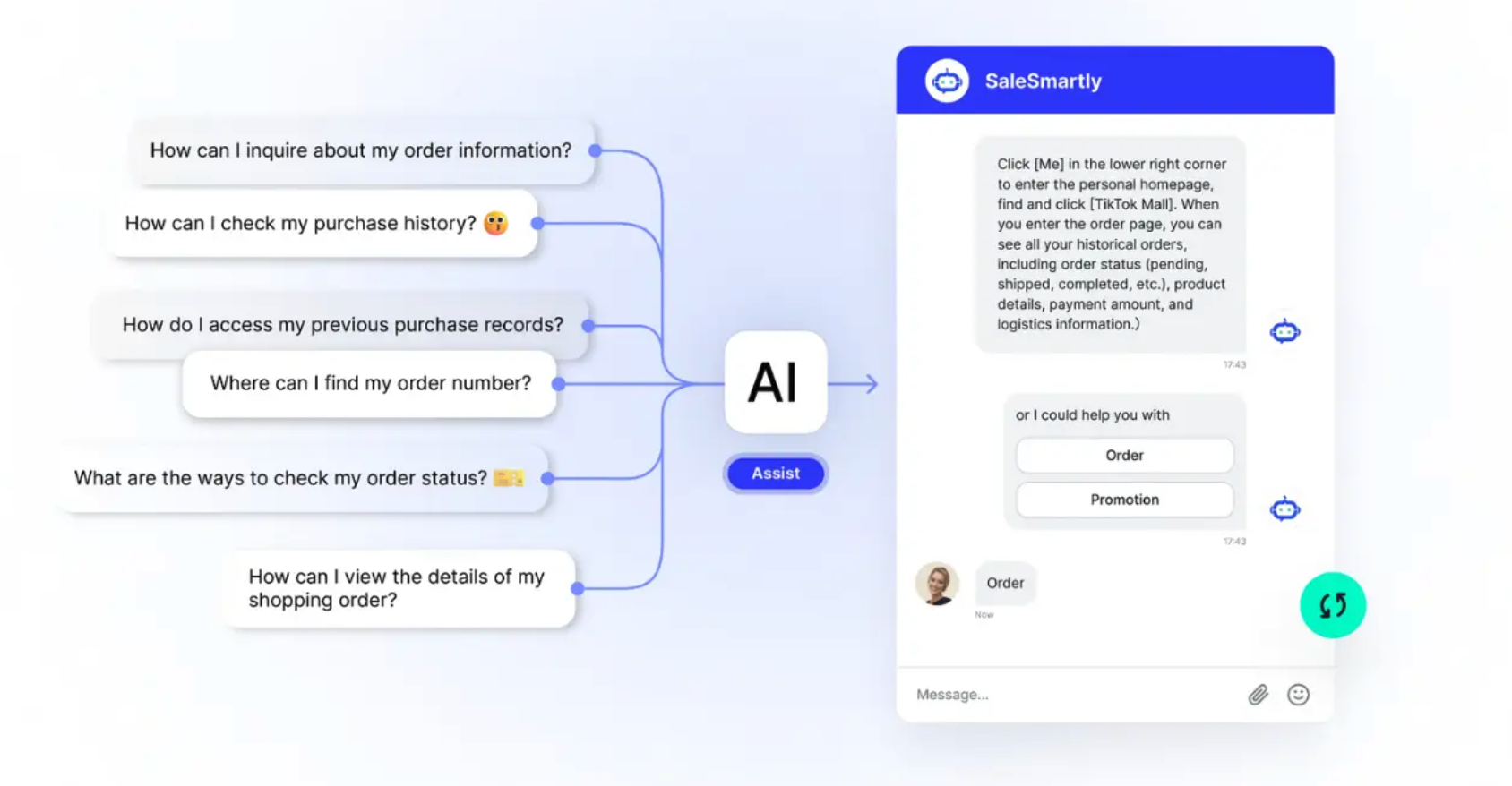
As orders grow, logistics inquiries often become a major source of customer service pressure. AI or chatbot tools can automatically answer common questions, such as "estimated delivery time," "tracking status," or "return process." This lets customers get quick answers without waiting for a human agent and reduces repetitive work for support teams.
For example, tools like SaleSmartly integrate multiple messaging platforms—LiveChat, WhatsApp, Facebook Messenger, TikTok, Instagram, Telegram, Line, Email, and VKontakte—allowing AI and human teams to work together seamlessly. Features include real-time translation in 134 languages, customer management (SCRM), data visualization, and business growth tracking. AI responses keep service efficient while letting humans focus on complex issues and sales, boosting overall efficiency and customer satisfaction.
Use the tracking page for marketing
A logistics tracking page isn't just for checking orders—it can also serve as a marketing touchpoint. For example, you can show new products, coupons, or loyalty points, giving customers extra value while they track their orders. Branded tracking pages can also support cross-selling and upselling. Highlight related accessories, bundles, or limited-time offers, and tailor recommendations based on each customer's purchase behavior. This approach keeps your brand visible during the order and fulfillment process while boosting repeat purchases and average order value.
Offer flexible delivery options
ecommerce customers expect variety in delivery choices. Beyond standard shipping, various shipping setting and options like express delivery, scheduled delivery, in-store pickup, or partner convenience point pickup can improve order completion rates and satisfaction. Merchants can display these options on the order or tracking page and use smart recommendation systems to suggest the best choice based on customer location, inventory, and shipping cost. For example, if multiple warehouses are available, the system can highlight the fastest option while showing estimated delivery time and fees, meeting customer needs while optimizing logistics and stock management.
Provide return tracking
Returns are another key part of the customer experience. A return tracking system allows merchants to update customers on their return status, reducing questions and repeated support requests.
Tools like AfterShip Returns Center offer full return management, including shipment status updates, smart return rules, and cost optimization. Customers receive automatic updates such as "Package received at warehouse" or "Return completed," keeping the process transparent and efficient. Return data can also help optimize the supply chain, identify common return reasons, and improve overall operations and satisfaction.
Common mistakes in order tracking
When optimizing order tracking, many merchants overlook basic issues, which can hurt customer experience and increase support workload. Common mistakes include:
- Only providing the tracking number: Many stores just show the tracking number on the order page or email, forcing users to visit the carrier's website. Without a clear, branded tracking interface, customers get confused, support inquiries rise, and order transparency drops.
- Delayed updates: If the system doesn't sync package status promptly, customers may worry about lost or delayed shipments, which can hurt brand trust. This also increases WISMO ("Where Is My Order") inquiries and may affect repeat purchases and reputation.
- Too many or too few notifications: Improper notification frequency can harm the user experience. Too few updates make customers anxious and constantly checking; too many create noise, burying important info. The best approach is sending timely, relevant updates to key order milestones.
By avoiding these mistakes and using automated, branded tracking tools, merchants can improve customer satisfaction, reduce support load, and make order fulfillment more efficient.
How to measure if order tracking improvements work?
After improving your order tracking system, you need clear metrics to see if it's effective. Key points to track include:
- WISMO inquiry rate: Monitor "Where Is My Order" questions. A good tracking system should reduce these inquiries, lower support workload, and encourage self-service.
- Delivery success rate: Measure if orders reach customers on time and intact. High success rates indicate smooth logistics, fewer delays or losses, and better customer satisfaction.
- Average delivery time: Track the time from shipping to delivery. Faster, consistent delivery directly improves customer experience and repeat purchase likelihood.
- Customer satisfaction: Collect feedback through surveys, NPS, or reviews to see how users perceive the shipping experience. High satisfaction shows tracking info is clear, timely, and accurate.
- Repeat purchase rate: Observe if customers return after an optimized fulfillment experience. A positive logistics experience builds trust and loyalty, boosting long-term revenue.
By monitoring these metrics, merchants can judge the impact of their improvements and fine-tune strategies, making order tracking a real tool to enhance customer experience and operational efficiency.
Conclusion
Ecommerce order tracking is now a key part of the fulfillment experience. By applying these ten optimization strategies, merchants can reduce WISMO inquiries and improve customer satisfaction. Using an all-in-one platform like Shoplazza, sellers can efficiently build and enhance their order management and tracking system, ensuring full transparency from purchase to delivery, boosting operational efficiency and earning greater customer trust.
FAQs about order tracking
Q1: Why should the order tracking page be branded?
A branded order tracking page lets customers check their shipment directly on your website without being redirected to the carrier's site. This keeps the visual identity consistent, improves user experience, increases time spent on your site, and builds trust. Branded pages can also show delivery instructions, customer service links, or recommended products, reducing WISMO inquiries and keeping customers engaged during the shipping process.
Q2: How can small ecommerce stores optimize order tracking at low cost?
Small stores can start with basic tools, like integrating a tracking plugin, setting up automated shipment notifications, and creating a simple order tracking page. These don't require complex development. Optimizing confirmation emails and shipping notifications ensures customers know when their orders ship and how to track them, reducing support queries and improving the overall experience.
Q3: How to do post-purchase order tracking?
Post-purchase tracking can be done by providing customers with clear shipment updates through emails, SMS, or a website tracking page. Include shipment stages, estimated delivery dates, and links to track each package. For multi-item orders, ensure each parcel has its own tracking information so customers can follow progress without confusion.
Q4: Are there automation or technology options for ecommerce order fulfillment tracking?
Yes. Tools like Track718 or 17Track can aggregate tracking info from multiple carriers, while platforms like Shoplazza provide built-in tracking notifications. AI chatbots or automated messaging systems can answer common order queries instantly, reducing customer service workload and keeping customers informed at every stage of fulfillment.


%20(2).png)