It's Friday night, and a store owner sends a promotion for the new fall collection to everyone who's signed up in the past three months. The open rate barely clears 20 percent, clicks are lower still, and most of that day's orders come from search and paid ads instead. The email might as well have gone out into an empty room.
The issue isn't whether to send email. It's who gets it, when it lands, and what it says, and if any one of those three is one size fits all, results suffer. Email marketing itself pays back well. Litmus reports an average ROI of 36 dollars for every dollar spent, one of the strongest returns of any digital marketing channel. Getting that return means automating the parts that don't need a human making the call. Here are six practical automation scenarios worth setting up, plus what it takes to actually land these emails in the inbox instead of the spam folder.
Quick answer
Effective email automation combines behavior-triggered flows, mainly cart recovery, customer segmentation, and content personalization, with sender authentication (SPF, DKIM, DMARC) so emails both reach the right person and land in the inbox. A tool like Shoplazza's Loyalty & Push runs segmentation, personalization, discount calculation, and reporting from one shared set of customer data, so these flows don't need separate tools stitched together by hand.
What is AI-powered email marketing automation?
Automated email marketing sets trigger conditions and content rules in advance, so when a customer takes a specific action, the system sends the matching email without anyone scheduling or writing it by hand. The content also adjusts to that person's preferences instead of using one template for everyone.
The difference from a manual blast isn't whether email software is involved. It's how the send decision gets made and how the content gets generated. A manual blast relies on someone picking a send time and writing a copy. Automation hands that decision and the content generation to a system.
Which email marketing tasks are worth automating first?
Six scenarios cover most of what's worth automating, moving from acquisition through retention:
- Cart recovery, to bring back shoppers who stopped at checkout.
- Customer segmentation, to group people by real behavior instead of static tags.
- Dynamic content personalization, to match products to each person.
- Discount and perk automation, to size discounts and trigger rewards without manual review.
- First-purchase incentives, to convert new visitors at checkout.
- Data analysis, to track what's actually working.
Cart recovery runs natively in Shoplazza's backend, with no extra install required. The other five are shown below using Loyalty & Push as the example tool.
Cart recovery
Cart recovery sends an automatic follow-up email after a shopper abandons checkout, with a link back to the unfinished order. The global average cart abandonment rate has held at around 70 percent for years, which means roughly 7 out of every 10 shoppers who add something to a cart never finish paying, often because of price, shipping cost, or hesitation rather than a lack of interest.
Shoplazza's backend includes a free built-in setup for this under Customers, then Customer notifications, then Marketing strategy. A template can be added with a send delay and a discount code, and the system sends automatically once checkout is abandoned. Orders still eligible for recovery can also get a manual follow-up with a chosen code and template.
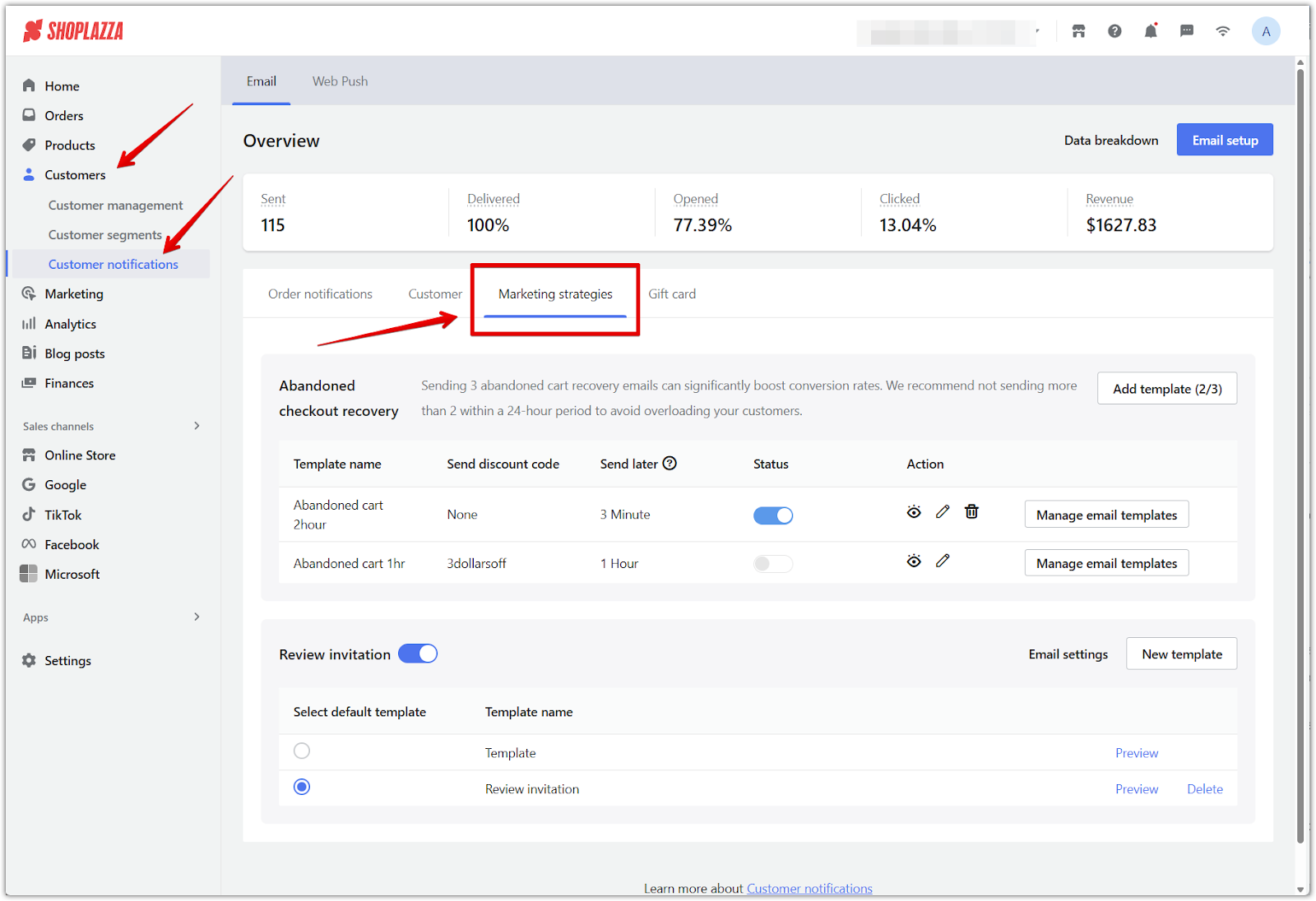
Cart recovery is usually the first automation worth setting up because the trigger is unambiguous: the shopper already showed intent to buy and got stuck at the last step.
Customer segmentation
Segmentation groups customers by what they've actually done, not by static attributes like location, so each group can get a different message. Loyalty & Push ships with preset segments, so there's no need to build the logic from scratch:
| Segment | Definition |
| Registered but never ordered | Email is on the customer list, zero orders |
| Browsed or added to cart without ordering | Viewed or added a product in the past 30 days, no checkout |
| Ordered but never paid | Abandoned checkout in the past 14 days |
| Bought once but never repurchased | Exactly one paid order |
The number of preset segments available ranges from 4 to 16, depending on the plan. A points-based campaign, such as an order discount, product discount, buy-one-get-one deal, or free shipping, can be created directly from a segment, without exporting a list first. If segmenting still means exporting a list and setting up a campaign by hand afterward, chances are that extra step gets skipped. Tying the segment directly to an action is what makes it usable.
Dynamic content personalization
Tagging a list is the first step toward segmentation, but a tag by itself isn't personalization. Static attributes like gender or location still put people in one bucket that gets roughly the same content, just a smaller bucket. However, dynamic content personalization changes what a customer sees in an email based on their actual behavior, such as products browsed or categories purchased, instead of showing everyone the same layout.
The more common setup keeps the store and the email tool separate, which means someone has to sync data back and forth or re-enter customer details by hand before the email content can match up with real purchase behavior.
Unlike these standalone email tools that run independently of the store, Loyalty & Push is built directly on top of Shoplazza's ecommerce platform. Once installed, it reads product, order, and customer behavior data straight from the store, so there's no manual export or re-entering customer records.
Loyalty & Push's content personalization takes that behavioral data straight into email generation. The AI picks which products to feature in the email based on each member's purchase history and preferences, so the same campaign can show different products to different members, landing closer to a one-to-one match than one email for everyone. For the marketing side, that means not writing a separate version of the copy and product images for every micro-segment.
Discounts and perks
How deep a discount should go is often a guessing game based on past experience or what competitors are doing, which tends to land on either giving away too much margin or offering too little to move the needle. Loyalty & Push uses AI to calculate the discount, factoring in a member's purchase behavior and the store's margin, aiming for a number that drives conversion without eating into profit, rather than picking a percentage by feel.
On the perks side, the platform supports automatic triggers for tier-based perks, birthday perks, and recurring perks, with the number and type of perks available varying by plan. Once these are set up, they fire automatically whenever the trigger condition is met, so no one has to remember it's someone's birthday and manually send something.
First-purchase incentive
A first-time visitor deciding whether to become a first-time buyer often gets stuck on small decisions, like whether to hand over an email address or whether joining a loyalty program for a small discount is worth the extra step. Shoplazza's checkout page lets new customers join without logging in, and points apply immediately as a discount right there at checkout, no redirect or waiting for approval, turning that first visit directly into a first purchase.
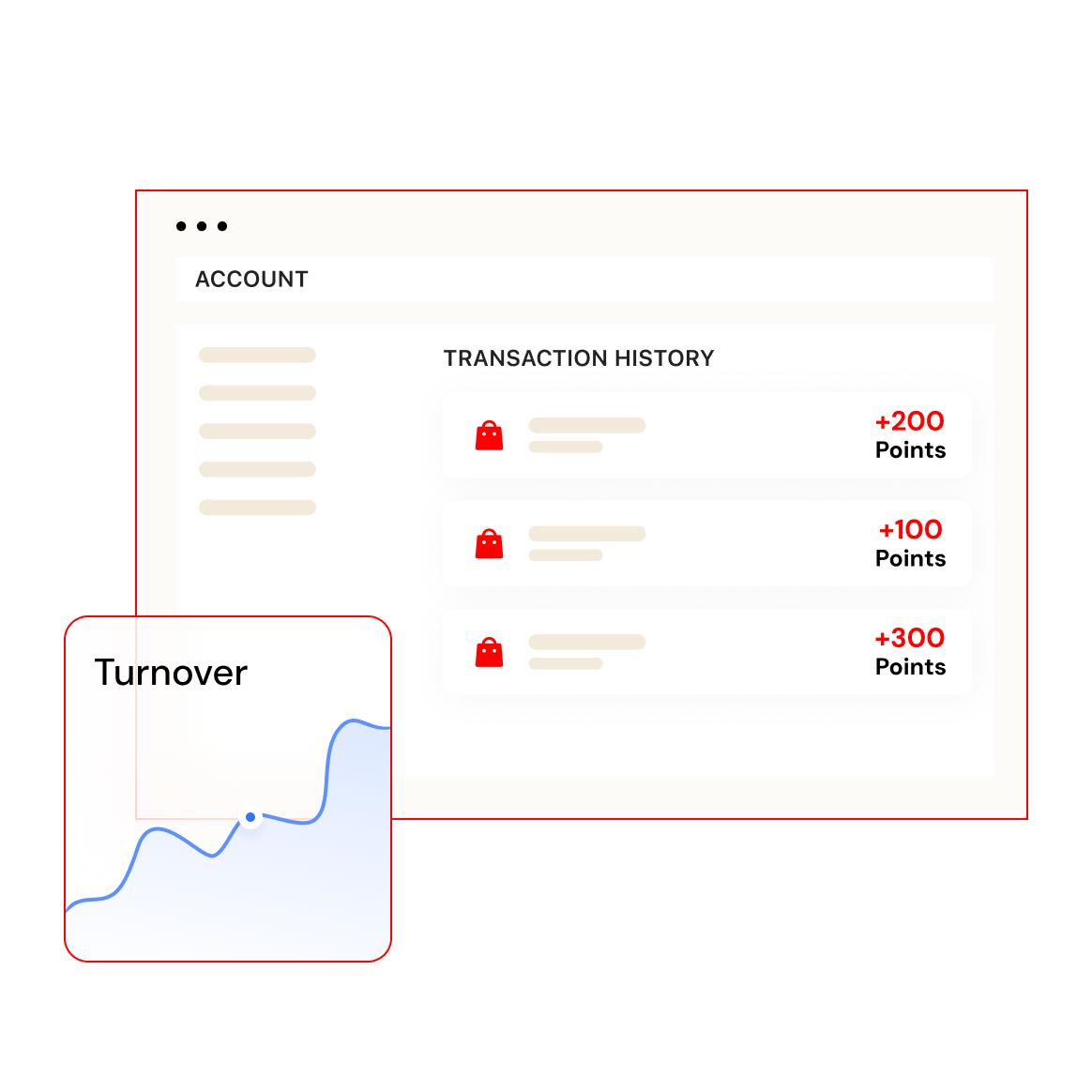
This scenario is particularly useful for a store that's just getting started and doesn't have order history to work with yet. Not having data doesn't mean not getting results. A first-purchase incentive is one of the few automation scenarios that works without any historical data at all, and new customers notice it the moment they hit checkout.
Data analysis
Once these automations are running, deciding whether to keep investing, or how to fine-tune the content, comes down to data rather than a general sense that something worked. After a merchant installs Loyalty & Push and gets a points-redemption campaign running, the system automatically generates a comparison report on day 10, covering member activity, order conversion, and product performance, which helps decide whether to stick with the free plan or upgrade.
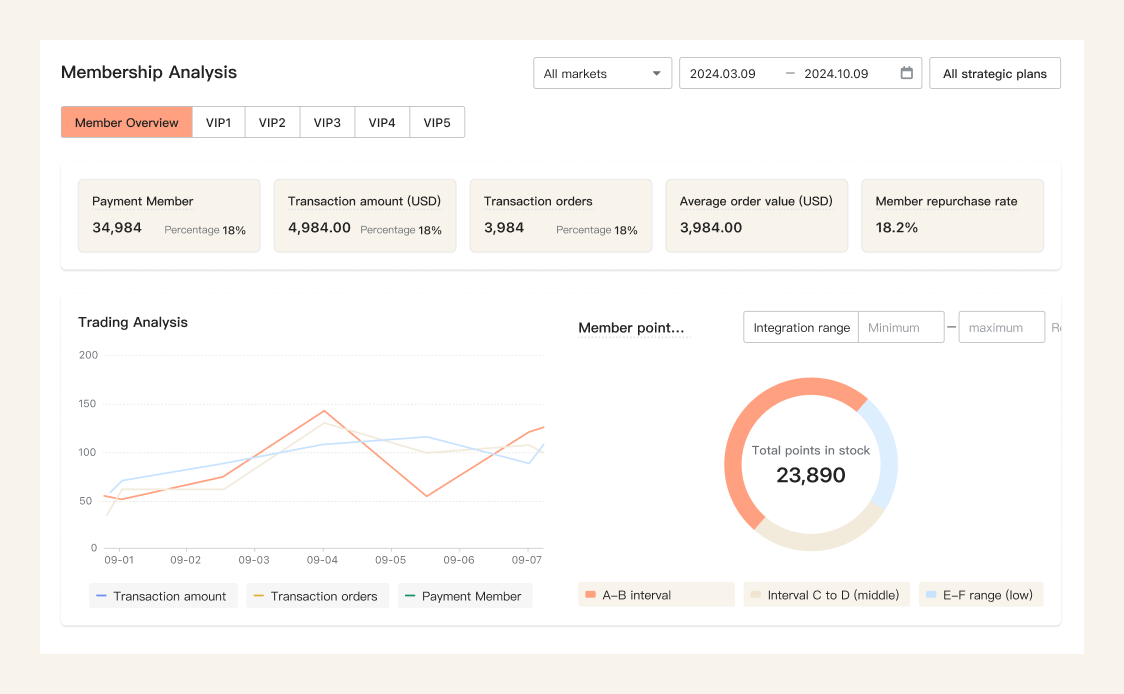
After that, data for any time period can be pulled at will to keep tracking promotion performance, shifts in member behavior, and product sales trends. The segmentation feature mentioned earlier also has its own analytics view, showing exactly how many members are in each segment and how that changes over time. Data analysis works more like a check on the other five scenarios than something that produces results on its own.
How do you keep automated emails out of the spam folder?
None of the six scenarios above matter much if the email never actually reaches an inbox, and that got a lot less forgiving after 2024, when Google and Yahoo introduced mandatory authentication requirements for bulk senders. Emails that don't meet the bar get rejected outright or routed straight to spam. Here are three aspects that are required:
- SPF verifies that the sending server is authorized to send on behalf of the domain.
- DKIM adds a digital signature confirming the email content wasn't altered in transit.
- DMARC tells receiving servers what to do when SPF or DKIM verification fails.
Crossing the 5,000-message threshold even once permanently classifies a sender as bulk, so the requirements apply from then on.
What does SPF do, and how do you set it up?
SPF lets a receiving mail server confirm that the server sending an email has permission to send on behalf of that domain, which prevents someone else from spoofing the domain to send spam. It's added as a TXT record in the domain's DNS settings, at whatever registrar or DNS host the domain lives on. Whatever email tool is sending the mail, whether that's a marketing platform or the store's own outreach feature, typically generates the exact record value, so setup is mostly copying that value from one dashboard into another.
What does DKIM do, and how do you set it up?
DKIM attaches a digital signature to an email's content, letting the receiving server verify nothing was altered in transit. Google and Yahoo require SPF and DKIM together as baseline authentication. DKIM gets added the same way as SPF, as a DNS record supplied by the sending platform, usually a CNAME or TXT record depending on the provider. Once both records are in place, DNS changes can take anywhere from a few minutes to 48 hours to propagate before authentication checks start passing.
What does DMARC do, and how do you set it up?
DMARC is a policy statement telling a receiving server whether to reject, quarantine, or deliver an email that fails SPF or DKIM, while sending the domain owner a summary report of failures. It's the third mandatory piece of the 2024 bulk sender rules. For a domain connected to Shoplazza, this means adding a TXT record at the domain host with the name _dmarc and a value of v=DMARC1; p=none; to start in monitoring mode, where every email still gets delivered while the policy just collects data. From there, the policy can move to p=quarantine or p=reject once the reports show legitimate email consistently passing authentication.
How do you keep an email list healthy?
Subscribers who haven't opened or clicked in a long time drag down open rates, which signals to mailbox providers that a sender isn't wanted and raises the odds of future emails landing in spam. A re-engagement email to long-inactive subscribers, followed by removing the ones who don't respond, is standard practice across the email industry rather than a feature tied to any one platform.
The takeaway
Cart recovery can run on its own using Shoplazza's built-in feature. Segmentation, content personalization, discounts and perks, first-purchase incentives, and data analysis all run through Loyalty & Push, pulling from the same set of member data instead of requiring separate tools stitched together by hand. What's left is putting the system to work, moving email marketing from manual judgment calls to something that runs on its own. Automation handles the reach. Personalization handles the repeat business.
Common questions about automating email marketing
Q: Is email automation worth it if my subscriber list isn't very big yet?
A new store without order history isn't the same as a store where automation can't work yet. For stores that don't have much data yet, Loyalty & Push uses industry averages to estimate overall performance, and the free plan is enough to start building a basic membership program. A first-purchase incentive at checkout is exactly the kind of feature that doesn't depend on historical data and starts working the moment a new store goes live.
Q: How long before I see repeat purchases or recovered sales from automated email?
With Loyalty & Push, once a merchant installs it and gets a points-redemption strategy running, the system generates a comparison report automatically on day 10, which is a reasonable first checkpoint. A more stable read on repeat purchase and recovery trends usually takes at least one full promotional cycle. Ten days of data works better for deciding whether to keep investing than for drawing a final conclusion.
Q: Does automated email end up feeling impersonal?
That concern usually assumes automation and mass blasting are the same thing. The point of automated, personalized email is the opposite of one size fits all. The AI picks which products to recommend based on each member's purchase behavior and preferences, so two people going through the same automated flow can see different content. That runs counter to sending one template to everyone.
Q: Do member emails conflict with a general newsletter, and should I run both?
They serve different purposes. Member email only goes to people who've joined the loyalty program, and it has to be triggered by a specific campaign. A general newsletter can go to every email address collected, which works for store-wide announcements or general promotions, but it can't distinguish members from non-members. The recommended approach is to run both, one covering everyone and one targeting members specifically.
Q: How is Loyalty & Push different from a dedicated email marketing tool like Omnisend?
The main difference comes down to whether the tool is a native part of the membership system. A dedicated email marketing platform like Omnisend is primarily a sending and marketing automation tool. It requires a separate subscription, and member data has to be maintained and synced on its own. Loyalty & Push is built as a membership system from the ground up, combining checkout-page point redemption, marketing email, and an AI assistant, keeping tiering, points, segmentation, and email sends in one shared dataset without a separate sync step. For a store that wants both a loyalty program and email marketing, that's one less integration to maintain.