Want to know how to scale your marketing with AI for business growth — without hiring a bigger team or blowing your budget? You're not alone. Most businesses buy AI tools and expect results. Few build the system that actually delivers them. This guide skips the hype. It shows you which areas to automate first, how to set everything up step by step, what it costs, and where most teams go wrong. If you've been wondering whether AI marketing is actually worth it, keep reading.
What "scaling marketing with AI" actually means?
A lot of people hear "AI marketing" and think it just means using ChatGPT to write faster. That's part of it. But real scaling is something different.
When you scale marketing with AI, your output grows, but your workload doesn't grow at the same rate. You publish more, reach more people, and convert more customers with the same team. The key is building AI-powered systems, not just using AI tools one task at a time. Here's a quick way to see that distinction:
| Approach | What it looks like in practice |
| AI tool | You ask an AI to write one email when you remember to. Or, you generate a social caption for today's post. |
| AI system | AI drafts emails, scores leads, and triggers the right message automatically. Or, a workflow repurposes every blog into 10 posts, scheduled in advance |
In practice, a team scaling with AI might:
- Publish content at the volume of a team twice their size
- Run 10 ad creative variants where they previously ran two
- Personalize product recommendations for every site visitor, with no manual rules written
That's the ceiling AI removes. But to get there, you need to do one important thing first.
Before you start, fix your data
Many people overlook this step. It's also the reason most AI marketing projects underdeliver. AI is only as good as what you feed it. If your customer data is spread across your CRM, your email tool, your ad platform, and a spreadsheet nobody has touched in two years — the AI doesn't have a clear picture. It guesses. The output ends up generic.
Here's how to fix that before you touch any AI tool:
- Step 1: Find where your customer data lives. List every platform that holds data about your customers, including CRM, email tool, ad accounts, website analytics, e-commerce platform. Write it all down.
- Step 2: Clean it up. Duplicate contacts, missing emails, outdated records — sort those out first. Bad data in means bad output.
- Step 3: Pick one source of truth. Your CRM should be the hub that everything else syncs to. HubSpot, Salesforce, and Klaviyo (solid for e-commerce) are all worth evaluating based on your size and budget. If you run an independent brand store, loyalty marketing tools like Shoplazza's Loyalty & Push are worth looking at too. It's built specifically for collecting and organizing loyalty customer data, including membership tiers, loyalty points, average order value, purchase behavior, and spending patterns.
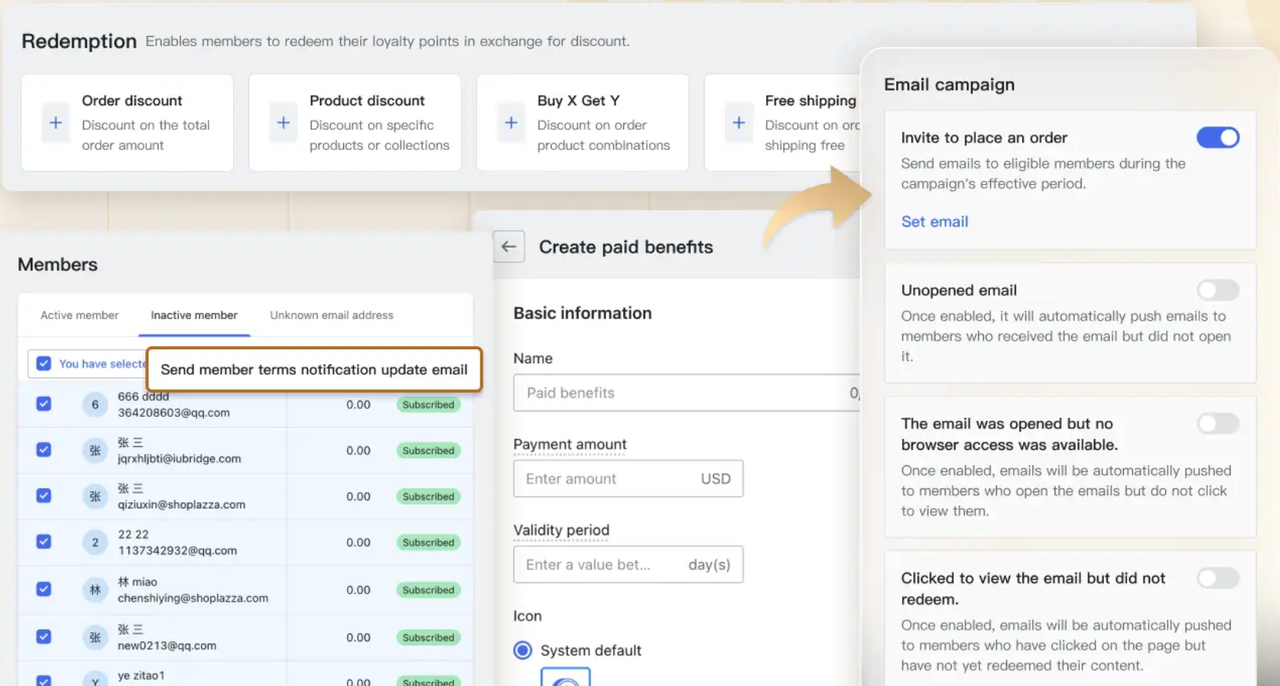
Customer data platforms (CDPs) can pull data from multiple sources into one unified customer profile. Tools like Loyalty & Push we just mentioned go a step further for e-commerce. They consolidate new signup and loyalty customer data from your store, then use that to automatically suggest member tier classifications, calculate optimized discounts, create marketing campaigns, and send personalized emails to the right segments. Once that kind of data is structured and accessible, AI tools actually have something useful to work with.
The 7 areas where AI scales marketing fastest (prompt and uses included)
AI can help across almost every part of marketing. But some areas deliver faster, more measurable results than others. Here's where to focus first.
AI-generated e-commerce store
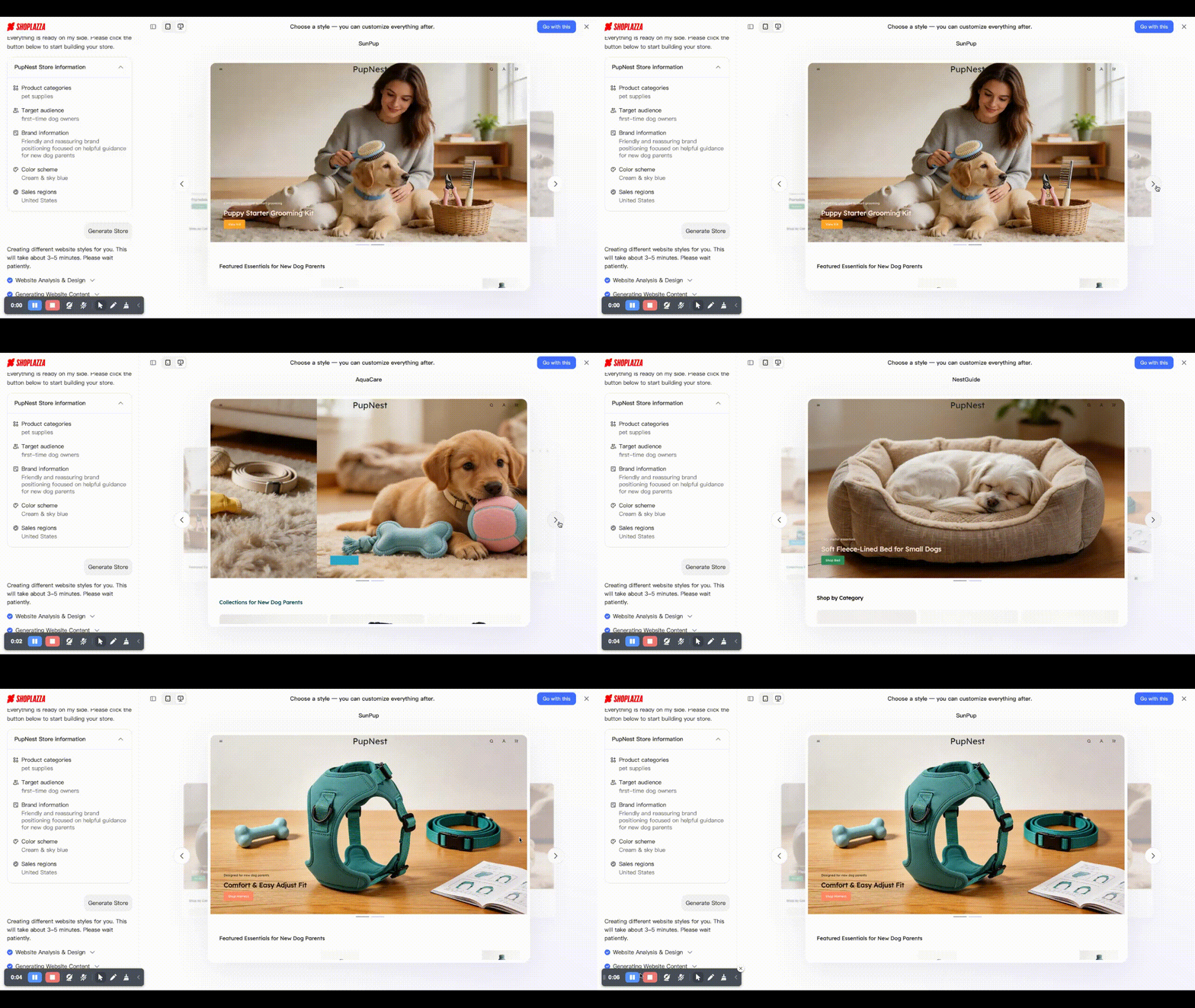
Before any marketing can happen, you need a store. And building one used to take days, from picking a theme, writing product pages, setting up checkout to configuring navigation. AI has compressed that into minutes.
An AI-built store isn't just a landing page. It generates product pages, shopping cart, checkout flow, and site structure ready to sell from day one. Shoplazza's AI store builder does exactly this. Give it a prompt describing your business, and it generates a complete, ready-to-use e-commerce store — no design skills or coding needed. From there you can customize, add products, and connect your marketing tools. It's the starting point that makes the rest of this guide possible.
Content creation
This is where most teams see results the quickest. Tools like ChatGPT, Claude, and Gemini can produce first drafts of blog posts, product descriptions, social captions, and email copy in minutes rather than hours. The approach that works well: AI drafts, human edits. You get the speed. Your editor adds the brand voice and checks the facts. You publish more without quality dropping.
You might also notice how much content you're leaving on the table. One well-written blog post can become:
- 5 LinkedIn posts
- 3 email subject line tests
- 2 short video scripts
- A handful of social captions
AI handles that repurposing in minutes. Most teams just haven't built the workflow yet.
Product descriptions
Product descriptions are a good place to start if you run an e-commerce store. Writing them manually — especially at scale — is slow and inconsistent. AI can generate or optimize them in seconds.
If you use Shoplazza, the platform has a built-in AI product description generator that lets you set the tone, language, word count, and key selling points before generating. You can also use it to optimize existing descriptions rather than writing from scratch.
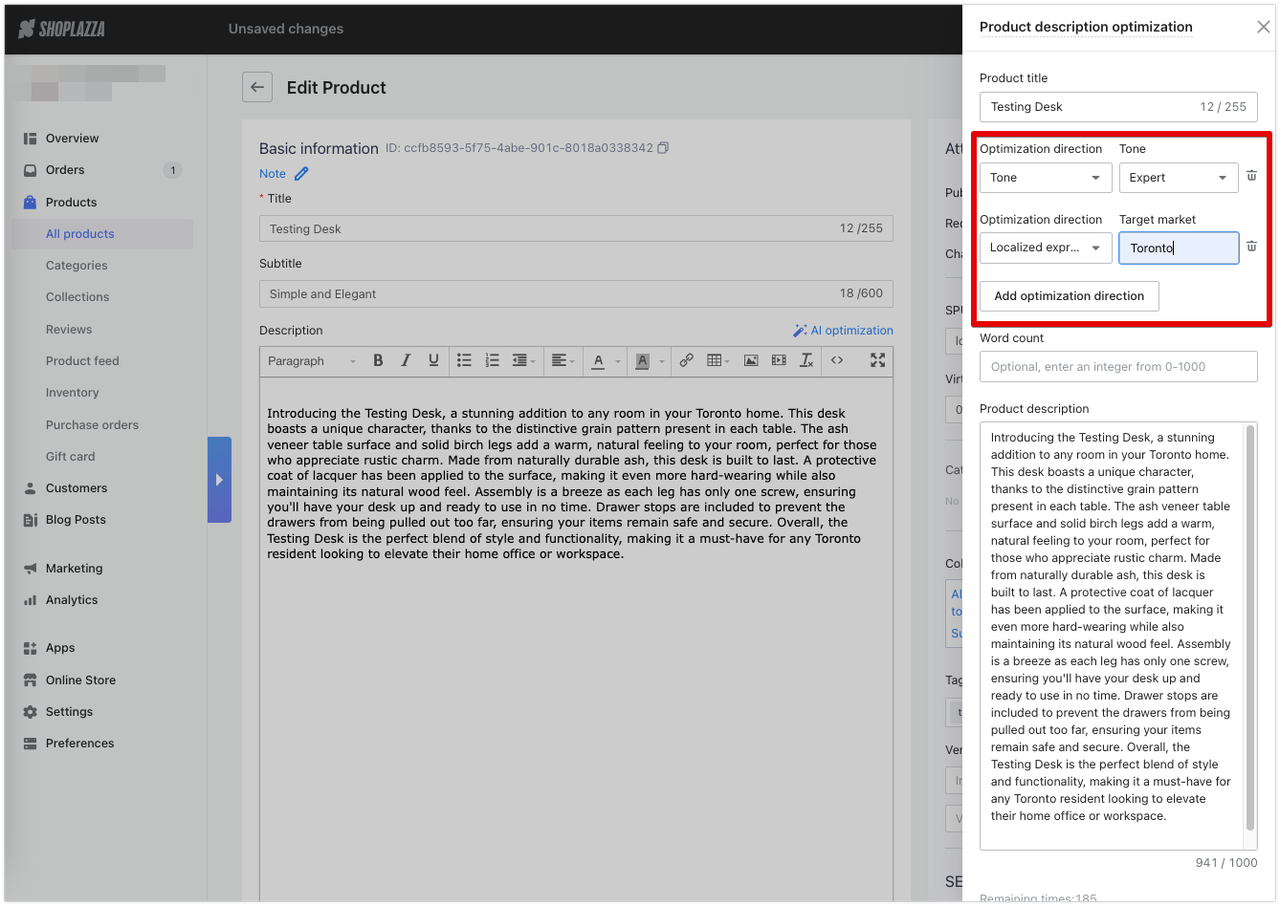
For other platforms, you can get similar results with ChatGPT or Claude. A prompt that works well looks something like this:
"Write a product description for [product name]. Tone: confident and friendly. Target audience: [describe your customer]. Word count: 80 to 100 words. Key selling points: [list 3 to 4 features or benefits]. End with a soft call to action."
The more specific you are, the closer the output is to something you can actually use. Vague prompts produce vague results. Think of it the same way you'd brief a copywriter. Give the AI the audience, the tone, the goal, and the constraints.
Blog posts and social content
For longer content, a useful approach is to ask AI to produce the structure first, then fill in each section. For example:
"Give me an outline for a 1,500-word blog post about [topic]. Target audience: [describe them]. Include an intro, 4 main sections, and a conclusion with a call to action. And your writing style should:* Write like an experienced practitioner sharing insights* Mix short and long sentences for a natural flow* Avoid phrases like “best choice,” “must-buy,” “don’t miss out”* Use soft guidance language such as: * “You might notice…” * “Many people overlook…” * “In practice…”* Keep the tone conversational, practical, and slightly informal"
Once the outline looks right, you can go section by section: "Now write the intro based on this outline." This keeps the output focused and easier to review than asking for the whole article in one go. For repurposing, a prompt like this works well: "Here is a blog post. Turn it into 5 short LinkedIn posts, each under 150 words, using a conversational tone." Paste the article in, and you have a week of social content in under a minute.
Email marketing and nurture sequences
Email still delivers some of the highest ROI of any marketing channel. AI makes it significantly better by enabling personalization at a scale that manual segmentation simply can't match. With AI, your email tool can:
- Test subject lines automatically and send the winning version to the rest of your list
- Predict the best send time for each subscriber based on their open history
- Generate content blocks that change based on what someone browsed or bought
The question most store owners ask is: where do I actually start?
Step 1: Recover abandoned orders first
Abandoned cart emails are one of the highest-converting automations you can set up. If you run your store on Shoplazza, this is built in, no third-party tools or extra costs needed.
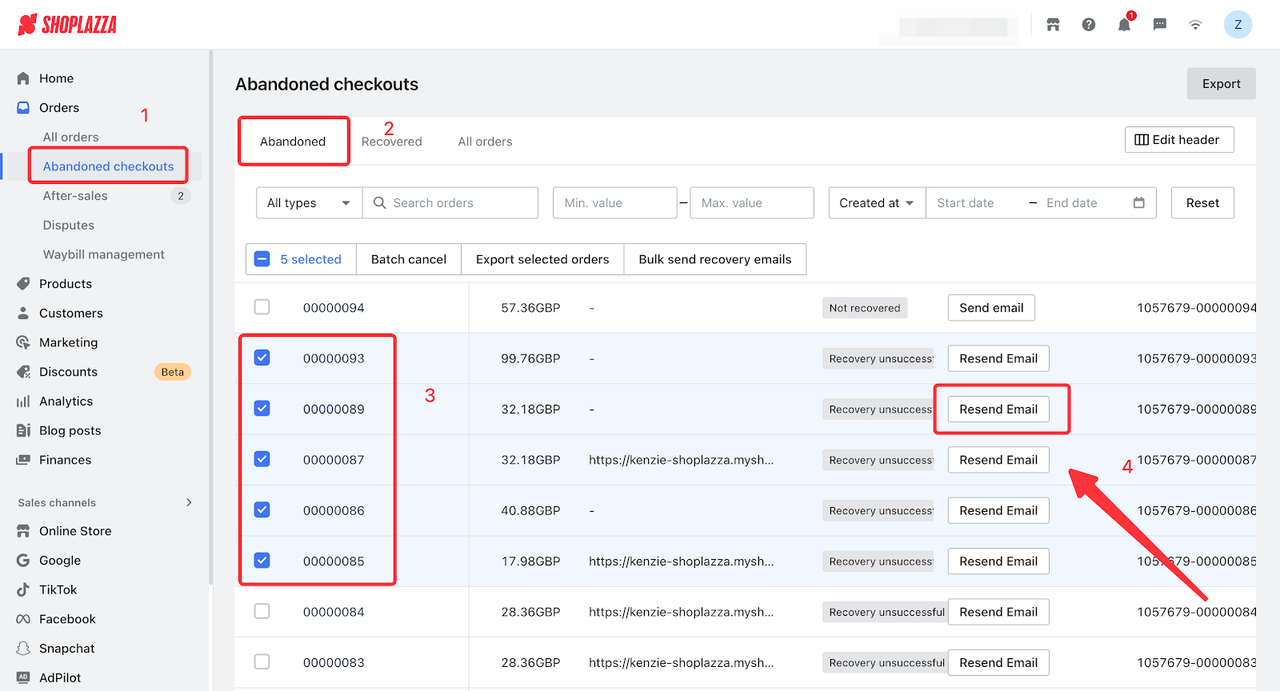
The system automatically generates a recoverable orders list under "Abandoned Checkout." From there, you can batch-send emails with promo codes or pre-built templates to bring hesitant shoppers back. For real-time recovery, you can set up abandoned checkout triggers in "Customer Notifications" — the system catches customers the moment they drop off and sends a follow-up automatically. This is a good first win because it's low effort to set up and the results are immediate and measurable.
Step 2: Run broad email campaigns for your full list
Once you have recovery flows in place, the next step is reaching your wider email list. Tools like Klaviyo and Mailchimp are well-suited here. They let you send campaigns to everyone you've collected, including promotional offers, new product launches, and seasonal announcements. AI features inside both platforms help with subject line testing, send time optimization, and content personalization based on past behavior.
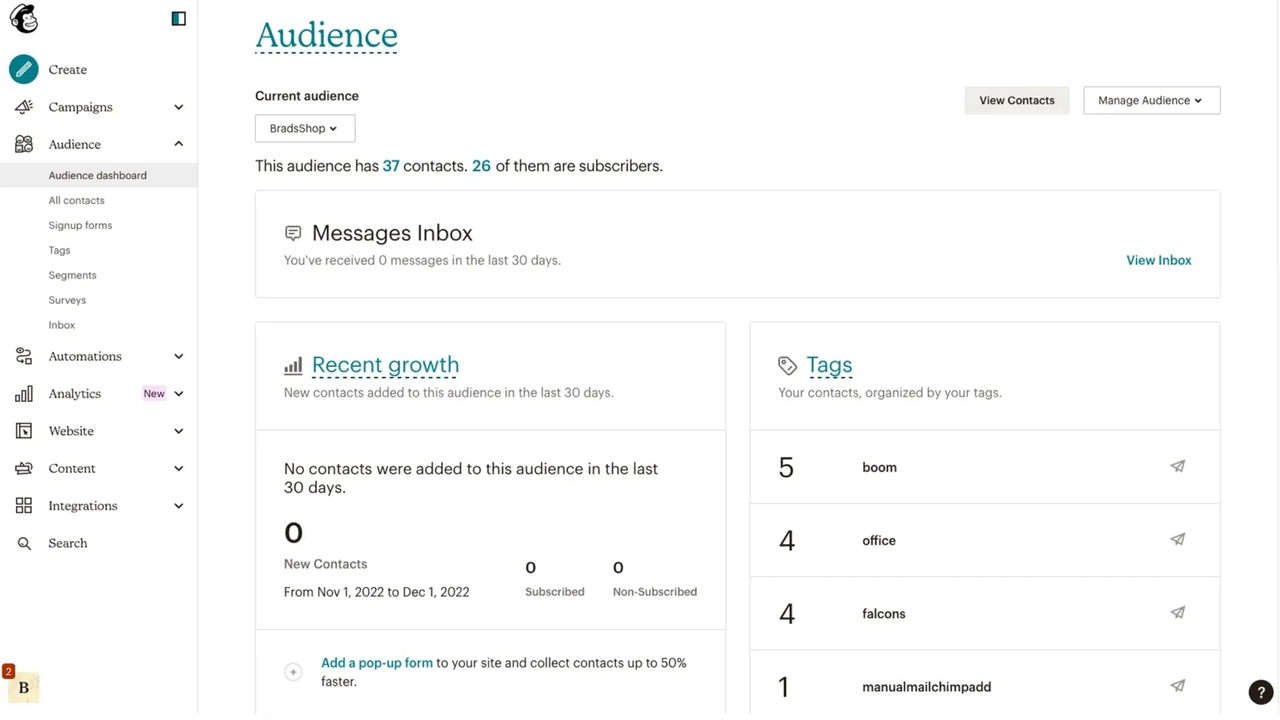
One limitation worth knowing: these tools work well for broad campaigns, but they don't distinguish between a first-time buyer and a loyal customer who has spent significantly more with you. Everyone gets roughly the same message unless you build the segmentation manually, which takes time.
Step 3: Personalize by membership tier and customer segmentation
This is where Loyalty & Push comes in. Unlike general email tools, it knows who your members are, like their tier, their points balance, their average order value, their purchase frequency, and their spending patterns. That means campaigns can be targeted at specific member segments, not just your full list.
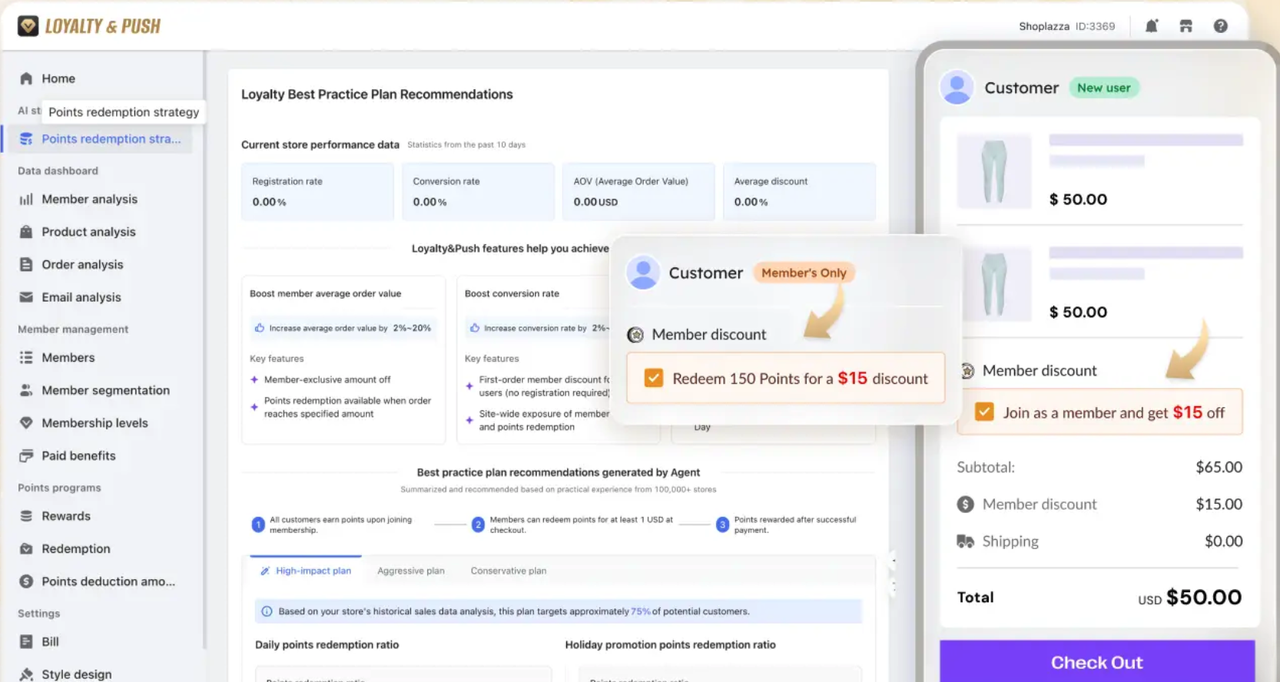
What makes it more than a loyalty program is the AI Agent built into it. It does not just show you data and suggest what to do next. It acts. It automatically calculates the right member tier for each customer, sets optimized discounts based on spending behavior, configures campaign mechanics, and lets you launch with a single click. Member management, email targeting, and campaign setup handled in one place — without stitching together multiple tools.
For growing e-commerce brands, that combination of loyalty data and AI-driven automation is difficult to replicate by combining separate platforms, and significantly more cost-effective than doing so.
Paid advertising
AI has already changed paid ads at the platform level. Google's Performance Max and Meta's Advantage+ both use machine learning to allocate budget, select audiences, and test creative combinations automatically. They shift spend toward what's working faster than a human campaign manager could do manually.
In practice, your role as a marketer shifts. You spend less time adjusting bids and more time on strategy — what offer you're making, which messaging angles to test, what creative approach resonates with different segments. The AI handles the optimization mechanics. You provide the direction.
One thing worth noting: these platforms work best when you give them strong creative inputs and clear conversion goals. On the creative side, AI product photo generators like LazzaStudio let you generate professional images, so you can produce fresh ad visuals without a photography budget or a design team. Feed better creative into your campaigns, and the platform's AI has more to work with.

Customer support and AI chat
When a customer has a question and nobody answers, they leave. For most growing stores, a full-time human support team around the clock isn't realistic.
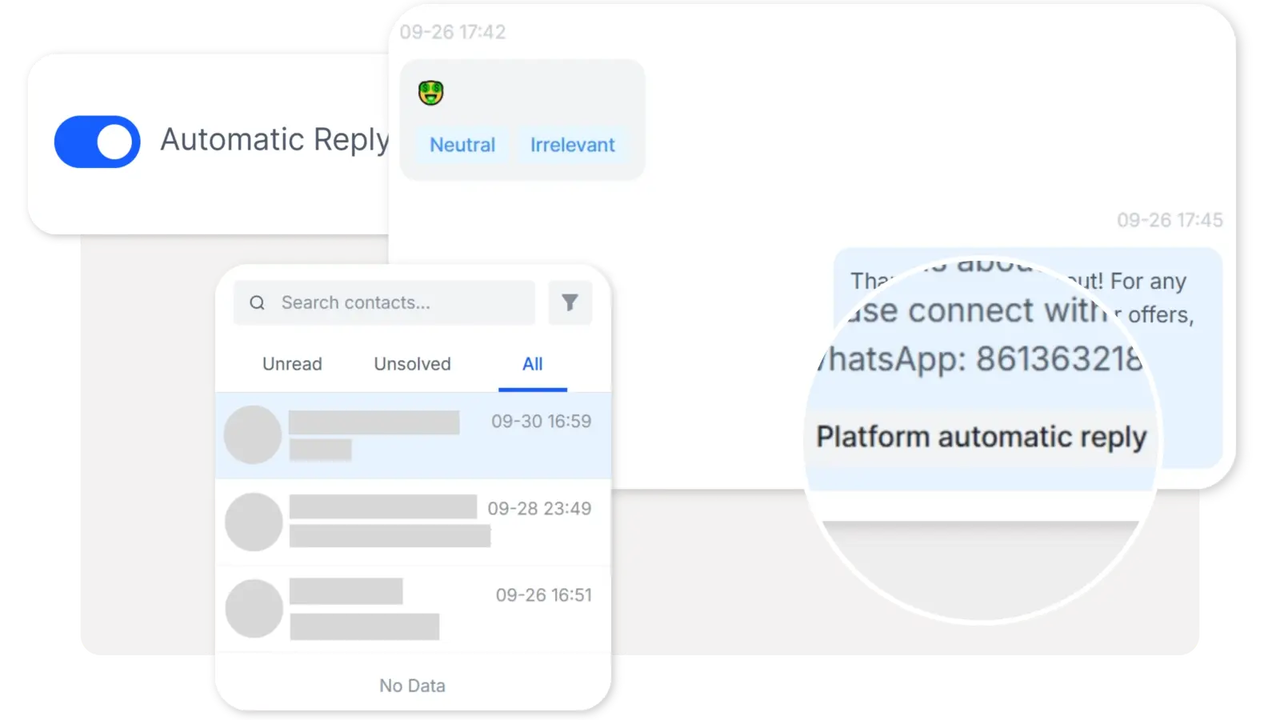
That's where AI-powered chat tools come in. They handle routine questions automatically while real agents focus on conversations that actually need a human. For example:
- JivoChat is a live chat and AI agent tool for stores that want a simple setup. The AI handles incoming questions based on a knowledge base you configure, captures customer contact details automatically, and passes anything unresolved to a live agent. It also generates a conversation summary and sentiment analysis after each chat.
- SaleSmartly is built for stores selling across multiple channels. It pulls WhatsApp, Facebook Messenger, Instagram, TikTok, Telegram, LINE, and live chat into one inbox. The AI handles automated responses, triggers follow-up workflows, and supports real-time translation across 134 languages — useful for cross-border brands managing customers in different regions.
- SocialEcho focuses on social media management — publishing across accounts, responding to comments and messages, and monitoring KOL posts or keywords from one place. AI features help automate parts of the workflow so you're not manually checking every channel every day.
In practice, most stores start with one tool, configure it well, and focus on keeping response times short. A well-set-up AI chat layer that handles your 10 most common questions is more useful than a complex system nobody maintains.
Lead scoring and sales handoff
Many people overlook how much time sales teams lose chasing leads that aren't ready. AI-powered lead scoring fixes this by evaluating behavioral signals, email opens, page visits, time on pricing pages, content downloads, and ranking leads by how likely they are to convert.
Sales teams get a prioritized list and focus their energy where it's most likely to result in a deal. When a lead hits a score threshold, the system can automatically alert the rep, create a task, and pull recent activity into the CRM. HubSpot, Salesforce, and Marketo all offer this.
Reporting and insights
This one is underrated. Marketing teams spend hours every week pulling reports and trying to figure out what actually drove performance last month. AI can handle the routine parts automatically.
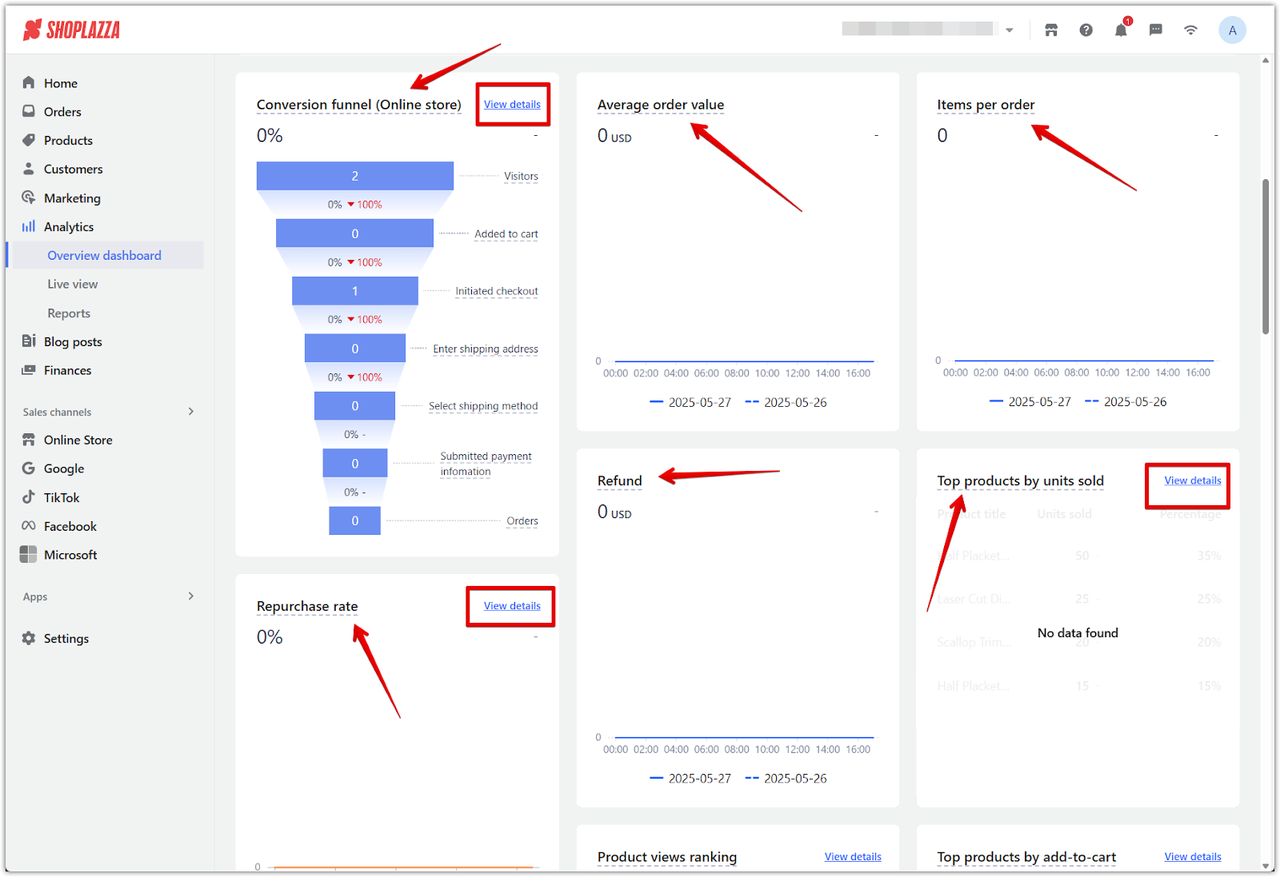
If you run your store on Shoplazza, the built-in analytics dashboard is a good starting point — and it's free. It gives you an overview of traffic, sales, customer behavior, and order data without needing a third-party tool. For teams that need deeper analysis, tools like Google Looker and Tableau's AI features can generate regular performance summaries, flag unusual changes, and surface attribution data connecting campaigns to revenue. Some now let you ask plain-language questions — "what drove the traffic spike last Tuesday?" — and get a data-backed answer without building a custom report from scratch.
How to build an AI marketing workflow: step by step
You don't need a big team or a big budget. You need a clear process.
Audit your current marketing tasks.
Write down every repetitive task your team handles weekly — content drafts, report pulls, follow-up emails, ad copy updates. Ask yourself: is this task formulaic or data-heavy? If yes, it's a good candidate for AI. Tools like ChatGPT or Claude can draft copy in seconds. For product visuals, LazzaStudio generates professional product images with AI — so you're not spending hours on photography or design before your ads go live.
Then, you may pick one high-volume, low-risk task and run AI on it alone for 30 days.
Connect your data.
Before deploying any AI tool, make sure it can pull from your CRM, ad platforms, and store analytics. An email tool that can't see a customer's purchase history sends the same message to everyone. Integration is what turns AI from a generic assistant into something that actually personalizes. If you use Shoplazza's Loyalty & Push, this data — member tiers, spending patterns, order values — is already structured and ready for AI to act on.
Build a prompt library and share it.
Once you find prompts that produce good results, save them somewhere the whole team can access — a shared Google Sheet or Notion doc organized by task type works well. This speeds up onboarding, keeps output consistent across people and regions, and means you're not starting from scratch every time someone new joins the team.
Set system instructions in your AI tools.
Most AI writing tools let you define standing rules — your brand tone, target audience, words to avoid, format preferences. Set these once and they apply to every prompt going forward. Think of it as onboarding the AI to your brand. Instead of repeating context in every prompt, the AI already has it in the background.
Embed AI into the tools your team already uses.
The most practical setups don't add new platforms. They put AI inside what your team already works in. Klaviyo's AI sits inside Klaviyo. Canva's AI is right there in Canva. Less friction means higher adoption. If your team has to open a separate tool to use AI, most people won't bother.
Review and refine every quarter.
You may check whether your prompts still produce quality output. Update your system instructions as your brand evolves. AI marketing isn't a one-time setup — customer behavior shifts, your offers change, and what worked six months ago may need adjusting. A quarterly review keeps things accurate and effective.
How to keep your brand voice when using AI?
This is a real concern. When AI content gets published without any guardrails, everything starts sounding the same — smooth, polished, and a bit hollow. The fix is straightforward.
You may write a short brand voice document and load it into every AI tool your team uses. It doesn't have to be long. It needs to be specific:
- Your tone — conversational? direct? warm?
- Words and phrases you never use
- Words and phrases you prefer
- Two or three example sentences that sound unmistakably like your brand
Beyond the document, the most important rule is simple: AI writes the draft, a human approves it before it goes out. This review step catches off-brand moments and factual errors before they reach your audience. It doesn't have to take long — 30 seconds for a caption, a few minutes for a longer piece — but it protects the consistency your readers expect.
How to measure AI marketing ROI?
Most teams invest in AI marketing tools but never formally check whether those tools are working. That makes it hard to justify the spend and nearly impossible to spot where things are falling short. Here are the metrics worth tracking:
| Metric | What to measure |
| Time saved | Hours per task before AI vs. after |
| Content volume | Pieces published per month |
| Cost per lead | Before AI vs. after implementation |
| Conversion rate | AI-personalized campaigns vs. generic baseline |
| Revenue attribution | Deals influenced by AI-assisted campaigns |
A simple starting framework: compare your last three months before AI against your first three months after. Look at output volume, cost per lead, and conversion rate. The difference tells you whether the investment is working.
What does this cost? An AI marketing budget guide
A basic AI marketing stack for a small e-commerce store typically runs $50 to $200 per month, depending on which tools you activate and at what plan level. Here's what that covers:
- AI store builder: Shoplazza starts at $39/month, or $29.25/month on an annual plan. Not just a website — it generates a full e-commerce store with product pages, checkout, and shopping cart built in.
- Content drafting: ChatGPT Plus or Claude Pro, around $20/month each (free plan provided). Shoplazza's AI product description generator is free for the first 200 responses per month, enough for basic use.
- Email and loyalty marketing: Klaviyo or Mailchimp start at $50 to $150/month. Loyalty & Push has a free plan covering 500 emails and 250 member orders per month, with paid plans from $27/month.
- Paid ad optimization: Built into Google and Meta. No extra cost.
- Analytics: Google Analytics 4, Google Search Console, Looker Studio, and Shoplazza's built-in dashboard are all free.
| Tool | Estimated monthly cost |
| Shoplazza (annual plan) | $29.25 |
| ChatGPT Plus or Claude Pro | $0-$20 |
| Loyalty & Push (starter) | $0–$27 |
| Ad optimization (Google/Meta) | $0 |
| Analytics | $0 |
| Total | ~$30–$76/month to start |
Start lean. One workflow running well is worth more than five tools nobody uses. Measure what changes, then reinvest where the results show it's working.
What are common mistakes and how to avoid them?
Even experienced teams run into these. It helps to know them before you do.
- Buying tools before fixing data. AI on bad data gives bad outputs. Clean your data first — always.
- Skipping human review. AI can produce factually wrong or off-brand content at scale if no one checks it. Every AI content workflow needs a human approval step built in.
- Treating it as a one-time setup. Your brand evolves. Customer behavior shifts. AI prompts and system instructions need regular updates — at least quarterly.
- No internal ownership. If nobody on your team is specifically responsible for AI marketing workflows, they gradually degrade. Someone needs to own the prompt library and monitor output quality.
- Scaling too fast. Automating five workflows at once before you've measured the first one means you won't know what's working. One workflow at a time, measured carefully, then expand.
- Ignoring data privacy and compliance. AI marketing campaigns are still subject to GDPR, CCPA, and email consent laws. Collecting customer data for personalization requires proper consent. It's worth reviewing your data practices with a legal or compliance contact before you scale.
Will AI take over digital marketing?
The short answer is no, but it will change what digital marketing work actually looks like. Many people also worry about whether AI will replace marketing jobs. The honest answer is that AI is already replacing specific tasks, not entire roles. Writing a first draft, pulling a weekly report, scoring a lead, resizing an image for five platforms — these are things AI does faster and cheaper than a human. That part is already happening.
What AI doesn't replace is judgment. Knowing which campaign angle will resonate with your audience, building a brand voice that feels genuine, deciding when to push a promotion and when to hold back — those decisions require context, experience, and creativity that AI doesn't have on its own.
The marketers who are most at risk are those who only do the tasks AI can automate. The ones who are hardest to replace are those who use AI to handle the repetitive work and focus their own energy on strategy, relationships, and creative direction. As Harvard marketing researcher Christina Inge puts it: your job won't be taken by AI — it will be taken by someone who knows how to use it.
Conclusion
If you've been wondering how to scale your marketing with AI for business growth, the answer isn't a tool; as you see in this blog, it's a mindset shift. Stop thinking about AI as something you add on top of your existing process. Start thinking about it as the engine underneath. The teams that grow with AI aren't necessarily the ones with the biggest budgets. They're the ones who pick the right starting point, measure honestly, and keep improving. That's a process anyone can follow.
Frequently asked questions about AI marketing
Q1: What is agentic AI marketing?
Agentic AI marketing is when AI doesn't just respond to your prompts — it takes actions on its own. Instead of waiting for you to adjust a campaign, it monitors performance, makes decisions, and executes tasks based on rules you've set. Google's Performance Max and Meta's Advantage+ are early real-world examples.
Q2: What is the best way to start using AI for marketing if you have a small team?
Pick one high-volume, repetitive task — writing email subject lines, drafting social captions, or generating blog outlines — and apply a single AI tool to it for 30 days. Measure time saved and output quality. Once you have a clear result, move to the next task. Starting narrow and measuring carefully works far better than trying to automate everything at once.
Q3: Does AI marketing work for small businesses, or is it mainly for larger companies?
It works well for small businesses and in some ways the productivity gains are proportionally bigger for smaller teams. A two-person team that triples its content output with AI gets more relative benefit than a larger team doing the same. Basic AI marketing tools start at around $30 per month and don't require any technical background to use.
Q4: How do you make sure AI-generated content doesn't sound off-brand?
You may write a short brand voice document with your tone, preferred phrases, words to avoid, and a few example sentences. Load it into the system instructions of every AI tool your team uses. Then add a human review step to every content workflow before anything goes live. AI drafts — humans approve. That combination keeps output quality consistent without slowing you down significantly.
Q5: What metrics should you track to measure AI marketing ROI?
Track time saved per task, monthly content output volume, cost per lead, campaign conversion rates, and — if your tools are properly integrated — revenue influenced by AI-assisted campaigns. The simplest approach: compare your three months before AI against your first three months after, using those same numbers.
Q6: What is the difference between AI marketing tools and AI marketing agents?
AI tools respond when you ask them to. You prompt, they produce an output, and you decide what to do with it. AI agents act on their own. They monitor performance, make adjustments, and execute tasks based on rules you've defined — without waiting for a prompt each time. Google's Performance Max and Meta's Advantage+ are current examples in paid advertising. Broader agentic marketing systems that manage campaigns end-to-end are coming as the technology matures.