You want to start an online store but have no inventory, no product photos, no copywriting, and no brand assets ready. That is not a problem. It is actually the norm for most first-time sellers. Knowing how to start an online store when you have nothing ready comes down to choosing the right business model, one that removes those barriers by design. This guide covers three practical paths: dropshipping, print-on-demand, and AI tools for product imagery, description, and store building. Each one solves a different missing asset. Together, they give you a clear answer to the question most beginners never think to ask: what do you actually need before you go live?
The three things most new sellers are missing
Before choosing a business model, it helps to name exactly what is missing. For most first-time sellers, the gap falls into one of three categories.
- No inventory. You have not sourced or purchased any products yet. You may not even know exactly what you want to sell.
- No product photos. You have no images to put on product pages. Without photos, you cannot build a storefront that converts.
- No copywriting. You have no product descriptions, no homepage copy, no About Us. A blank text field does not sell anything.
These three problems feel like they need to be solved in sequence — find products, photograph them, then write about them. They do not. Each one has an independent solution, and all three can be resolved before you spend a single dollar on inventory.
No inventory? Try dropshipping or print-on-demand models
Not having inventory does not mean you cannot sell. These two models are built specifically for sellers who want to launch before they have a single product in hand.
Dropshipping
In a dropshipping model, you list products from a supplier's catalog in your own store. When a customer buys, the supplier ships directly to them. You never hold stock, pack boxes, or pre-purchase anything. This means you can launch a store today, list fifty products, and only pay for those products after someone buys them. The financial risk of unsold inventory is eliminated entirely.
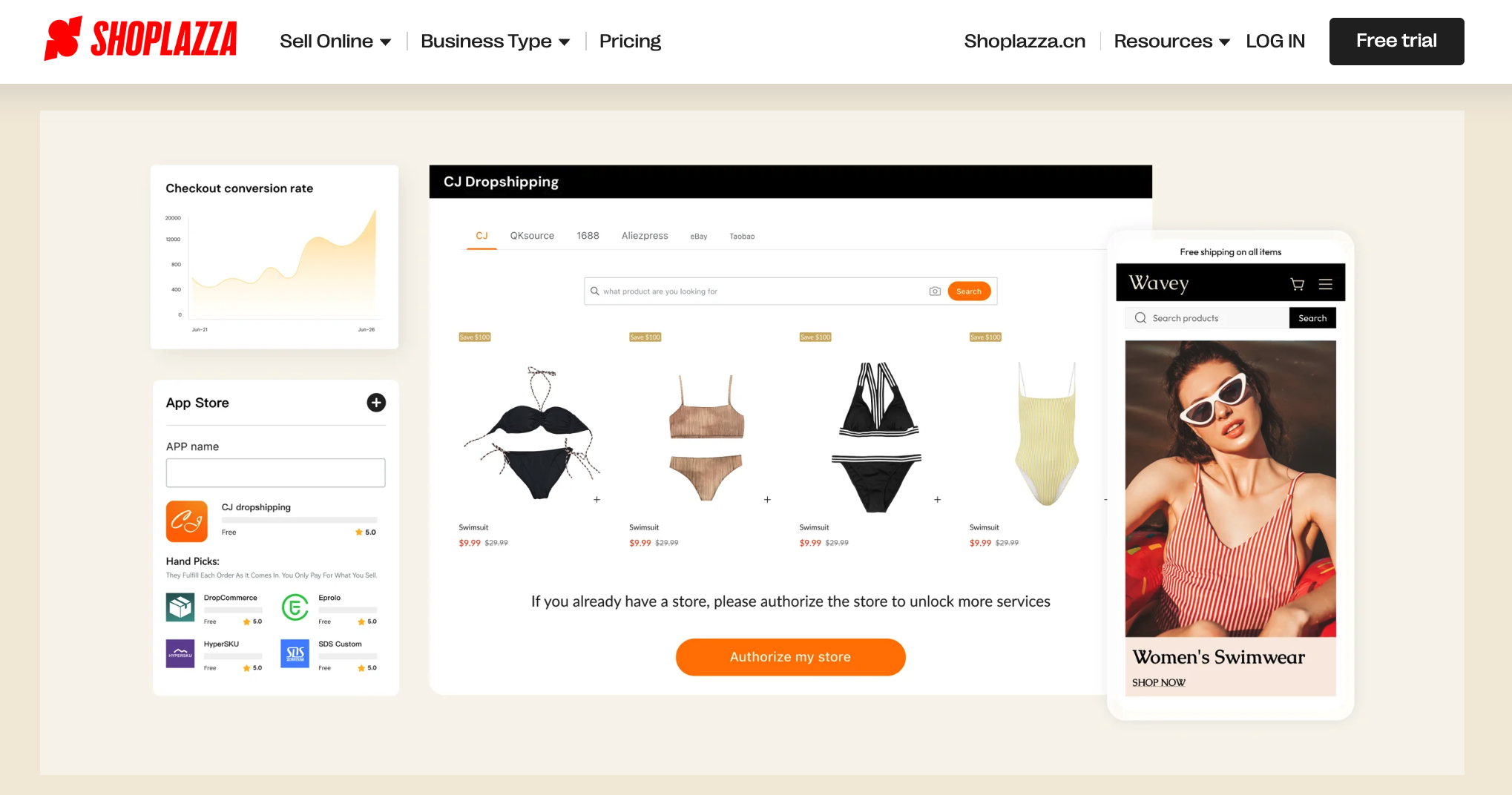
How to start dropshipping without inventory:
- Choose a niche based on market demand, not on what you already own
- Connect your AI-generated online store to a dropshipping supplier that carries that niche
- Import products and supplier images directly to your store, or replace and optimize them if necessary
- Write your own product descriptions with specific selling points, not general words (or use an AI tool — more on this below)
- Set your pricing and go live
Shoplazza integrates natively with CJdropshipping, EPROLO, Kakaclo, DropCommerce, and Wholesale2B, all available through the app store with no code required. Product data and supplier images import automatically.
Market selection matters more than product selection
Here is the mistake most dropshippers make: they pick a product, then wonder where to sell it. The smarter sequence is to validate the market first.
Consumer preferences vary significantly by country. A product trending in one market may be oversaturated or irrelevant in another. Take Australia as an example. Australian shoppers spent a record AU$82.6 billion online in 2025, a 14% year-on-year jump, with 9.8 million households shopping online. That is a large, growing market — but it has specific preferences. The strongest niches for online sellers in Australia in 2026 include:
- beauty and skincare
- pet care
- Activewear
- home and kitchen appliances
- health and wellness
- sustainable products
- digital and tech accessories
The smart home category is particularly strong, with Australian buyers upgrading their homes with smart locks, automated lighting, security cameras, and voice-activated devices. Emerging products like mini projectors and wellness gadgets have also seen sharp search interest increases in the Australian market through 2025.
The point is not that you must sell into Australia. The point is that market research should precede product selection in any dropshipping business, not follow it.
Print-on-demand (POD)
Print-on-demand works differently from dropshipping. Instead of reselling existing products, you upload your own design onto blank products, like t-shirts, mugs, tote bags, phone cases, and a production partner prints and ships them per order. You still hold no inventory. But the product is uniquely yours because the design is yours.
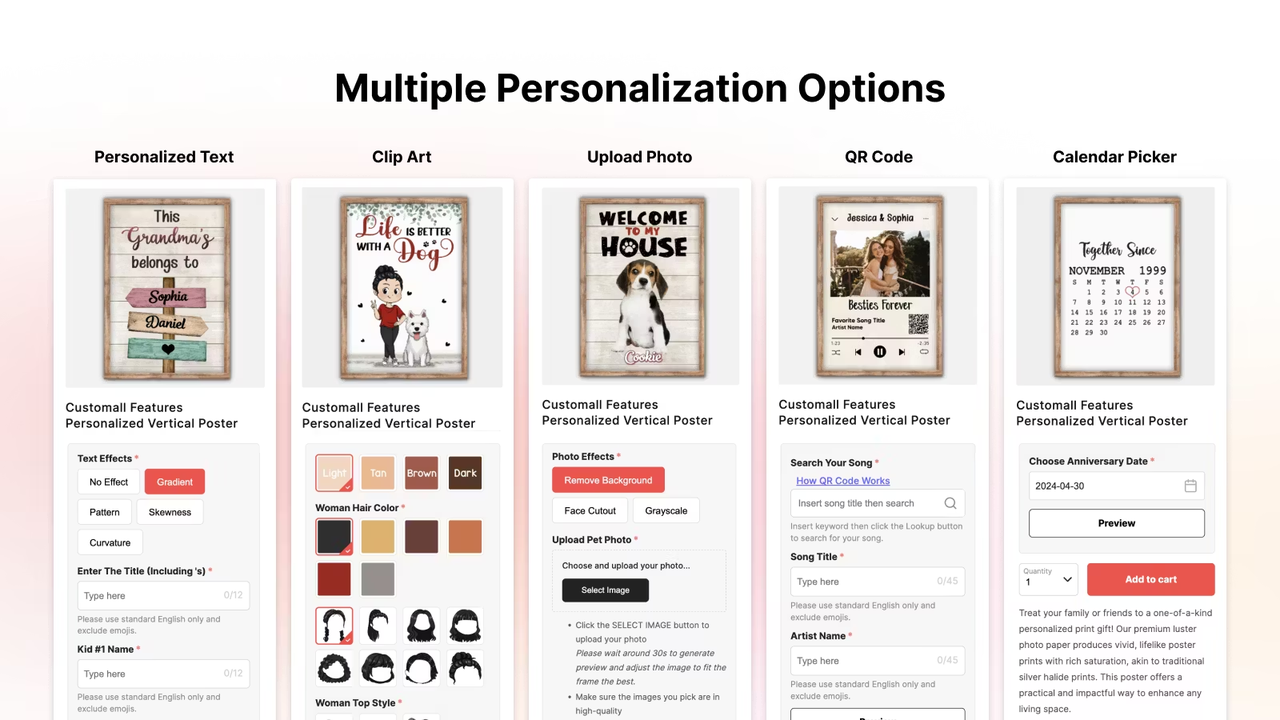
How to launch a POD store without inventory:
- Create or source a design, even a simple text-based design works for an initial test
- Upload it to a ecommerce platform supporting POD features and select your blank products
- Let the platform generate mockup images automatically, or design yourself
- Import those mockups and listings to your store
- Price, publish, and start driving traffic
Shoplazza integrates natively with Ymq, CustoMeow, Customily, and Customall, all generate product mockups as part of the setup flow, so your product images are created in the same step as your product listings.
No product photos? Use AI image generation
Whether you are running a POD store or dropshipping from a supplier, product photos are a problem you will face differently, but face either way:
- For print-on-demand sellers, the starting point is simply a plain white product image with no design elements, because the design itself is added by you or your customer. The mockup is generated automatically once a design is applied, so professional-looking product photos are a byproduct of the POD setup process.
- For dropshipping sellers, suppliers typically provide product images, but those same images are shared with every other seller using the same supplier. To avoid looking identical to competitors and to build a more professional brand presence, most serious dropshippers need to optimize or replace those supplier photos at some point.
That is where AI image generation changes the equation. Product photography used to require a camera, a studio, a lighting setup, and time. That constraint no longer applies. AI image generation tools can produce professional product visuals from a reference image, a text description, or both — at commercial quality, in minutes.
LazzaStudio generates product images without a studio
As you can see, this is different from dropshipping (where supplier photos already exist) and from POD (where mockups are auto-generated). AI image generation is most useful when:
- You have a product idea or sample but no photography setup
- You want lifestyle-context images (product in a kitchen, on a desk, being used)
- You need multiple visual variations without reshooting
Shoplazza's built-in AI product image maker, LazzaStudio, is designed specifically for ecommerce product photography. It does not require a professional photo as input — a plain white background image, an unedited snapshot, or even a rough reference shot is enough. From there, it can generate product visuals, lifestyle context shots, and creative backgrounds ready for your storefront.
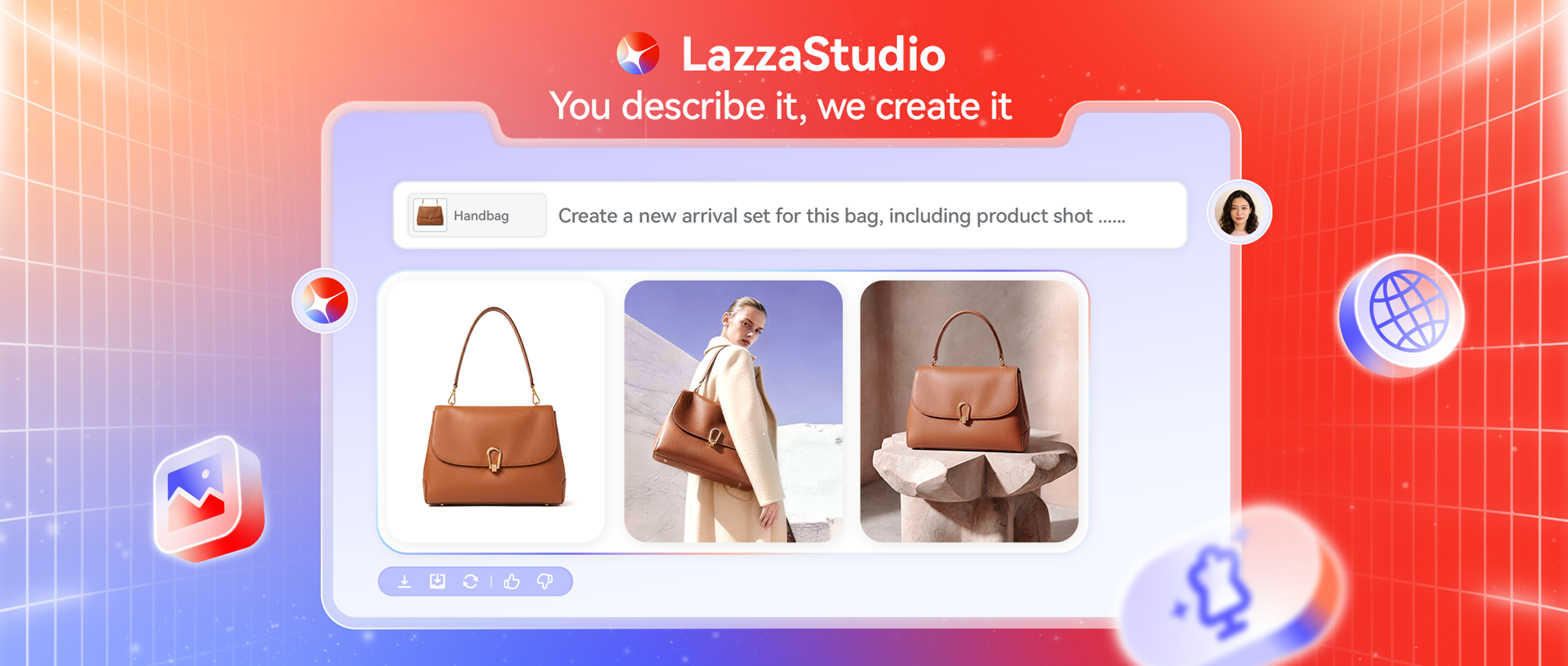
Besides, its underlying model is specifically optimized for product texture and material rendering, with 2K and 4K high-resolution output that meets the creative specs for Meta, TikTok, and Google ad placements — images are ready to publish or run as ads without additional editing.
The tool now offers four generation modes, covering everything from low-cost product testing to high-end commercial shoots:
- ChatGPT Image 2.0: Understands image intent with high reference-image fidelity, so design variations stay on-brand.
- Quick Draft: Fast output at low cost, suited for bulk creative testing.
- Standard Commercial: Stable quality at strong value, the default choice for day-to-day store operations.
- Pro Studio: Commercial-grade output for hero images, major campaign visuals, and high-demand scenarios.
New users receive 100 free credits to get started — enough to test all four modes and build out an initial product image library before committing to a paid plan.
Beyond image generation, LazzaStudio also addresses the brand assets problem directly:
- AI image restoration and upscaling: Built-in super-resolution and one-click watermark removal, so low-quality supplier images can be salvaged and upgraded.
- Brand Bible: Upload your brand visual guidelines and LazzaStudio learns your color palette, lighting style, and visual tone. Every generated image follows those rules consistently, eliminating the guesswork of AI output.
- Cloud asset library: All generated images save to a centralized library, keeping product images and social media creatives visually consistent across channels and reducing post-production rework.
How to create product photos with LazzaStudio:
- Open LazzaStudio from within your Shoplazza dashboard
- Upload a reference image and describe your product in the prompt field
- Select your generation mode based on the output you need
- Generate multiple variations and select the strongest ones
- Save to your cloud library and attach directly to your product listings
This workflow replaces a product photography session entirely for most ecommerce use cases. For dropshipping sellers, LazzaStudio is most useful for creating lifestyle context images that go beyond the plain supplier photos — giving your store a visual identity that competitors using the same supplier cannot replicate.
No copywriting? Use AI to write product descriptions
When you sync products from a dropshipping or POD supplier, product descriptions come along with them, but just like supplier photos, those descriptions are shared across every seller using the same catalog. Every competitor selling the same product is working from the same copy. For new sellers trying to build a credible brand, that is a problem.
AI lets you rewrite and optimize those imported descriptions in bulk, and for products with strong sales potential, you can go further — generating new descriptions built around real buyer pain points and purchase motivations rather than generic feature lists.
How Shoplazza's AI product description generator works?
Shoplazza's built-in AI product description generator lets you create or optimize product descriptions directly from the product editing interface — no third-party tools, no copy-pasting between platforms.
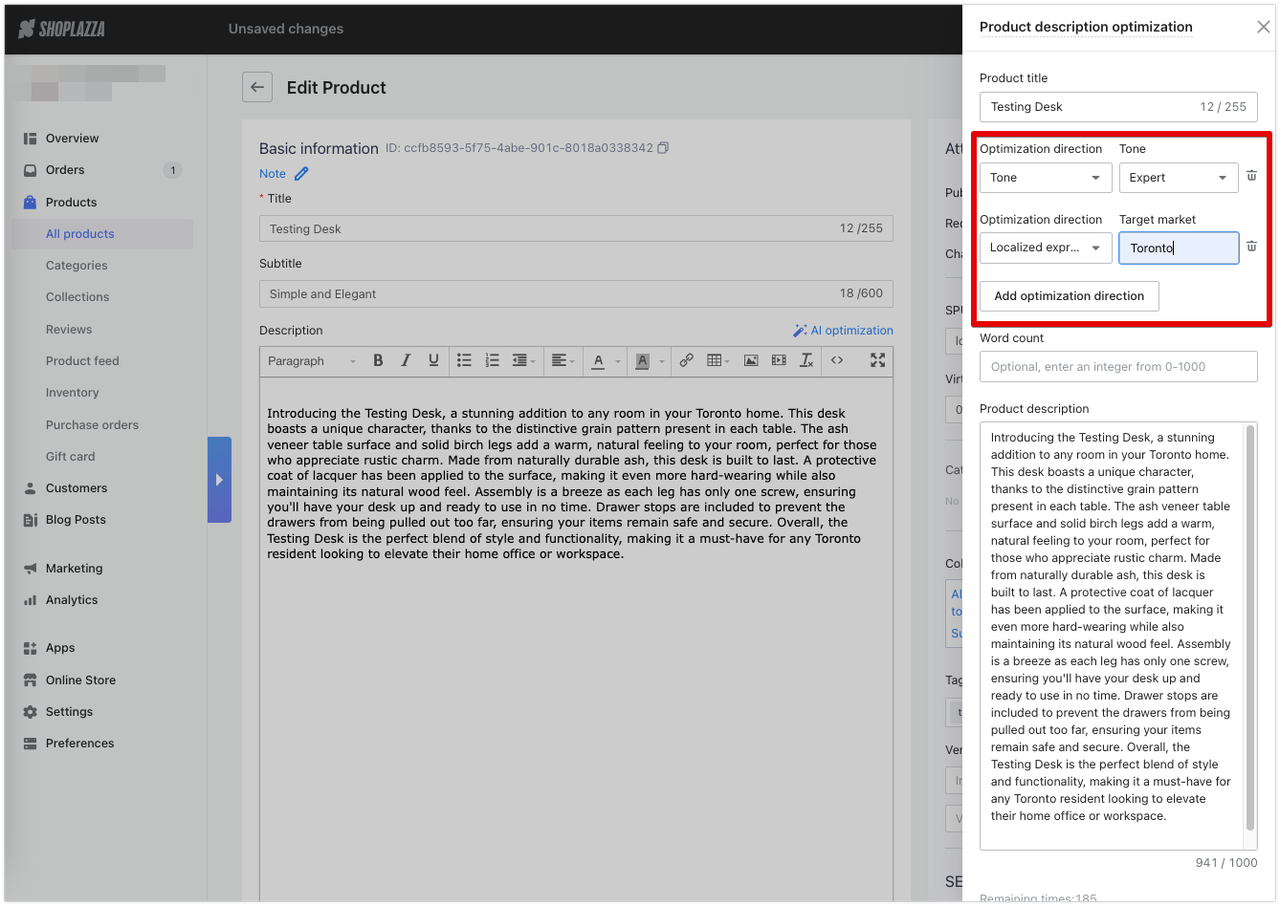
Steps to generate product descriptions without writing:
- Go to Shoplazza Admin > Products > All products.
- Click Create product for a new listing, or the Edit icon for an existing one.
- In the product editing interface, click AI generation (for new products) or AI optimization (for existing ones).
- Fill in your product title, keywords, tone, and target word count.
- Click Generate, review the output, and click Apply to add it to your listing.
The tool supports tone customization across four options — expert, enthusiastic, humorous, and kind — and generates descriptions in 16 languages including English, French, Spanish, Arabic, and more. If you are targeting a specific market, the localized expression option lets you input a target city or region, and the AI tailors the copy accordingly.
For sellers updating an existing catalog, the AI optimization direction also covers translation and expression refinement, so you can adapt existing descriptions for new markets without rewriting from scratch.
Note: there is a monthly limit of 200 generated responses per store.
Put it together: launching with nothing ready
You do not need to solve all three problems before you launch. The practical sequence is:
- Step 1: Choose your business model. Dropshipping if you want to test a broad catalog quickly. POD if you want a branded product line without inventory risk.
- Step 2: Set up your store. Shoplazza's AI Store Builder generates a complete store, including homepage, product pages, About page, Contact page, policies, and checkout, from a short guided setup. You answer questions about your niche and brand style, and the AI builds the structure. You are editing, not creating from scratch.
- Step 3: Source your products. Connect your supplier integration or POD platform. Product data and images import automatically.
- Step 4: Generate missing images. Use LazzaStudio for any products where supplier photos are insufficient, or where you want lifestyle context visuals.
- Step 5: Generate product descriptions. Use AI to generate or optimize produce descriptions in bulk before publishing. Review and adjust tone as needed.
- Step 6: Go live and validate. A lean store with ten well-chosen products, accurate images, and clear descriptions will outperform a more elaborate store that took months to build. Launch first, then iterate based on real traffic data.
Start lean, iterate fast
Starting an online store with no inventory, no photos, and no brand assets is not a workaround — it is a legitimate and increasingly common way to build an ecommerce business. Dropshipping and print-on-demand remove the inventory barrier. LazzaStudio removes the photography barrier. Shoplazza's AI product description generator removes the copywriting barrier. If you have been waiting until everything is ready, this is the sign to stop waiting. You have everything you need to start an online store with no inventory today.
FAQ about starting an online store from scratch
Q: Can I really start an online store with no upfront investment?
Dropshipping and print-on-demand both allow you to launch without purchasing inventory. Product costs only occur after a sale is made. You will still need a ecommerce platform subscription (Shoplazza just as low as $39/month and 7 day free trail), but there is no minimum stock requirement.
Q: Do AI-generated product images look professional enough for a real store?
Yes, for most ecommerce use cases. Tools like LazzaStudio are trained specifically for product imagery and produce commercial-quality output. The more specific your input — product type, background style, lighting mood — the stronger the result.
Q: Can AI write product descriptions that actually convert?
AI-generated descriptions work well as a starting point and often perform better than blank fields or generic copy. For highest conversion, review the output and add any product-specific details the AI could not infer.
Q: What is the difference between dropshipping and print-on-demand?
Dropshipping resells existing products from a supplier's catalog. POD produces custom-designed products on demand. Dropshipping is faster to start and requires no design work. POD gives you a unique, branded product line that competitors cannot copy directly.
Q: Do I need a business registration before launching?
Requirements vary by country. In Australia, for example, you need an ABN if operating as a business, and GST registration is required once annual turnover reaches AU$75,000. Check the requirements for your specific market before accepting payments.
Q: How many products do I need before I can launch?
There is no minimum. Many successful stores launch with five to ten products to validate a niche before expanding. A focused, well-described small catalog around 10-15 items converts better than a large unfocused one.